Table of Contents
- Module 1 - Understanding Security Threats
- Module 2 - Pelcgbybtl (Cryptology)
- Module 3 - The 3 A’s of Cybersecurity: Authentication, Authorization, Accounting
- Module 4 - Securing Your Networks
- Module 5 - Defense in Depth
- Module 6 - Creating a Company Culture for Security
Module 1 - Understanding Security Threats
The CIA Triad
A guiding model for designing information security policies.
- Confidentiality: Keeping things hidden - password protections, limit access, …
- Integrity: Keeping out data accurate and un-tampered with - received data should remain the same throughout its entire journey.
- Availability: The information we have is readily accessible to those people that should have it. being prepared if your paper is lost or system shutdown.
Essential Security Terms
- Risk: The possibility of suffering a loss in the event of an attack on the system.
- Vulnerability: A flaw in a system that could be exploited to compromise the system.
- 0-day Vulnerability (Zero day): A vulnerability that is not known to the software developer or vendor, but is known to an attacker.
- Exploit: Software that is used to take advantage of a security bug or vulnerability.
- Threat: The possibility of danger that could exploit a vulnerability.
- Hacker: A hacker in the security world is someone who attempts to break into or exploit a system.
- Attack: An actual attempt at causing harm to a system.
Malicious Software
A type of malicious software that can be used to obtain your sensitive information, or delete or modify files.
- Virus: The virus attaches itself to some sort of executable code like a program.
- Worms: Similar but instead of having to attach themselves onto something to spread, worms can live on their own and spread through channels like the network. (e.g., ILoveYou)
- Adware: Software that displays advertisements and collects data.
- Trojan: Malware that disguises itself as one thing but does something else.
- Spyware: A type of malware that’s meant to spy on you.
- Keylogger: A common type of spyware that’s used to record every keystroke you make.
- Ransomware: A type of attack that holds your data or system hostage until you pay some sort of ransom (e.g., WannaCry ransomware attack in May, 2017).
Hacker can also steal computer’ resources like CPU.
- Botnet: Designed to utilize the power of the internet-connected machines to perform some distributed function.
- Backdoor: A way to get into a sytem if the other methods to get in the system aren’t allowed (secret entry access).
- Rootkit: A collection of software or tools that an admin would use.
- Logic bomb: A type of malware that’s intentionally installed.
Anti-malware Protection, Malware Removal
If a computer is performing poorly or acting strangely, it might be infected with malware. IT professionals need to know how to isolate, remove, and repair infected devices.
Gather and Verify
First gather information when the symptoms started and if the user has downloaded any unusual files.
- Running slower than normal
- Restarts on its own multiple times
- Uses all or a higher than normal amount of memory
Use resource manager to identify any unusual program running and investigate it.
Quarantine Malware
Distributed botnets can communicate with bad actors. Disconnect any network connections to separate or quarantine the infected device form the rest of the network. Automatic backups might restore the system with files infected by malware, so you should be careful of enabling or disabling backup system.
Remove Malware
First, run offline malware scan while disconnected from local network. All anti-virus/anti-malware programs rely on threat definition files (do a complete update). Monitor the computer again to confirm no further issues.
Make sure and reconfigure the computer to won’t happen again. After all, manually create a safe restore point.
Malware Education
- Keep the computer and software updated
- Use a non-administrator account whenever possible
- Think twice before clicking links or downloading anything
- Be careful about opening email attachments or images
- Don’t trust pop-up windows that ask to download software
- Limit your file-sharing
- Use antivirus software
Network Attacks
A DNS Cache Poisoning attack works by tricking a DNS server into accepting a fake DNS record that will point you to a compromised DNS server. It then feeds you fake DNS addresses when you try to access legitimate websites.
- Can spread to other DNS servers
Meddler-in-the-middle attack: commonly the session hijacking or cookie hijacking. Rogue AP: An access point that is installed on the network without the network administrator’s knowledge. Evil Twin attack: Similar to Rogue AP, is for you to connect to a network that is identical to yours. Once we connect to it, they will be able to monitor our traffic.
Denial-of-Service
An attack that tries to prevent access to a service for legitimate users by overwhelming the network or server.
- Ping of death (PoD): Send a malformed ping to a computer. Ping would be larger in size than what the internet protocol was made to handle - buffer overflow - causes crash and execution of malicious code.
- Ping Flood: Sends SYN request, when servers responds with SYN/ACK, but the attacker would reject or not respond with ACK - causes many half-open connections and server resource usage will be full.
Distributed Denial-of-service attack (DDoS): A DoS attack using multiple systems.
Client-Side Attacks
- Cross-site scripting (XSS) attack: A type of injection attack where the attacker can insert malicious code and target the user of the service. (targets user)
- SQL Injection attack: Unlike XSS, it targets the entire website if it’s using SQL database. Attackers can potentially run SQL commands that allow them to delete website data.
Password Attack
Utilize software like password-crackers that try and guess your password.
- Brute force: Continuously tries different combinations of characters and letters until it gets access (abc123!@#, ABC1, etc,.).
- Dictionary Attack: Instead of combinations, it tries out words that are commonly used passwords (banana, 1vent0r, etc,.).
A strong password with a mix of capitals, letters, numbers and special characters can prevent this attack.
Deceptive Attacks
- Social Engineering: An attack method that relies heavily on interactions with humans instead of computers (phishing | spear phishing attacks).
- Spoofing: A source masquerading around as something else.
- Baiting: Enticing the victim to do something (e.g, Leaving a USB drive somewhere in hope that someone out there will plug it into their machine).
- Tailgating: Gaining access into a restricted area or building by following a real employee in.
- Whaling: A whale target is typically someone in a position of power (wealthly, high-level government employee, etc.) that they have ability to pay high ransomware fees.
- Vishing: Uses Voice over IP (VoIP) to make phone calls or leave voice messages pretending to be from reputable companies in order to trick victims into revealing personal information.
Targeted and in-person deceptive attacks
- Shoulder surfing: Shoulder surfing happens when a person looks over a victim’s shoulder to watch them enter login credentials, credit card numbers, or other sensitive information.
- Tailgating: A form of social engineering in which an unauthorized party gains physical access to a restricted area by simply following a person or group of persons who have authorized access.
- Impersonation: Might happen over email, text messaging, or a phone call. The attacker impersonates someone who should have access to an organization’s computer network.
- Dumpster Diving: Involves the attacker literally digging through the trash of an individual or organization to hunt for confidential information.
- Evil twin: Installing Wi-Fi routers that appear to belong to an organization’s network. These Wi-Fi access points may not require a password and might appear to offer a stronger signal than the real Wi-Fi router.
Physical Security
- Guards monitoring controlled access points.
- Door locks restrict access with key or security badge.
- Equipment locks can restrict the movement of sensitive equipment.
- Video surveillance to record activities for playback.
- Alarm systems notify security by sounding and alarm.
- Motion sensors detect movement within a controlled area - triggers alarm systems.
Protecting the entry points of a building
- Access Control vestibules: Interlocking doors or gateways to prevent unauthorized individuals from following authorized individuals into controlled facilities.
- Badge readers: They identify each user by the badge they present to the device.
Protecting the outside of a building
- Bollards are sturdy, short, vertical posts placed to restrict access of vehicles to a controlled area.
- Fences are physical barriers, with many different designs, that enclose controlled areas to establish a perimeter and keep out external threats.
Module 2 - Pelcgbybtl (Cryptology)
Cryptography
Hiding messages from potential enemies. Overarching discipline that covers the practice of coding and hiding messages from third parties - referred to as cryptology. Works by a Encryption algorithm and a key.
The opposite of this, looking for hidden messages or trying to decipher coded message is referred to as cryptanalysis.
- Ecryption: The act of taking a message, called plain-text, and applying an operation to it, called a cipher, so that you receive a garbled, unreadable message as the output, called ciphertext.
- Cryptosystem: A collection of algorithms for key generation and encryption and decryption operations that comprise a cryptographic service should remain secure - even if everything about the system is known, except the key.
- Frequency analysis: The practice of studying the frequency with which letters appear in a ciphertext.
- Steganography: The practice of hiding information from observers, but not encoding it.
The system should remain secure even if your adversary knows exactly what kind of encryption systems you’re employing, as long as your keys remain secure.
Future of Cryptanalysis
Cryptanalysis uses technology to improve the process of encrypting data and innovates new ways to defend companies from attacks that can access and decode their data.
Many modern encryption algorithms are based on large prime number factorization - hard to do by hand. Evolved to create harder algorithms but also makes easier to crack (Modern quantum computers).
- Known-Plaintext Analysis (KPA) requires access to some or all of the plaintext of the encrypted information. The analyst’s goal is to examine the known plaintext to determine the key used to encrypt the message.
- Chosen-Plaintext Analysis (CPA) requires that the attacker knows the encryption algorithm or has access to the device used to do the encryption. The analyst can encrypt one block of chosen plaintext with the targeted algorithm to get information about the key.
- Ciphertext-Only Analysis (COA) requires access to one or more encrypted messages. No information is needed about the plaintext data, the algorithm, or data about the cryptographic key. (Intelligence agencies face this challenge when intercepting encrypted communications with no key)
- Adaptive Chosen-Plaintext Attack (ACPA) is similar to a chosen-plaintext attack. Unlike a CPA, it can use smaller lines of plaintext to receive its encrypted ciphertext and then crack the encryption code using the ciphertext.
- Meddler-in-the-Middle (MITM) uses cryptanalysts to insert a meddler between two communication devices or applications to exchange their keys for secure communication. The meddler replies as the user and then performs a key exchange with each party. The users or systems think they communicate with each other, not the meddler.
Results from a cryptanalysis attack
- Instance deduction - discovers additional plain or cipher text. While the key isn’t found to break the code, the additional plaintext or ciphertext can be used to cause problems or continue attacks.
- Information deduction - obtains some information about plain or cipher text not previously known. The additional information can lead to more information about the encryption key.
- Distinguishing algorithm - distinguish the encryption algorithm from a random alteration. This information reveals clues about the encryption algorithm.
- Global deduction where the attacker finds an algorithm that is functionally equivalent to the one used in the key. This algorithm is then used to decrypt all information and messages.
- Total break - gaining the entire key.
Symmetric Cryptography
The algorithm that they use the same key to encrypt and decrypt messages.
- Substitution Cipher: An encryption mechanism that replaces parts of your plaintext with ciphertext.
- Stream Cipher: Takes a stream of input and encrypts the stream one character or on digit at a time, outputting one encrypted character or digit at a time.
- Block Cipher: Takes data in, places it into a bucket or block of data that’s a fixed size, then encodes that entire block as one unit.
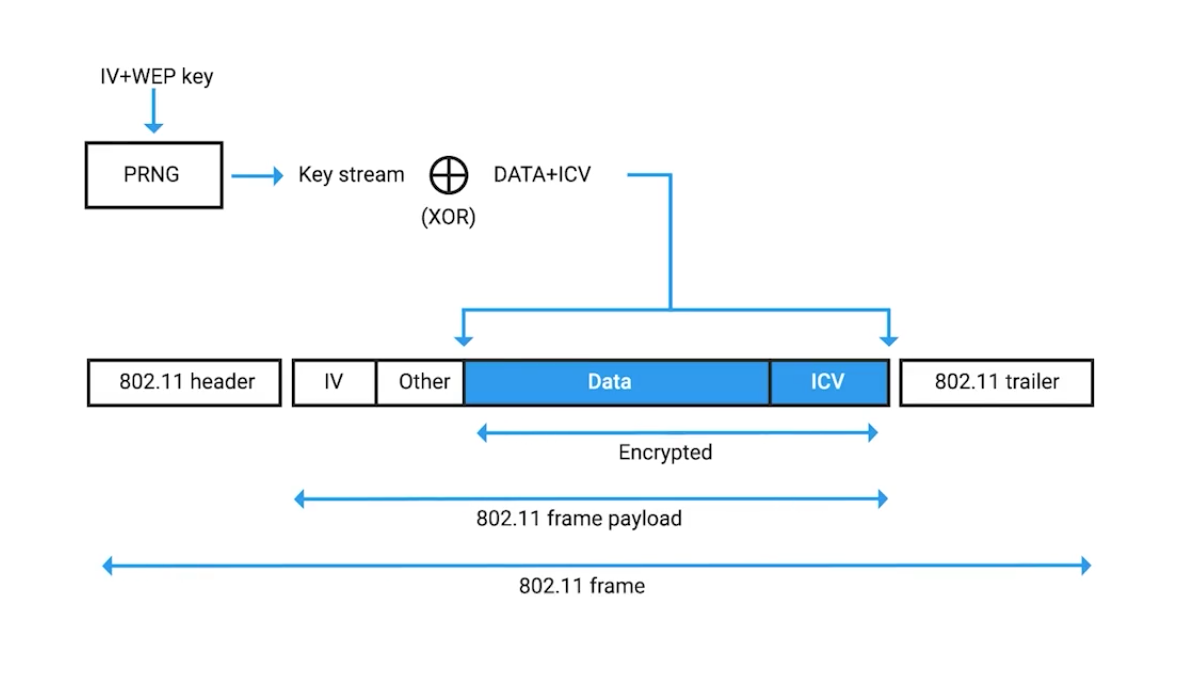
Example, it can be seen when inspecting the 802.11 frame of a web encrypted wireless packet:
Symmetric Encryption Algorithms
Data Encryption Standard (DES): Designed in the 1970s by IBM, with some input from the US National Security Agency. Adopted as official FIPS (Federal Information Processing Standard for the US).
DES is a symmetric block cipher that uses 64-bit key sizes and operates on blocks 64-bits in size. Though the key size is technically 64-bits in length, 8-bits are used only for parity checking, a simple form of error checking.
This means that real world key length for DES is only 56-bits.
Key length is super important in cryptography since it essentially defines the maximum potential strength of the system.
Advanced Encryption Standard (AES): Also a symmetric block cipher, similar to DES in which it replaced. Uses 128-bit blocks, twice the size of DES blocks, and supports key lengths of 128-bit, 192-bit, or 256-bit.
Because of the large key size, brute-force attacks on AES are only theoretical right now, because the computing power required (or time required using modern technology) exceeds anything feasible today.
When considering various encryption algorithms is speed and ease of implementation.
RC4 (Rivest Cipher 4): A symmetric stream cipher that gained widespread adoption because of its simplicity and speed.
GCM (Galois/Counter Mode): works by taking randomized seed value, incrementing this, and encrypting the value, creating sequentially numbered blocks of ciphertext.
Seed value: A secret value that is used to initialize a process that is generated by software using one or more values.
Asymmetric Cryptography (public key ciphers)
They uses different keys to encrypt and decrypt.
- Confidentiality: since encrypted
- Authenticity: granted by digital signatures
- Non-repudiation: author of the message isn’t able to dispute the origin.
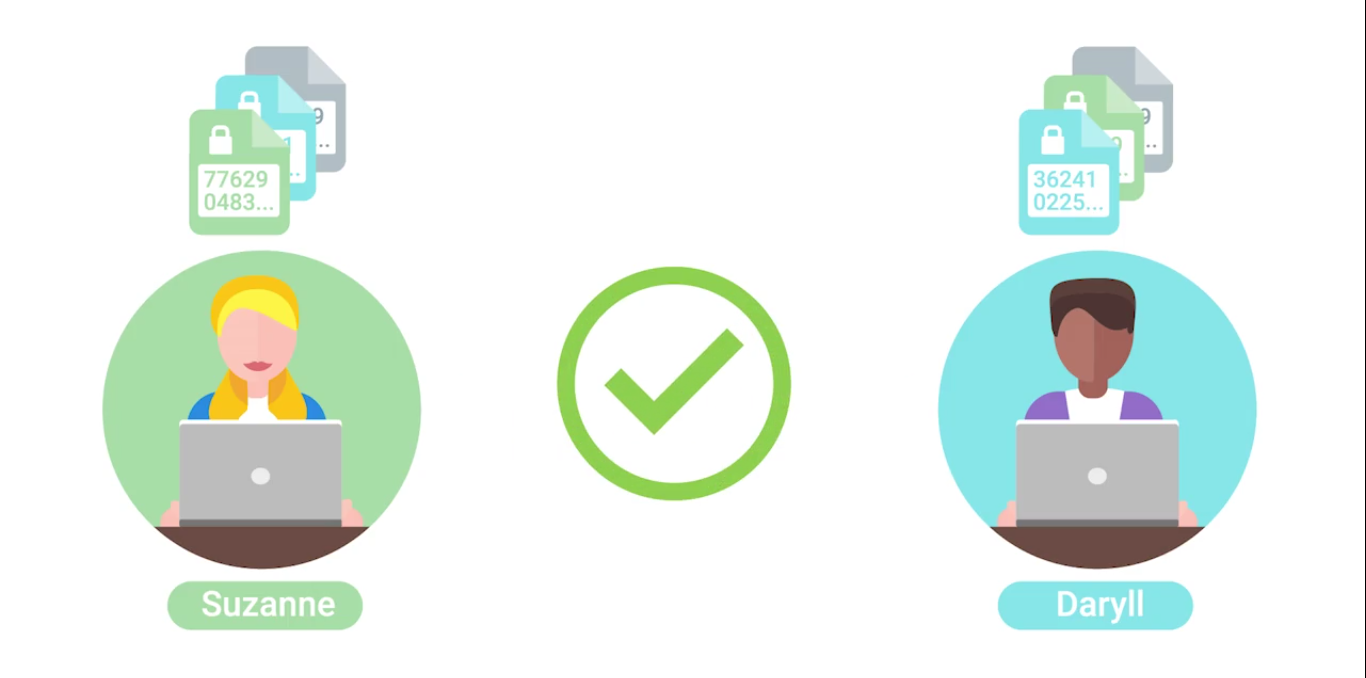
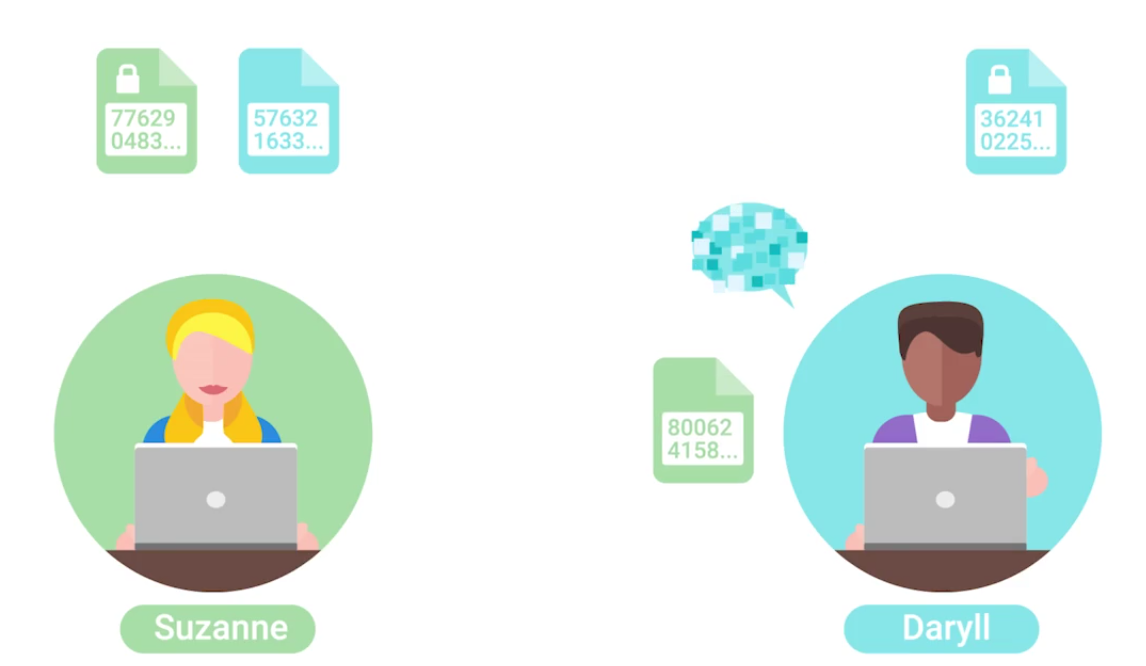 Both shared their public keys, but private keys are kept secret. When Daryll sends message, it is encrypted by Suzanne’s public key. When Suzanne receives the encrypted message, it is decrypted by her private key.
Asymmetric vs. Symmetric Cryptography
- MAC: A bit of information that allows authentication of a received message, ensuring that the message came from the alleged sender and not a third party masquerading as them.
- HMAC: Keyed-hash message authentication code.
- CMACs: Cipher-Based Message Authentication Codes.
- CBC-MAC: Cipher block chaining message authentication codes.
Asymmetric Encryption Algorithms
Elliptic curve cryptography (ECC): A public-key encryption system that uses the algebraic structure of elliptic curves over finite fields to generate secure keys.
Both Diffie-Hellmen and DSA have elliptic curve variants, referred to as ECDH and ECDSA, respectively.
Hashing
(Or a hash function) A type of function or operation that takes in an arbitrary data input and maps it to an output of fixed size, called a hash or digest.
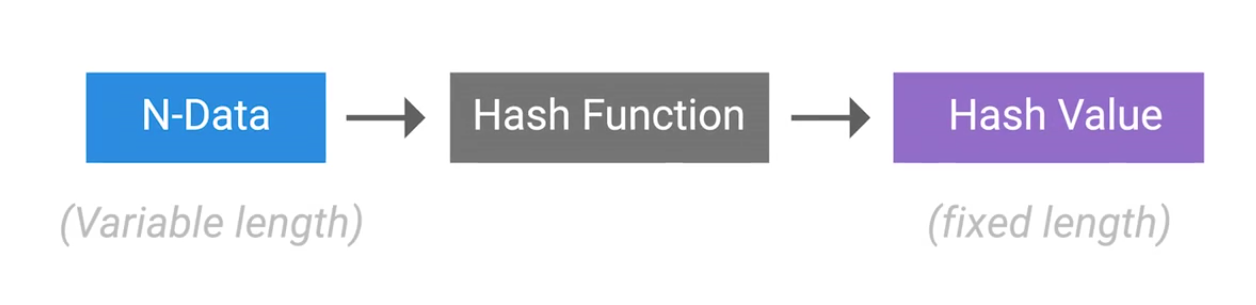
You feed in any amount of data into a hash function and the resulting output will always be the same size, but the output should be unique to the input, such that two different inputs should never yield the same output.
Hashing can also be used to identify duplicate data sets in databases or archives to speed up searching of tables or to remove duplicate data to save space.
Cryptographic hashing is distinctly different from encryption because cryptographic hash functions should be one directional. The ideal cryptographic hash function should be deterministic, meaning that the same input value should always return the same hash value.
Hash Collisions: Two different inputs mapping to the same output.
Hashing example, we can see that a small difference like changing to all lower case results wildly different output:
echo 'Hello Mom' | md5sum
2b6fa33b32023e88dc3fd3f43982d8f2  -
echo 'hello mom' | md5sum
ea893bac2d5652173cedf7c86526acf5  - # Small change, different hash
echo 'Hello Mom' | md5sum
2b6fa33b32023e88dc3fd3f43982d8f2  - # Same input, same hash
Hashing Algorithms
MD5 hash function had design flaws by hash collisions (2010) - replaced by SHA1.
A hash collision occurs when two distinct inputs produce the same output hash value using a hash function.
SHA1 is part of the Secure Hash Algorithm suite of functions, designed by the nSA, published in 1995. It operates a 512 bit blocks and generates 160 bit hash digest. Used in:
- TLS/SSL
- PGP SSH
- IPsec
- Git (uses hashes to identify revisions and data integrity by detecting corruptions or tampering) Now being replaced with SHA2 and SHA3.
A MIC is essentially a hash digest of the message in question. Think of it as a check sum for the message, ensuring that the contents of the message weren’t modified in transit.
A successful brute force attack, against even the most secure system imaginable, is a function of attacker time and resources.
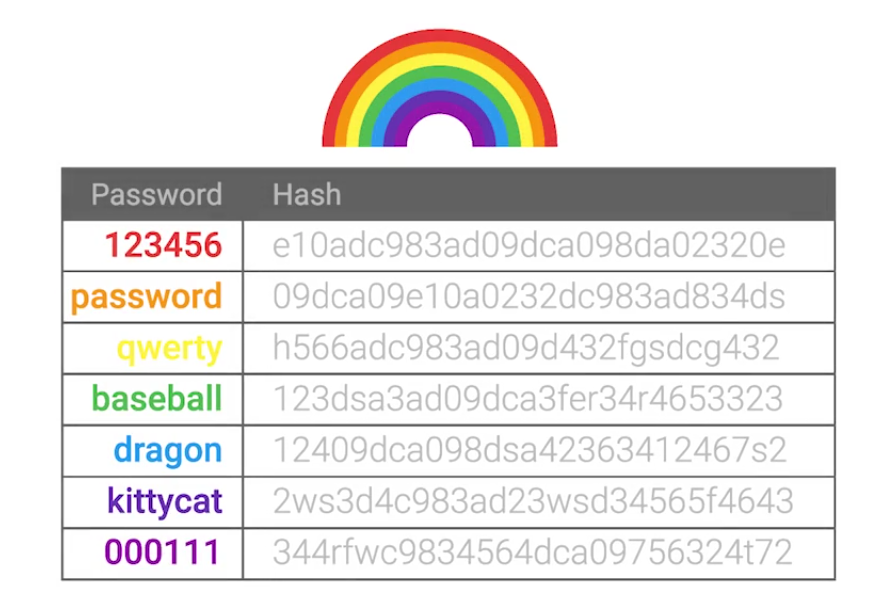
A rainbow table is just a pre-computed table of all possible password values, and their corresponding hashes - to trade computational power for disk space:
Password salt: Additional randomized data that’s added into the hashing function to generate a has that’s unique to the password and salt combination.
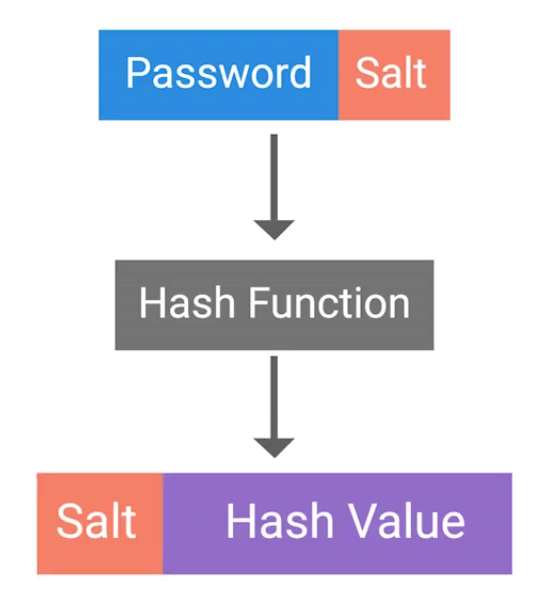
This means now for an attacker, is that they’d have to compute a rainbow table for each possible salt value. Early UNIX systems used fa 12 bit salt:
If a large salt is used, the computational and storage requirements to generate useful rainbow tables becomes almost infeasible. Modern systems now uses:
Clearly, it raises the bar high enough that a rainbow table attack wouldn’t be possible in any realistic time-frame.
Public Key Infrastructure
PKI is a system that defines the creation, storage and distribution of digital certificates (a file that proves that an entity owns a certain public key):
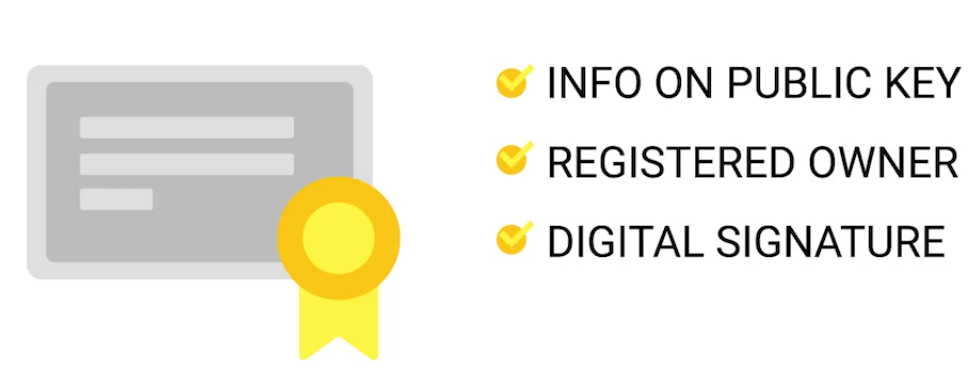
CA (Certificate Authority) is crucial component of a PKI system.
There’s also an RA (Registration Authority) that’s responsible for verifying the identities of any entities requesting certificates to be signed and stored with the CA.
A central repository is needed to securely store and index keys, and a certificate management system of some sort makes managing access to stored certificates and issuance of certificates easier.
SSL/TLS is a certificate that a web server presents to a client as part of the initial secure setup:
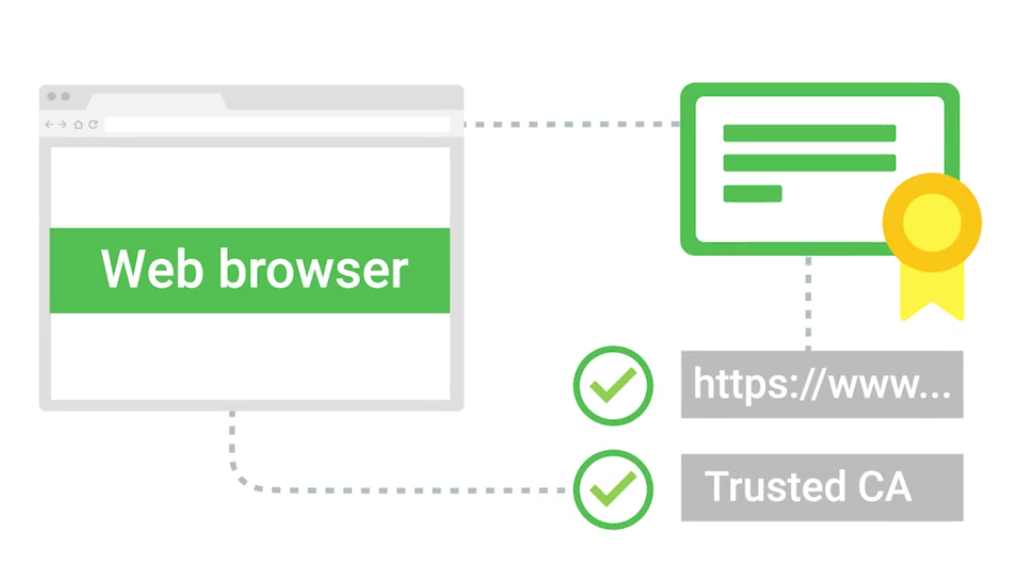
Self-signed certificate: the name implies, these are certificates that are bound to clients and are used to authenticate the client to the server, allowing access control to an SSL/TLS service.
With their own internal CA issues and manages client certificates for their service.
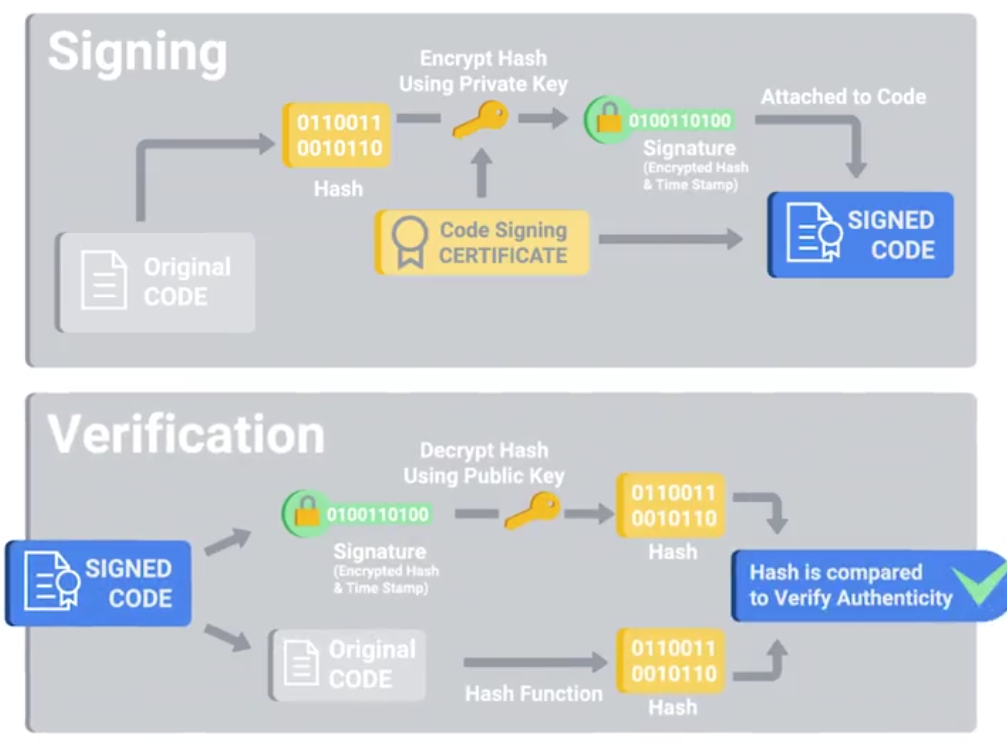
There’re also code signing certificates: Allowing users of these signed applications to verify the signatures and ensure that the application was not tampered with.
Certificates
The X.509 standard is what defines the format of digital certificates.
| Field | Description |
|---|---|
| Version | What version of the X.509 standard the certificate adheres to. |
| Serial Number | A unique identifier assigned by the CA that allows it to manage and identify individual certificates. |
| Certificate Signature Algorithm | Indicates which public key algorithm is used for the public key and which hashing algorithm is used to sign the certificate. |
| Issuer Name | Information about the authority that signed the certificate. |
| Validity | Contains two sub-fields — Not Before and Not After — defining the period during which the certificate is valid. |
| Subject | Identifying information about the entity to whom the certificate was issued. |
| Subject Public Key Info | Contains two sub-fields defining the public key algorithm and the public key itself. |
| Certificate Signature Algorithm (Signature Field) | Must match the algorithm specified in the Subject Public Key Info field. |
| Certificate Signature Value | The actual digital signature data. |
A web of trust is where individuals, instead of certificate authorities, sign other individuals public keys:
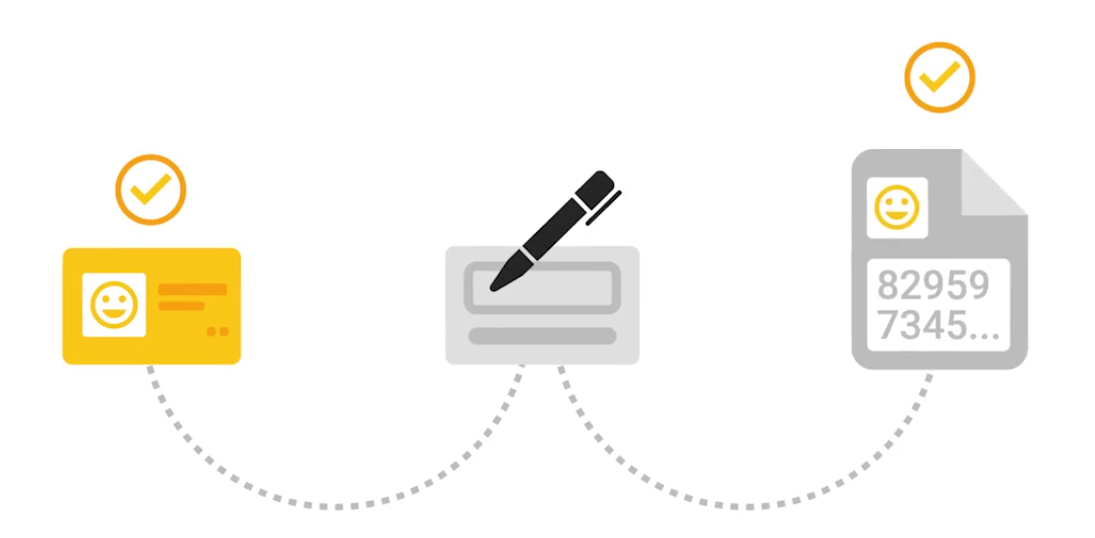
Cryptography in Action
HTTPS can also be called HTTP over SSL/TLS - since encapsulating the HTTP traffic over an encrypted secured channel utilizing SSL or TLS.
- A secure communication line, which means data being transmitted is protected from potential eavesdroppers.
- The ability to authenticate both parties communicating, though typically only the server is authenticated by the client.
- The integrity of communications, meaning there are checks to ensure that messages aren’t lost or altered in transit.
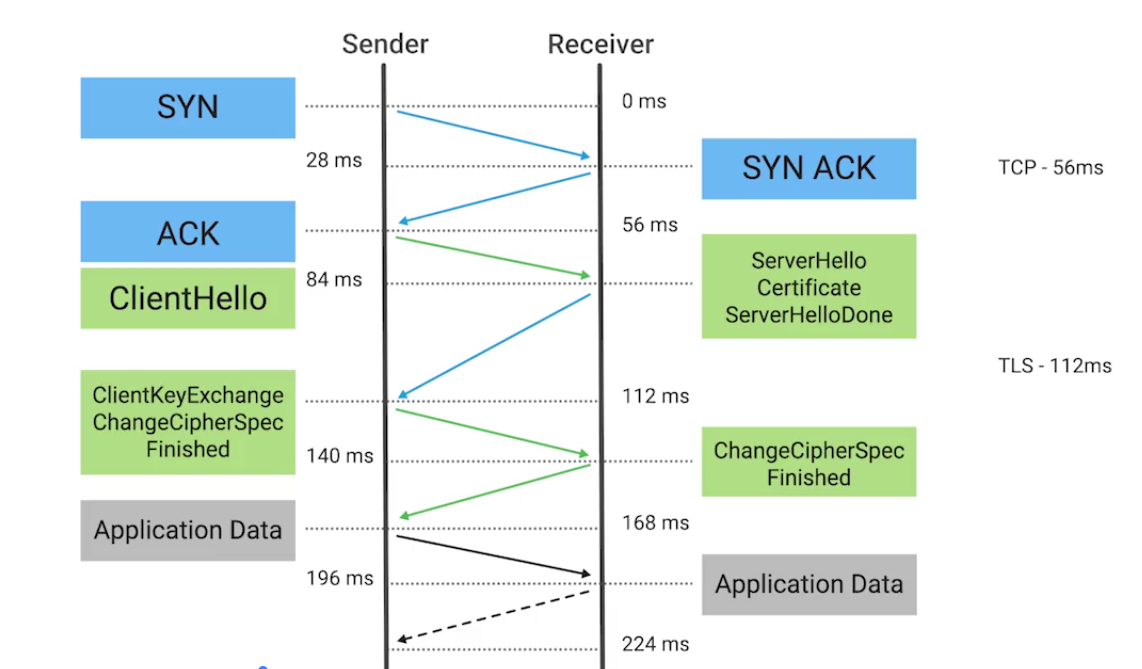
The session key is the shared symmetric encryption key used in TLS sessions to encrypt data being sent back and forth.
- Forward Secrecy: A property of a cryptographic system so that even in the event that the private key is compromised, the session keys are still safe.
- Secure Shell (SSH): A secure network protocol that uses encryption to allow access to a network service over unsecured networks (a secure replacement for telnet, rlogin or rexec).
- Pretty good privacy (PGP): An encryption application that allows authentication of data, along with privacy from third parties, relying upon asymmetric encryption to achieve this.
Securing Network Traffic
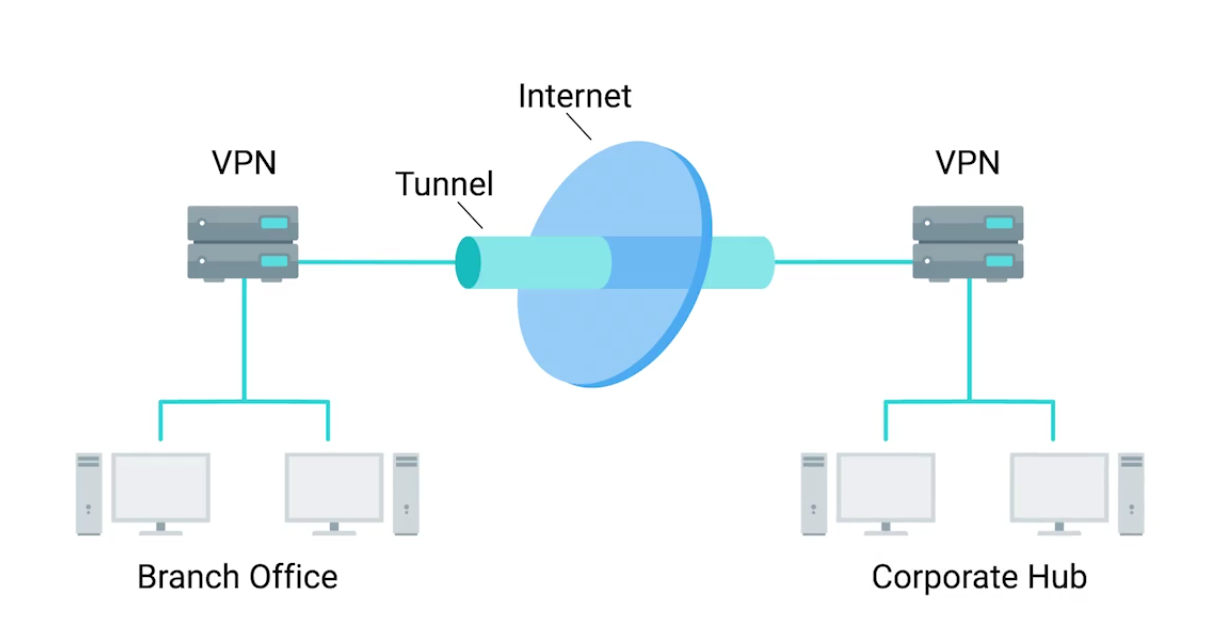
Virtual Private Network (VPN): A mechanism that allows you to remotely connect a host or network to an internal, private network, passing the data over a public channel, like the internet.
IPsec works by encrypting an IP packet and encapsulating the encrypted packet inside an IPsec packet - then it gets routed to the VPN end-point where the packet is deencapsulated and decrypted then sent to the final destination:
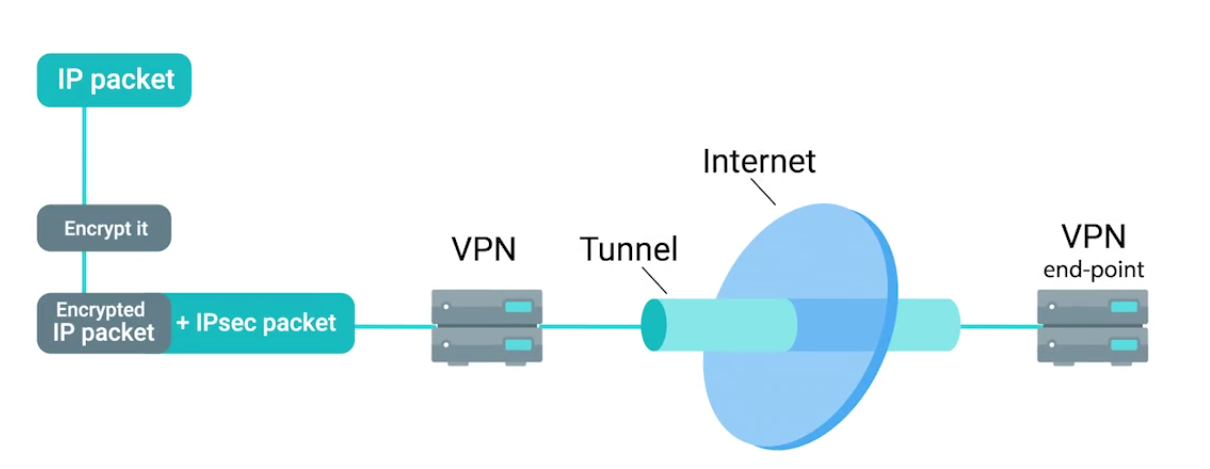
IPsec supports Transport mode and Tunnel mode:
- When transport mode is used, only the payload of the IP packet is encrypted, leaving the IP headers untouched.
- In tunnel mode, the entire IP packet, header payload and all, is encrypted and encapsulated inside a new IP packet with new headers.
The tunnel is provided by L2TP which permits the passing of unmodified packets from one network to another.
The secure channel, on other hand, is provided by IPsec, which provides confidentiality, integrity, and authentication of data being passed (e.g, OpenVPN).
OpenVPN can operate over either TCP or UDP, typically over port 1194. Supports up to 256 bit encryption through the OpenSSL library.
Cryptographic Hardware

A Trusted Platform Module (TPM) integrated into the hardware of a computer that’s dedicated crypto processor.
- Secure generation of keys
- Random number generation
- Remote attestation
- Data binding and sealing Has unique secret RSA key burned into the hardware at the time of manufacture - allows to perform hardware authentication - can detect unauthorized hardware changes to a system.
Data sealing is similar to binding since data is encrypted using the hardware backed encryption key.
Secure Element: A tamper resistant chip often embedded in the microprocessor or integrated into the main board of a mobile device. It supplies secure storage of cryptographic keys and provides a secure environment for applications.
Trusted Execution Environment (TEE): Provides full-blown isolated execution environment that runs alongside the main OS.
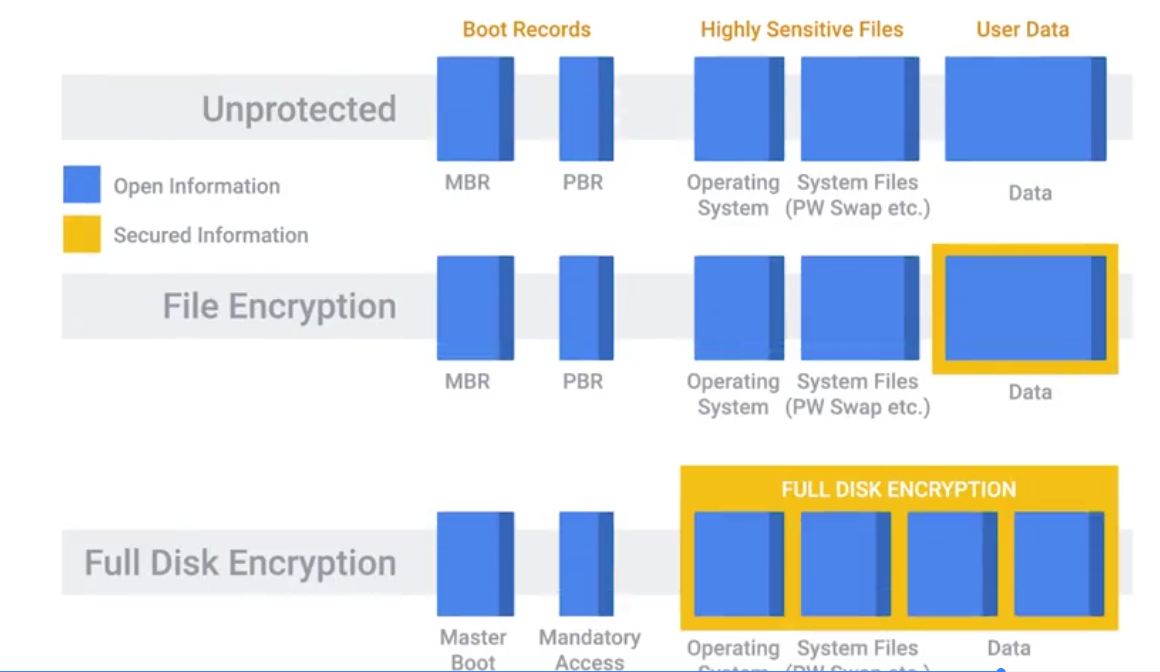
Options for implementing FDE:
- PGP (commercial product)
- Bitlocker (Microsoft)
- Filevault 2 (Apple)
- dm-crypt (open-source)
Lab Summary: OpenSSL
Generating Keys
Generating a 2048-bit RSA private key:
openssl genrsa -out private_key.pem 2048Generating a public key:
openssl rsa -in private_key.pem -outform PEM -pubout -out public_key.pemEncrypting and Decrypting
Encrypting a text file:
# Create a file
echo 'Hello mom, this is a secret text.' > secret.txt

# Encryption with public key
openssl rsautl -encrypt -pubin -inkey public_key.pem -in secret.txt -out secret.enc
Decryption with private key:
openssl rsautl -decrypt -inkey private_key.pem -in secret.encCreating a hash digest
A hash digest of a message:
openssl dgst -sha256 -sign private_key.pem -out secret.txt.sha256 secret.txtPerforming a verification:
openssl dgst -sha256 -verify public_key.pem -signature secret.txt.sha256 secret.txt

# OUTPUT
# If successful and file hasn't been modified
Verified OK
Lab Summary: Hands-on with hashing
MD5
Verifying a valid file:
# Test file
echo 'Hello mom!' > file.txt

# Generating a hashed file
md5sum file.txt > file.txt.md5

# Take a look at the hash
cat file.txt.md5

7514140760aa7da676090b97bd41ee8a  file.txt

# Verifying hash
md5sum -c file.txt.md5

file.txt: OK
Verifying an invalid file:
# Duplicate to test invalidity
cp file.txt badfile.txt

# Generate hash
md5sum badfile.txt > badfile.txt.md5

# Read hash: Both files currently have the same hash
cat badfile.txt.md5
cat file.txt.md5

# Modify bad file
vim badfile.txt # add an extra space

# Verify hash: a tiny modification results huge effect in hashing
md5sum -c badfile.txt.md5

badfile.txt: FAILED
md5sum: WARNING: 1 computed checksum did NOT match

# See how different the hash of the edited file is
md5sum badfile.txt > new.badfile.txt.md5
cat new.badfile.txt.md5
SHA1
# Test files
shasum file.txt > file.txt.sha1

# Read hash
cat file.txt.sha1

# Verifying hash
shasum -c file.txt.sha1
SHA256
# Test files
shasum -a 256 file.txt > file.txt.sha256

# Read hash
cat file.txt.sha256

# Verifying hash
shasum -c file.txt.sha256
Module 3 - The 3 A’s of Cybersecurity: Authentication, Authorization, Accounting
Best Practices for Authentication
They’re different:
- “authn” (for authentication)
- “authz” (for authorization)
Incorporating good password policies into an organization is key to ensuring that employees are securing their accounts with strong passwords.
- Length requirements
- Character complexity
- Dictionary words
Multifactor Authentication
A system where users are authenticated by presenting multiple peeces of information or objects.
- Something you know = Password / PIN
- Something you have = ATM / Bank card
- Something you are = Biometric ID
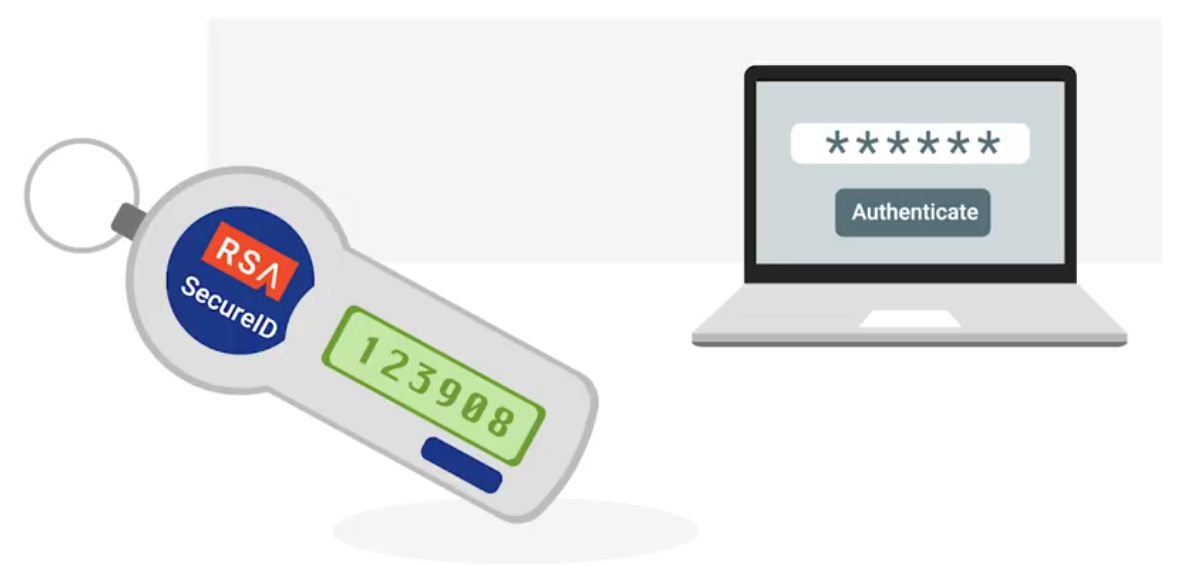
An example RSA SecureID token:
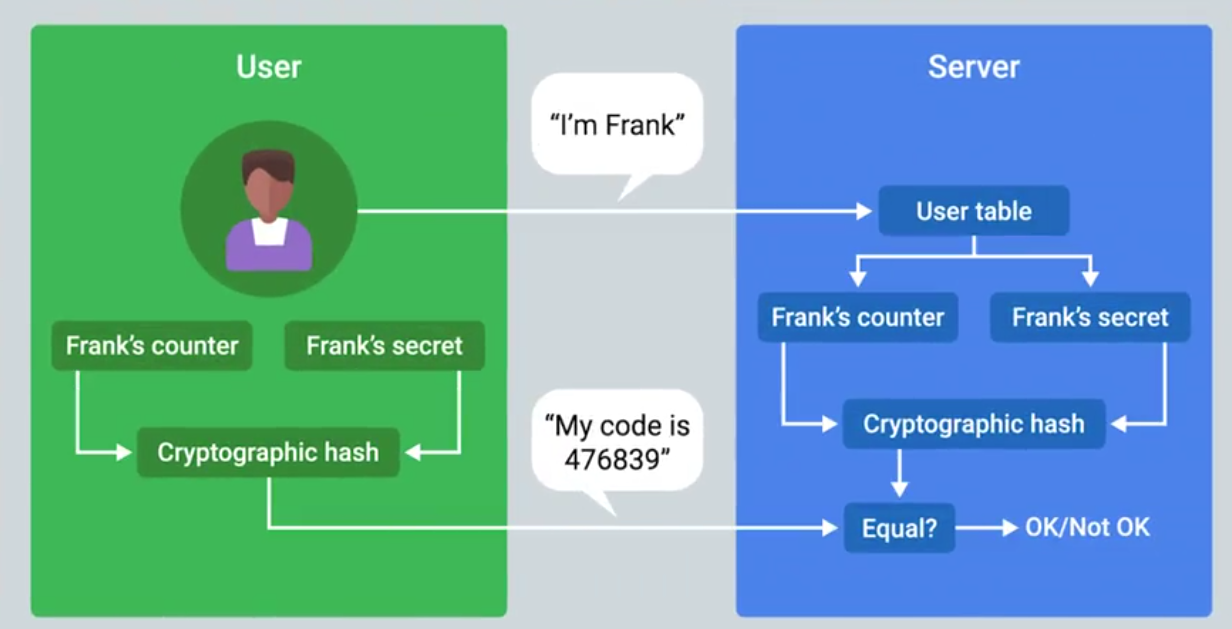
Counter-based, incremented every time:
Multifactor Authentication Options
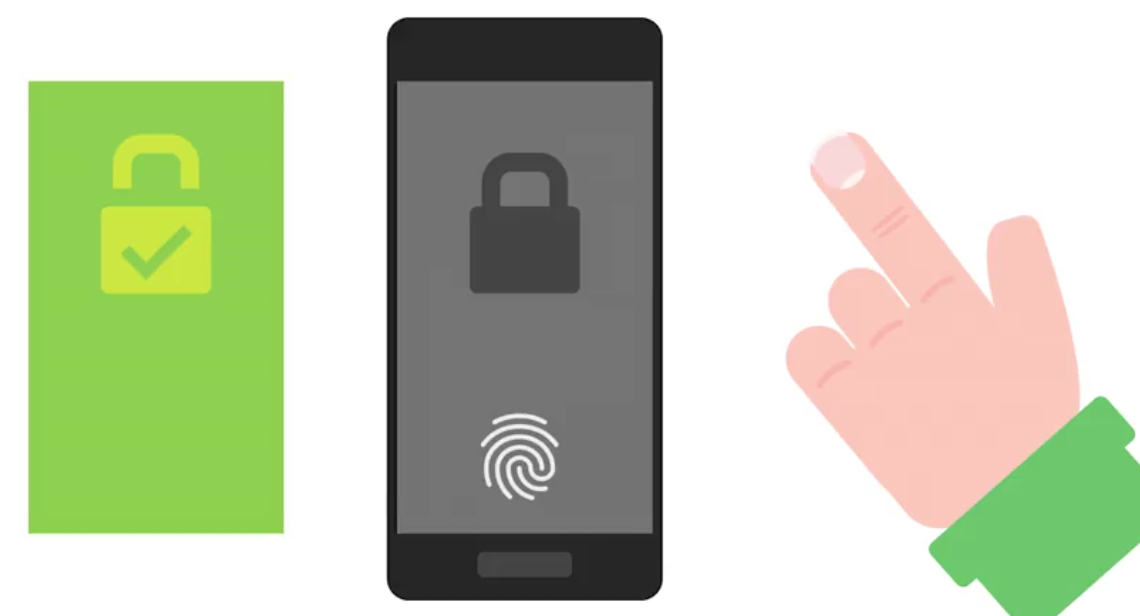
Biometric Authentication: The process of using unique physiological characteristics of an individual to identify them.
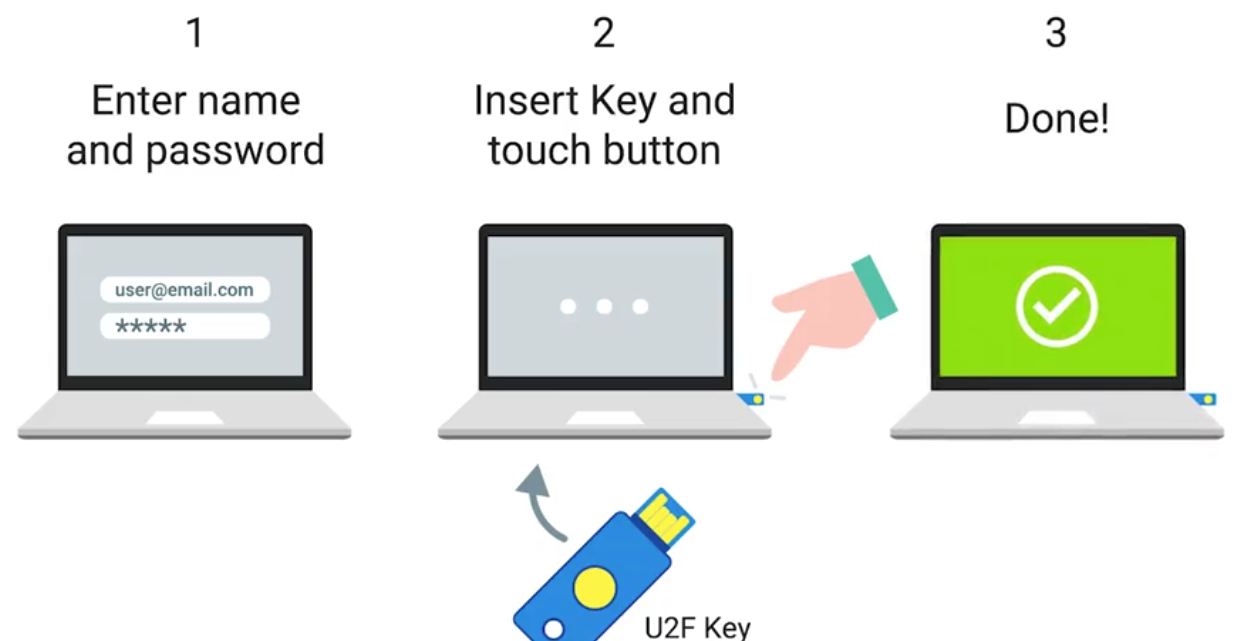
Certificates, Part Two
In order to issue client certificates, an organization must setup and maintain CA infrastructure to issue and sign certificates.
Certificate Revocation List (CRL): A signed list published by the CA which defines certificates that have been explicitly revoked.
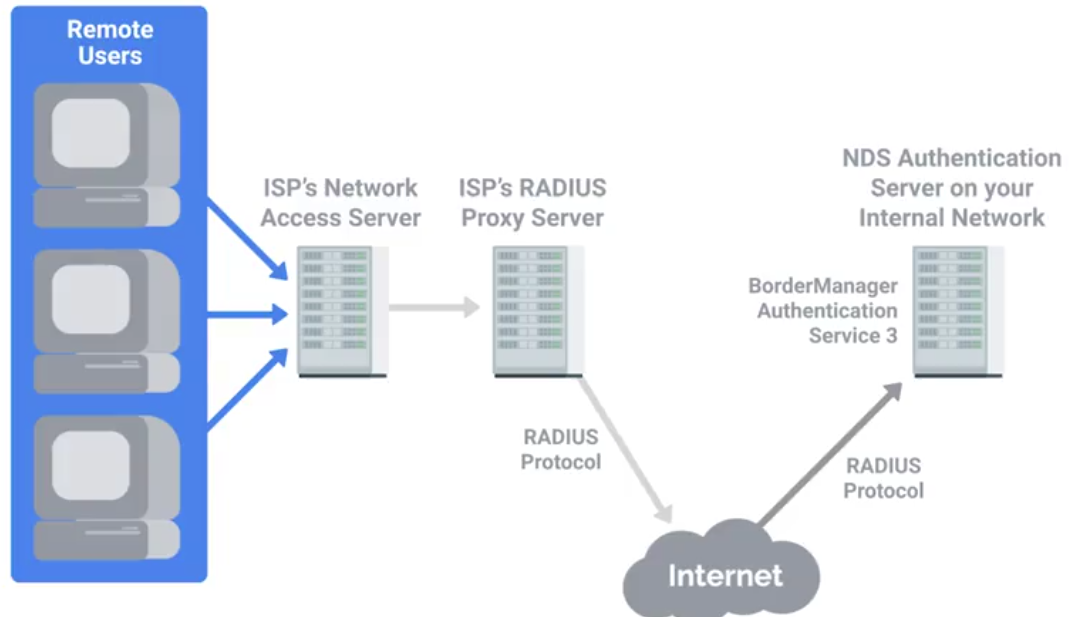
RADIUS
Remote Authentication Dial-In User Service - A protocol that provides AAA services for users on a network.
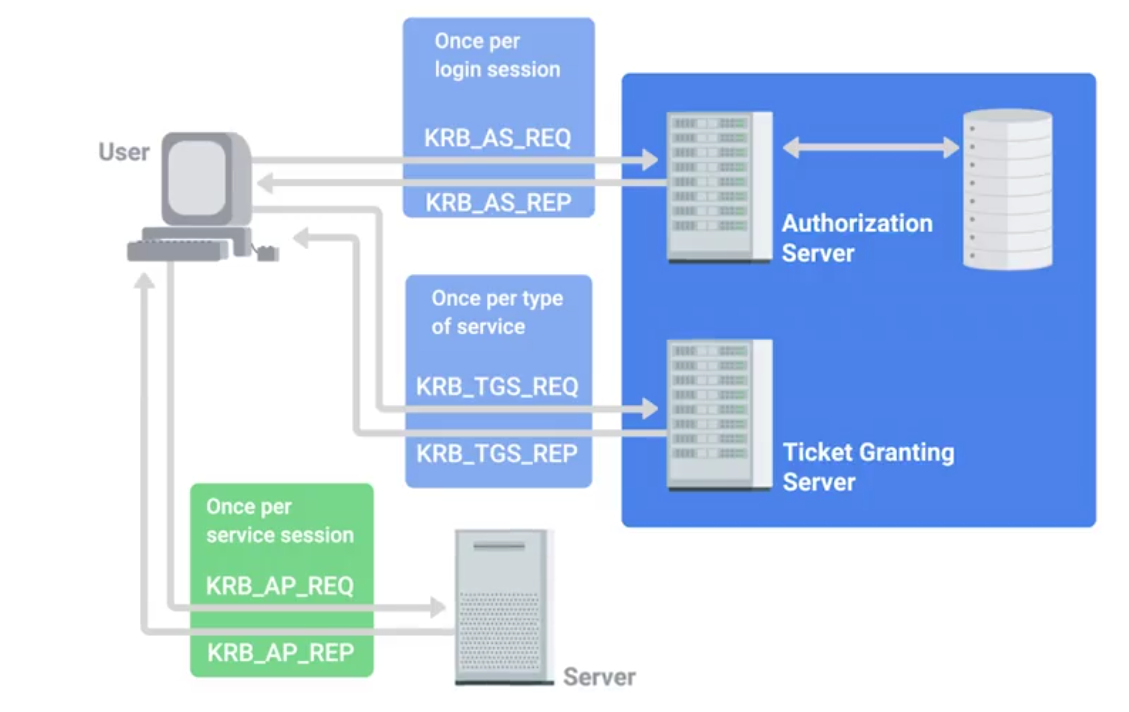
Kerberos
A network authentication protocol that uses “tickets” to allow entities to prove their identity over potentially insecure channels to provide mutual authentication.
The authentication tickets let users authenticate to services without requiring username and password authentication for every service individually. A ticket will expire after some time, but it has provisions for automatic transparent renewal of the ticket.
TACACS+
Terminal Access Controller Access-Control System Plus is primarily used for device administration, authentication, authorization and accounting. Mainly used as an authentication for network infrastructure devices - tend to be high value for attackers.
Single Sign-on (SSO)
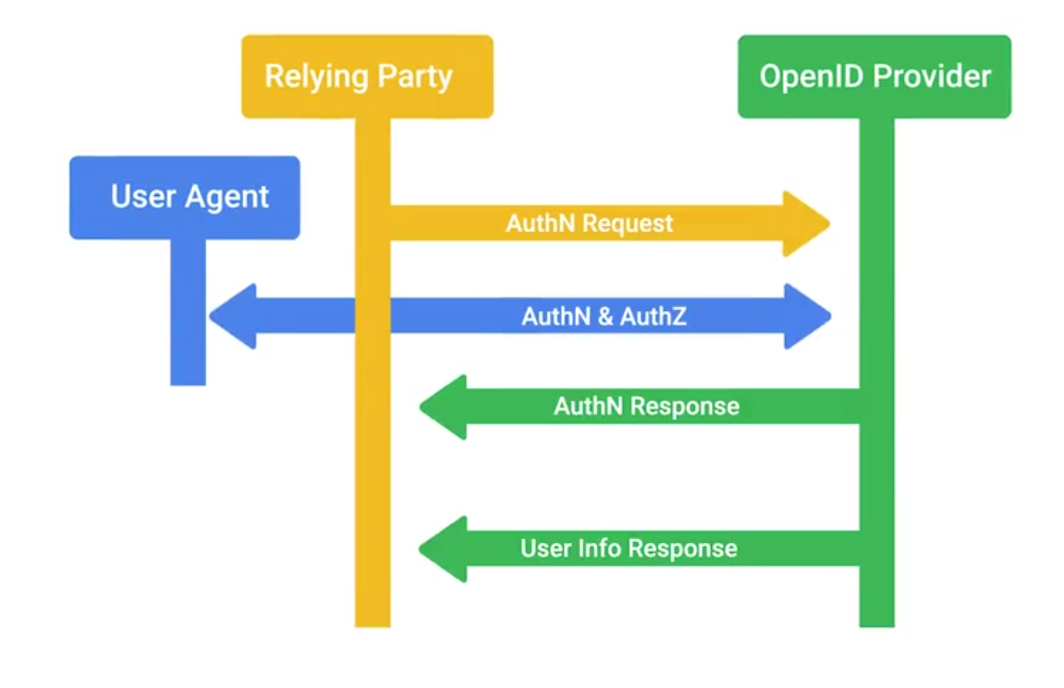
An authentication concept that allows users to authenticate once to be granted access to a lot of different services and applications.
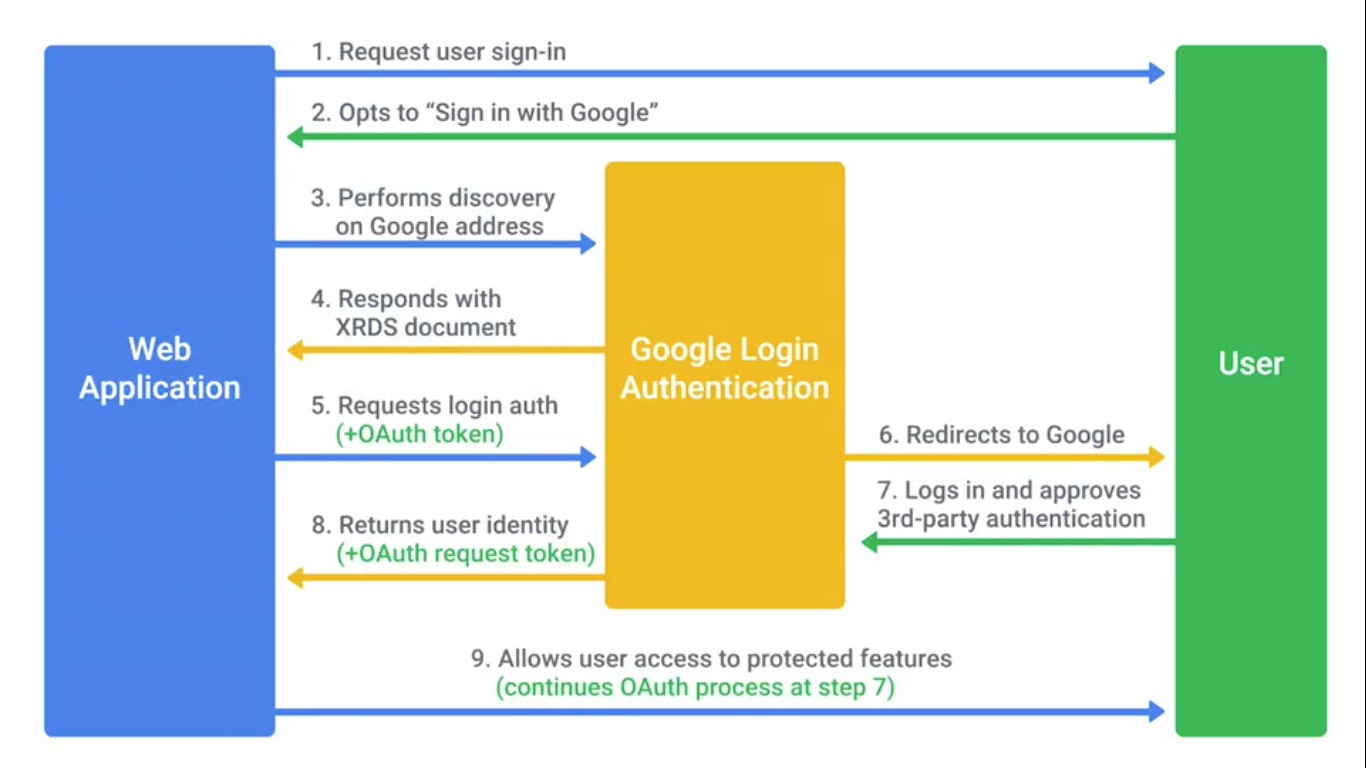
An example of an SSO system is the OpenID decentralized authentication system:
Authorization and Access Control Methods
Authorization pertains to describing what the user account has access to, or doesn’t have access to.
Mobile Security Methods
Common mobile security threats and challenges:
- Phishing
- Malicious applications (malware)
- Insecure Wi-Fi and “meddler in the middle” attacks
- Poor update habits for devices and apps Security measures used to protect mobile devices:
- Screen Locks
- Facial recognition
- PIN codes
- Fingerprint recognition
- Pattern uses
- Remote wipes
- Locator applications
- OS updates
- Device encryption
- Remote backup applications
- Failed login attempt restrictions
- Antivirus/Antimalware
- Firewalls
Access Control
OAuth is an open standard that allows users to grant third-party websites and applications access to their information without sharing account credentials.
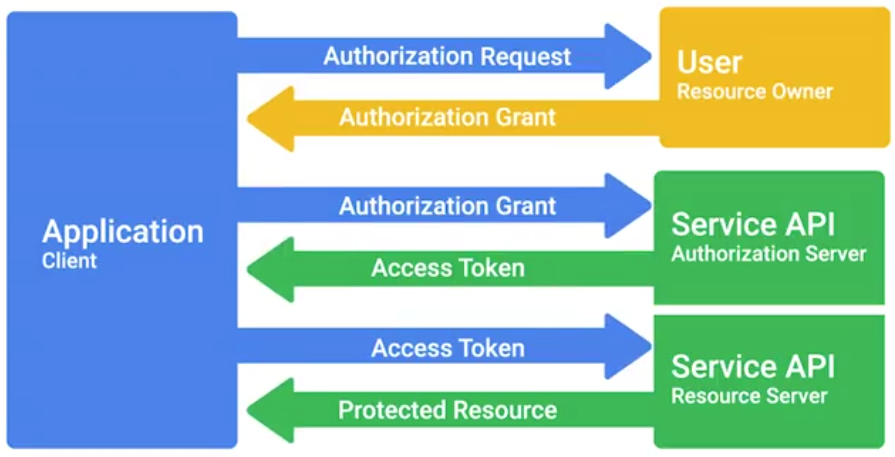
OAuth permissions can be used in phishing-style attacks to gain access to accounts, without requiring credentials to be compromised.
Access Control List (ACL)
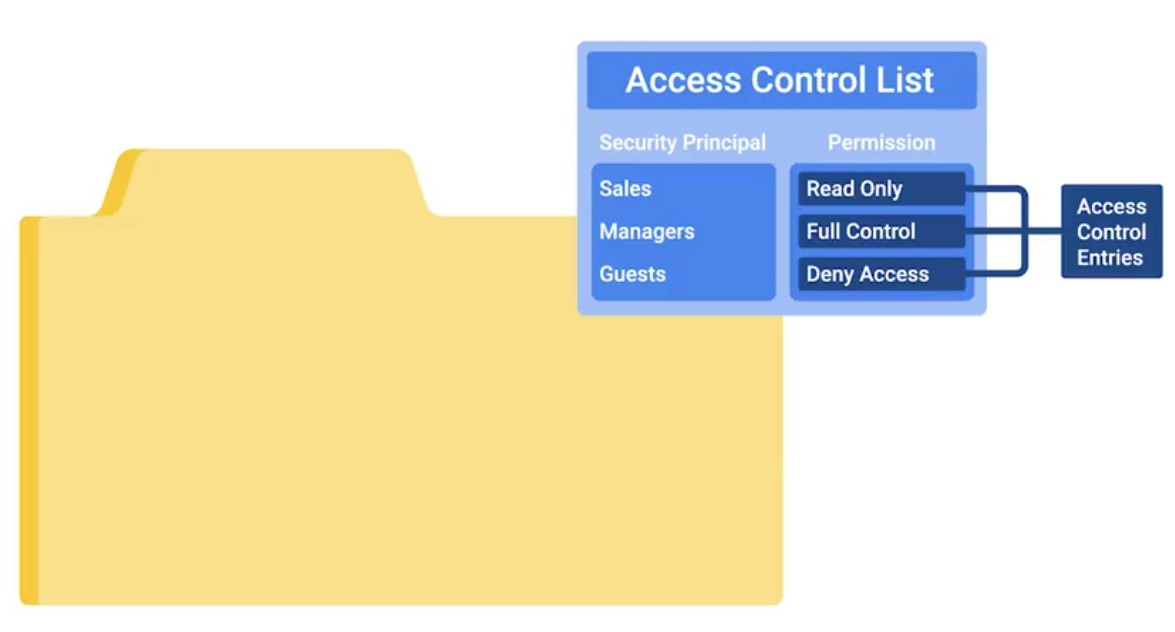
Network ACLs can be defined for incoming and outgoing traffic. They can also be used to restrict external access to systems and limit outgoing traffic to enforce policies or to prevent unauthorized outbound data transfers.
Tracking Usage and Access
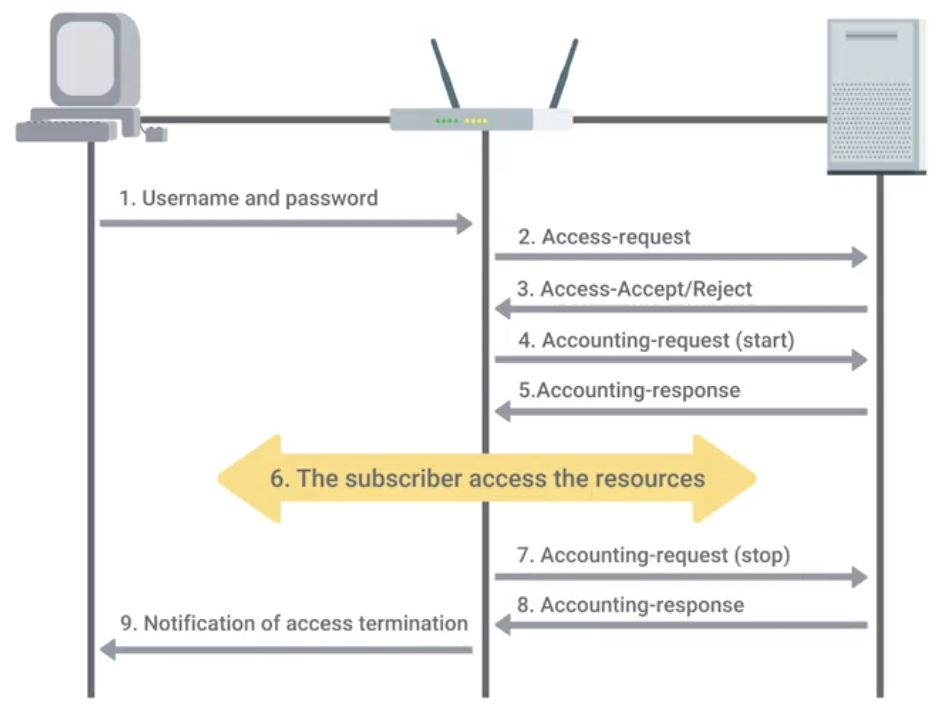
Accounting (The final of AAA): Keeping records of what resources and services your users accessed, or what they did when they were using your systems.
TACACS+ is a device access AAA system that manages who has access to your network devices and what they do on them.
Cisco’s AAA system supports accounting of:
- Individual commands executed
- connection to and from network devices.
- Commands executed in privileged mode
- Network services and system details like configuration reloads or reboots
Radius accounting kicks off with the network access server sending an accounting request packet to the accounting server that contains an event record to be logged:
Module 4 - Securing Your Networks
Network Hardening Best Practices
The process of securing a network by reducing its potential vulnerabilities through configuration changes and taking specific steps.
Implicit Deny is a network security concept where anything not explicityly permitted or allowed should be denied.
Analyzing logs is the practice of collecting logs from different network and sometimes client devices on your network, then performing an automated analysis on them.
Logs analysis systems are configured using user-defined rules to match interesting or atypical log entries.
Normalizing log data is an important step, since logs from different devices and systems may not be formatted in a common way.
Correlation analysis is the process of taking log data from different systems and matching events across the systems.
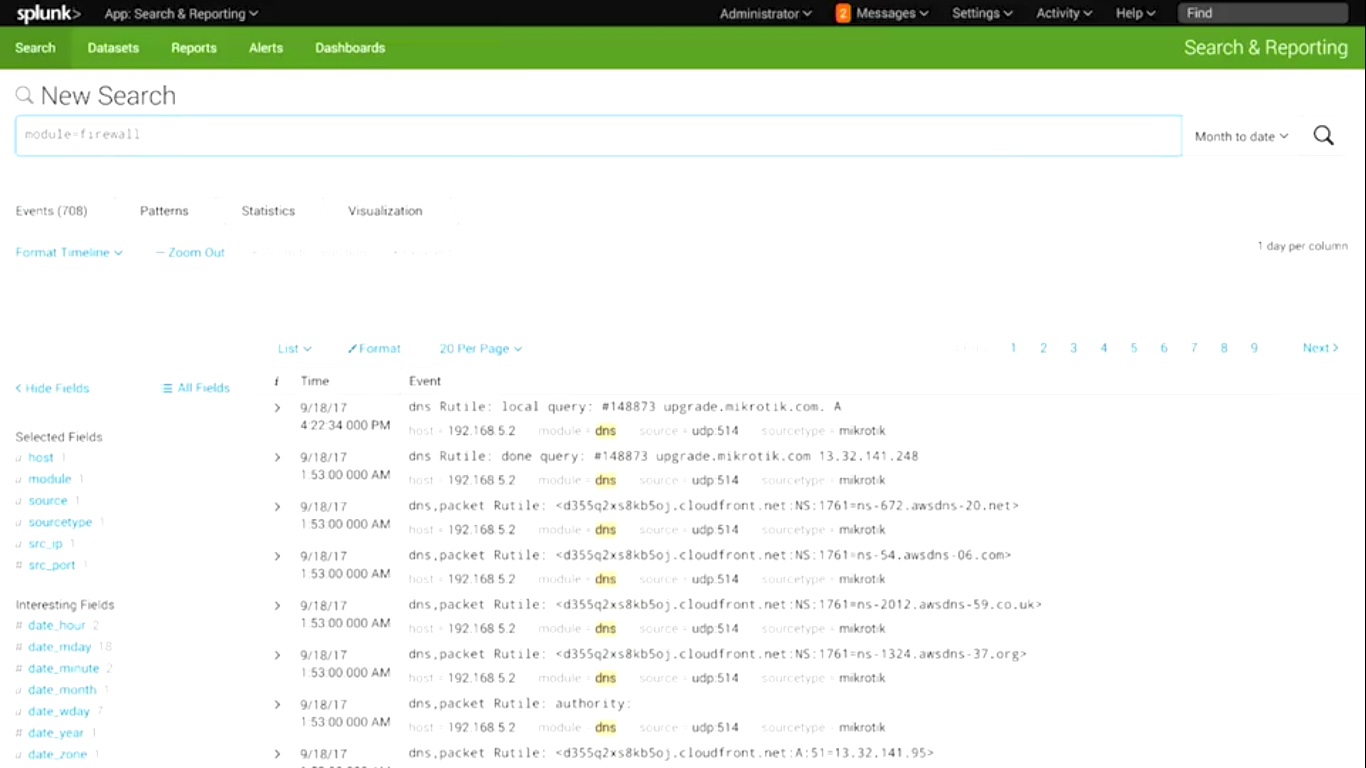
Splunk
Popular and powerful logs analysis system - very flexible and extensible log aggregation and search system.
Flood guards - Provide protection against DoS
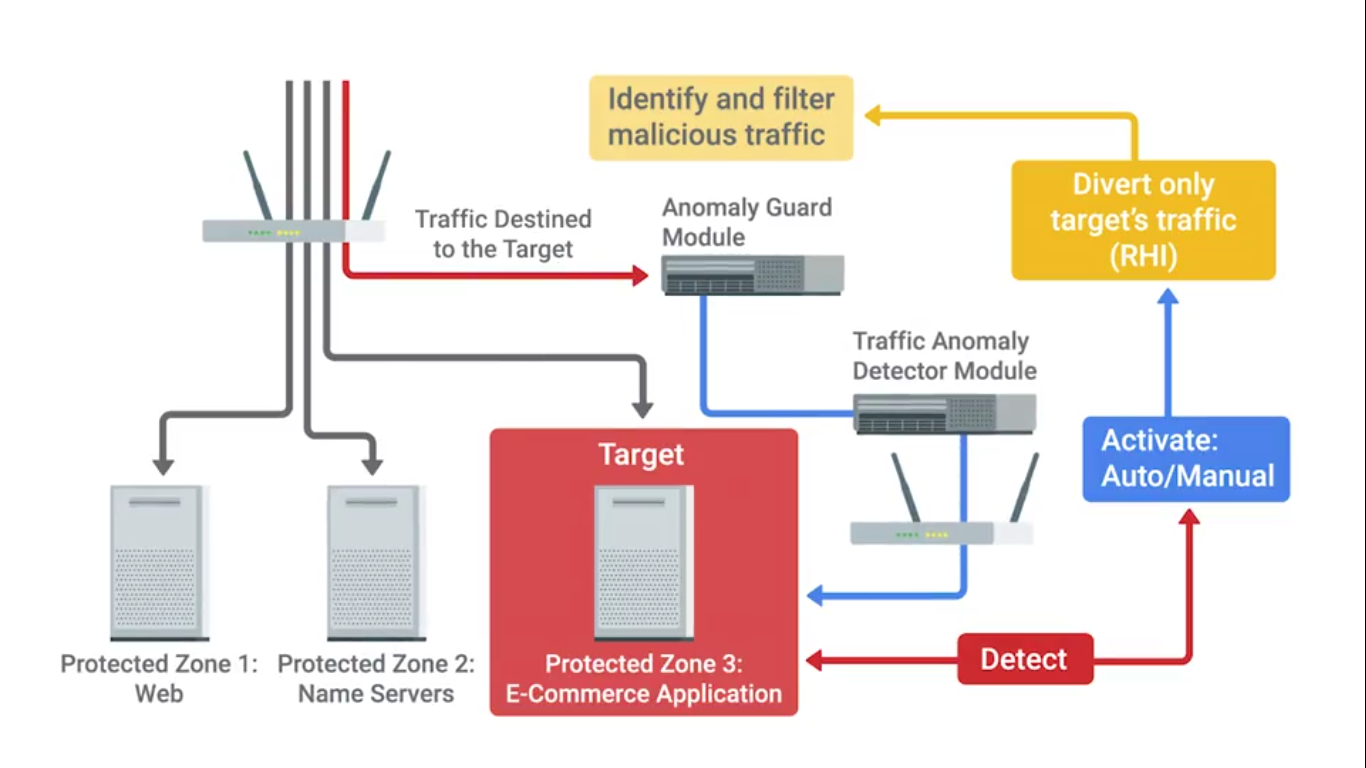 A common open-source flood guard protection tool is Fail2Ban.
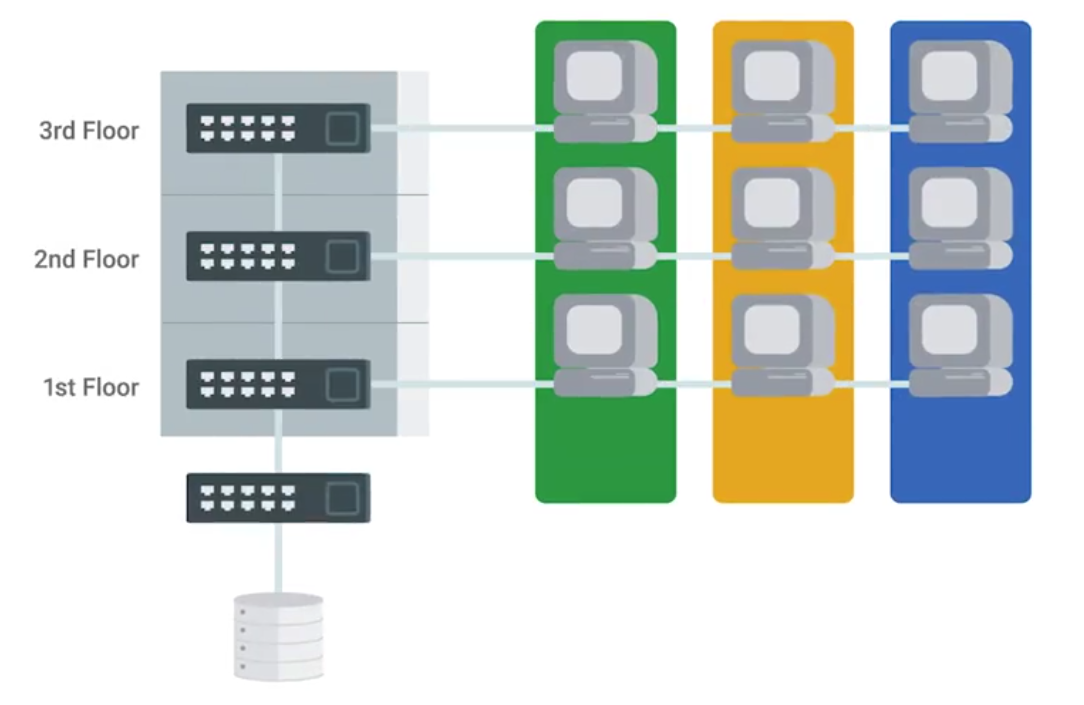
Network separation or VLANs is also a good concept for security:
Network Hardware Hardening
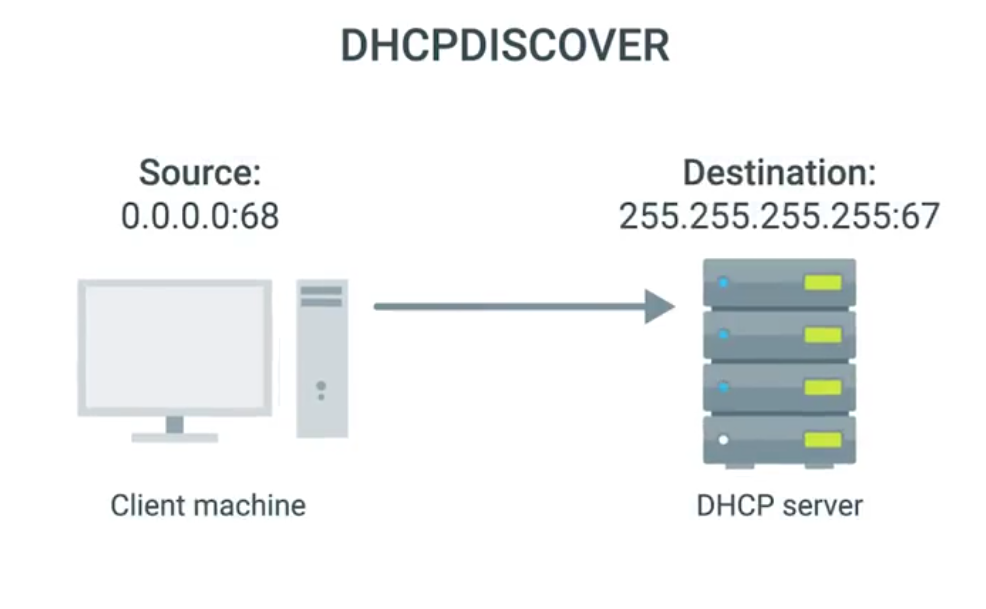
If an attacker can manage to deploy a rogue DHCP server on your network, they could hand out DHCP leases with whatever information they want.
The enterprise switches offer a feature called DHCP snooping:
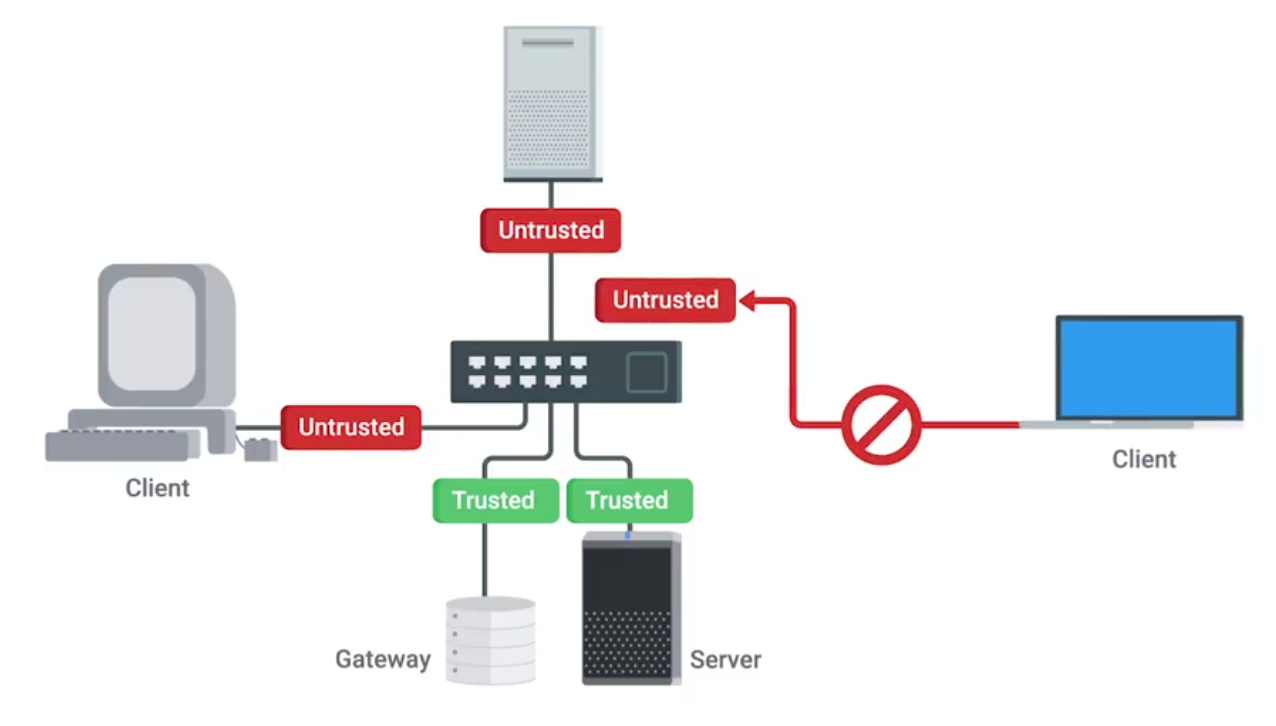
DHCP snooping also makes you designate either a trusted DHCP server IP, if it’s operating as a DHCP helper, and forwarding DHCP requests to the server, or you can enable DHCP snooping trust on the up-linked port, where legitimate DHCP responses would now come from
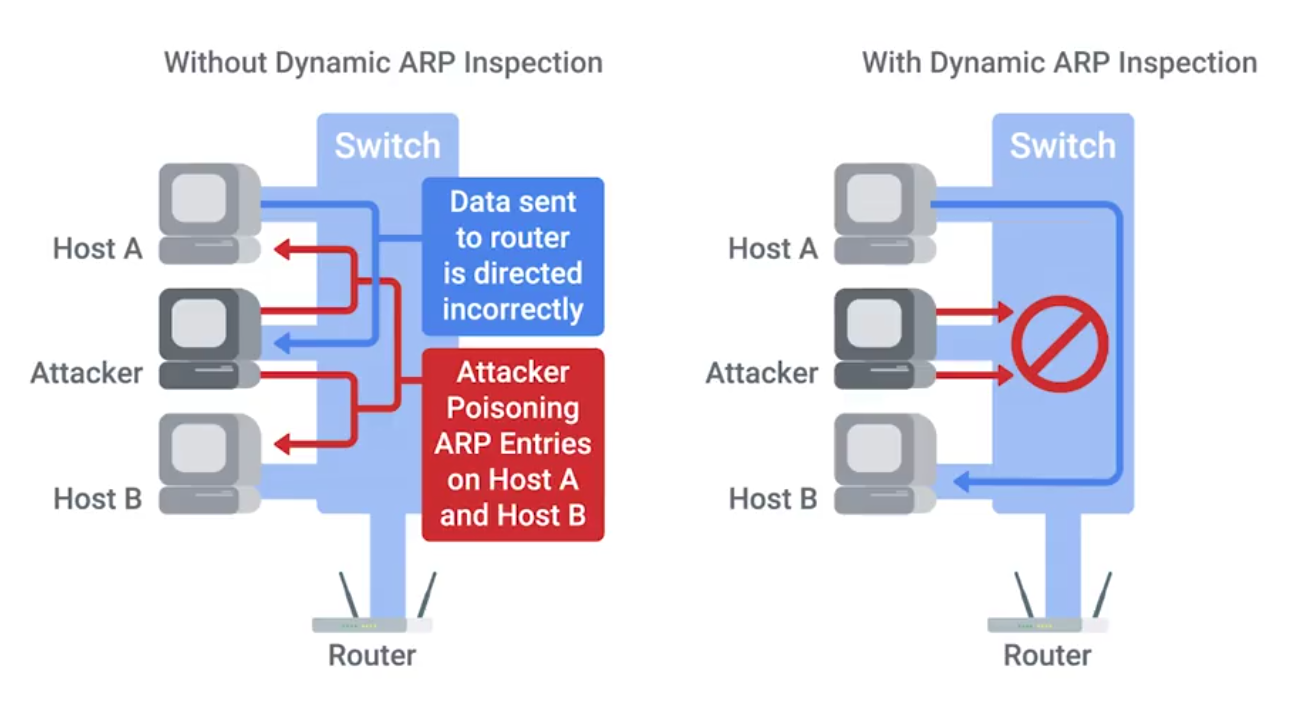
Gratuitous ARP response - effectively answering a query that no one made.
EAP-TLS is an authentication type supported by EAP that uses TLS to provide mutual authentication of both the client and the authenticating server.
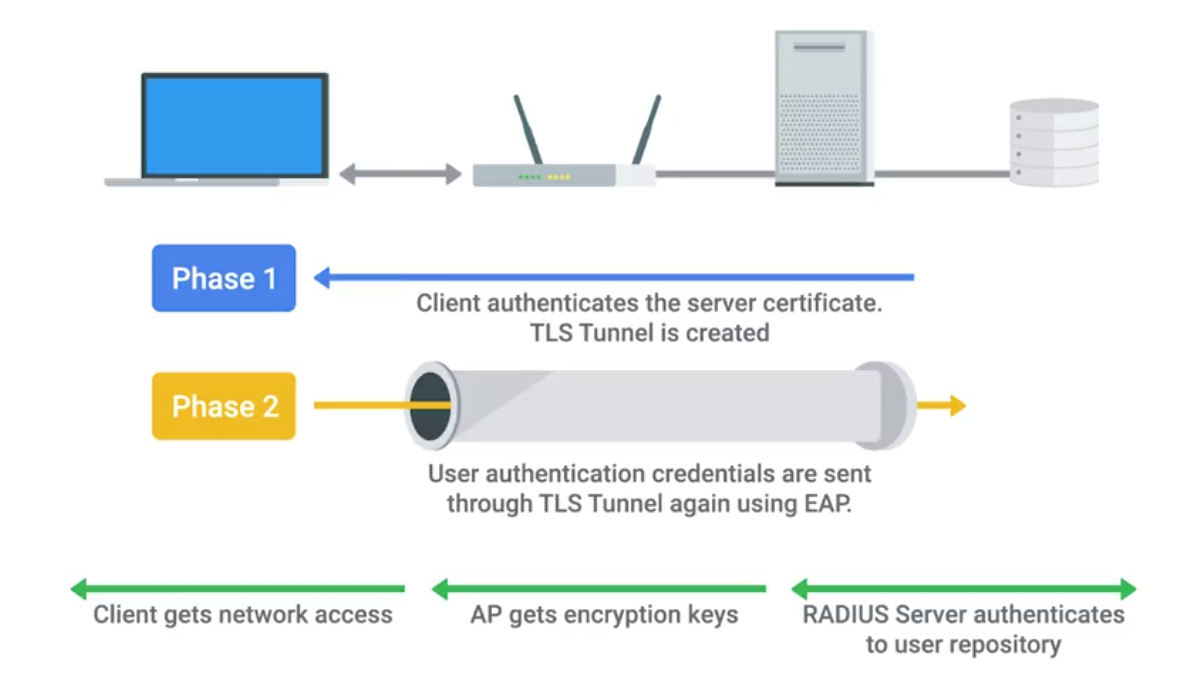
IEEE 802.1X
Authentication
- Supplicant - client making request to access LAN/WLAN
- Authenticator takes packet from supplicant and sends it to authentication server until session is authenticated. Any other info sent before authentication occurs is dropped.
- Authentication server provides a database of info required for authentication, and informs authenticator to deny or permit access.
Authentication Methods
- Shared key system - shared key or passphrase that is manually set on both device and AP.
- Open system - when authentication server has a list of authorized clients to check against when a client requests access. List is usually in the form of MAC addresses but varies by network.
Shared Key Authentication Methods
- Wired Equivalent Privacy (WEP) - not recommended for secure WLAN. Hackers can capture encrypted form of an authentication response frame, using widely software and using info to crack WEP encryption.
- Wi-Fi Protected Access (WPA) - complies with wireless security standard and increase data protection level. Enforcing IEE 802.1X authentication and key-exchange and only works with dynamic encryption keys.
- Wi-Fi Protected Access 2 (WPA2) - security enhancement to WPA. Users must ensure mobile and AP are configured using the same WPA version and pre-shared key (PSK).
- Association - allows AP to record each mobile device so that data is properly delivered - After authentication is complete.
Network Software Hardening
VPNs are commonly used to provide secure remote access, and link wo networks securely.
Common reverse proxies:
- HAProxy
- nginx
- Apache
WEP Encryption and Why You Shouldn’t Use It
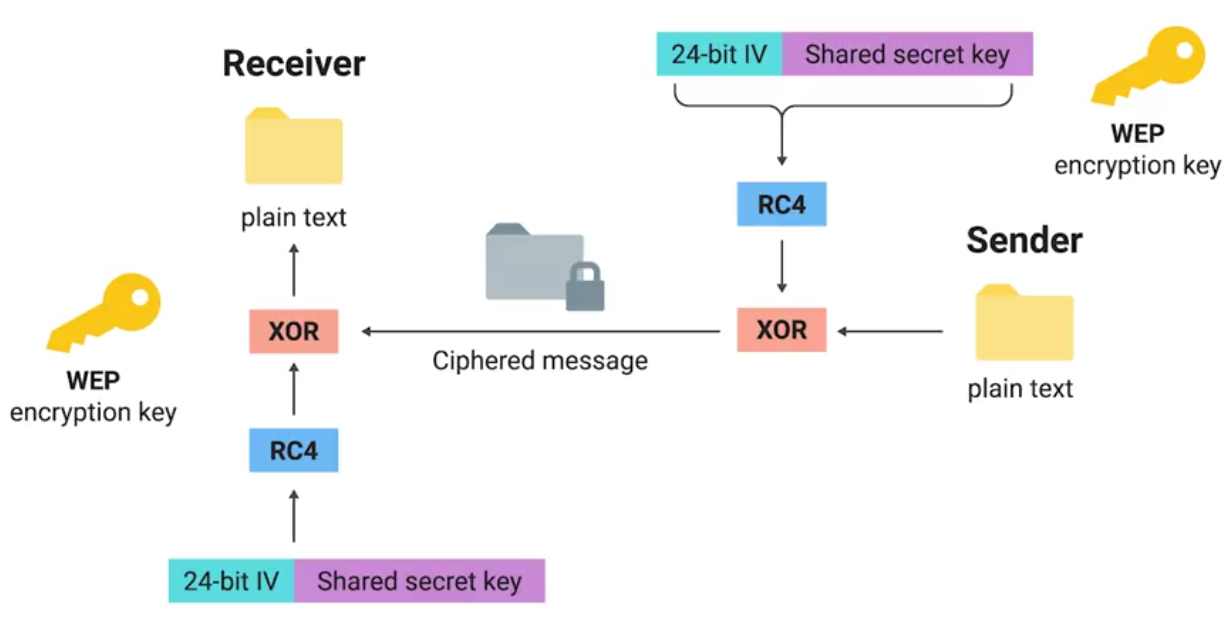
Open system authentication:
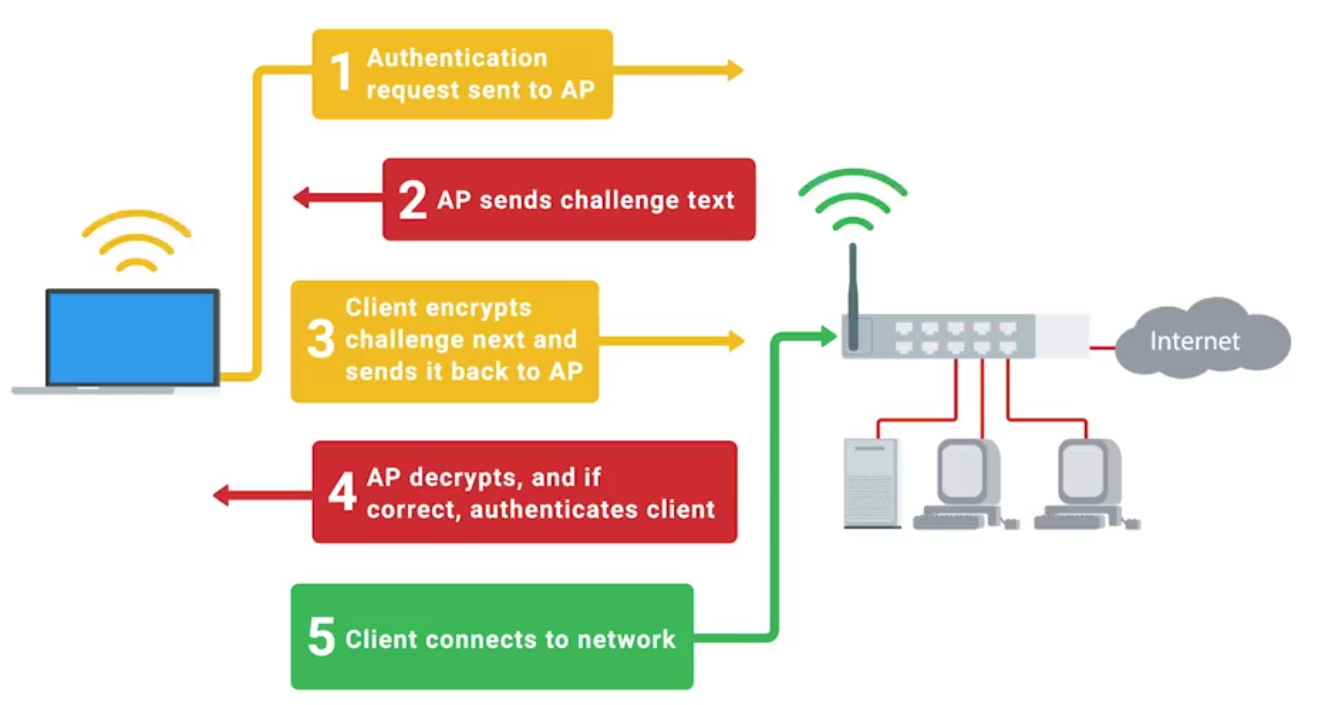
Let’s Get Rid of WEP!
WPA: Designed as a short-term replacement that would be compatible with older WEP-enabled hardware with a simple firmware update.
TKIP (Temporal Key Integrity Protocol):
- A more secure key derivation method was used to more securely incorporate the IV into the per packet encryption.
- A sequence counter was implemented to prevent replay attacks by rejecting out of order packets.
- A 64-bit MIC or Message Integrity Check was introduced to prevent forging, tampering, or corruption of packets.
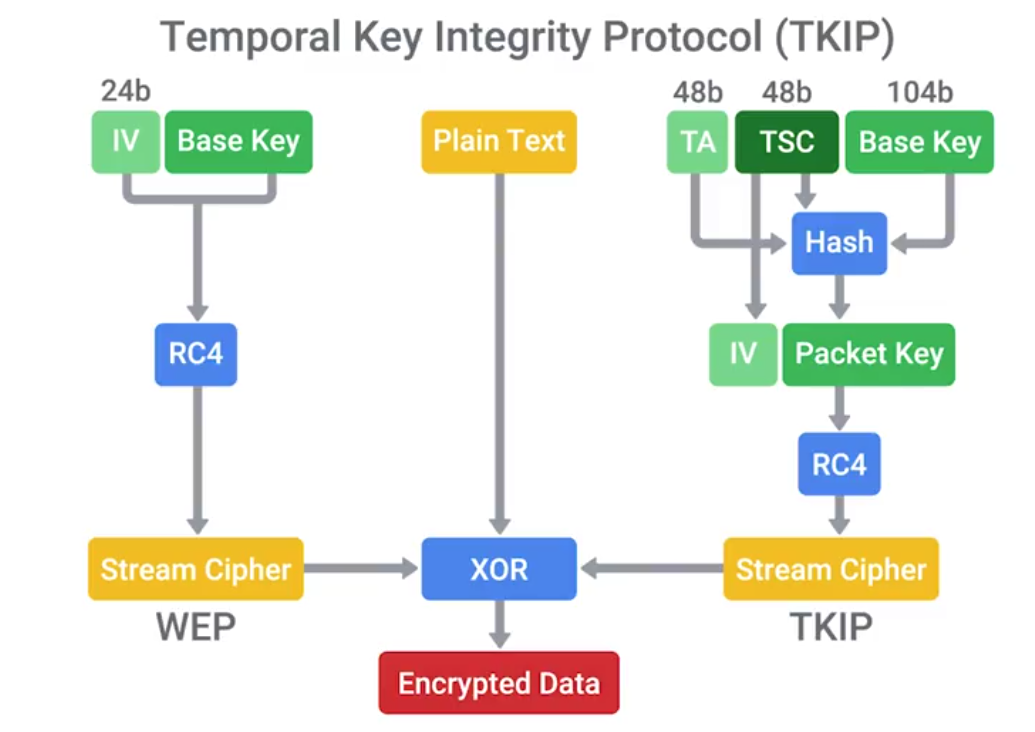
Under WPA, the pre-shared key is the Wi-Fi password you share with people when they come over and want to use your wireless network.
WPA2
CCMP (Counter Mode CBC-MAC Protocol)
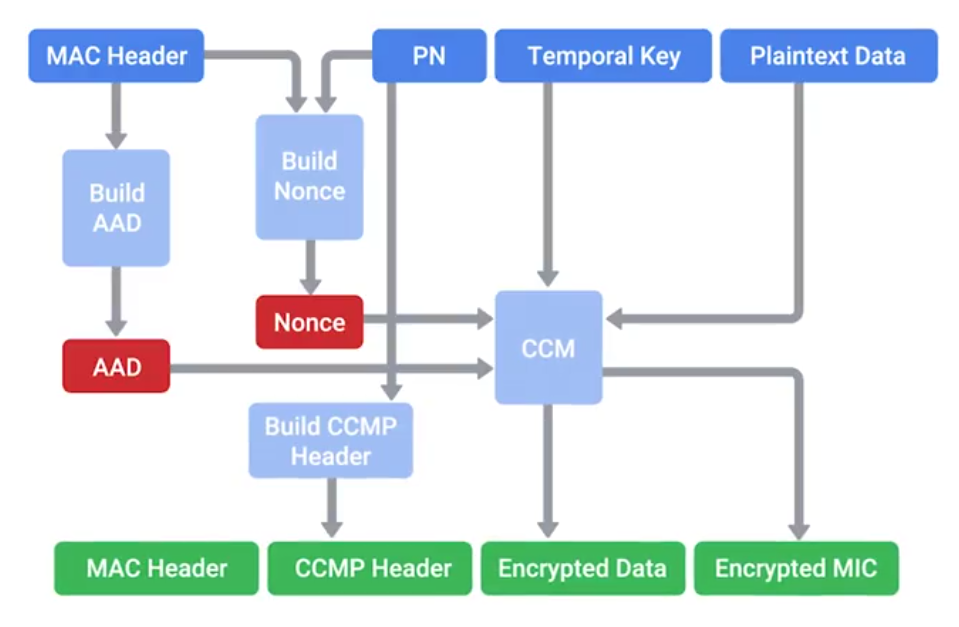
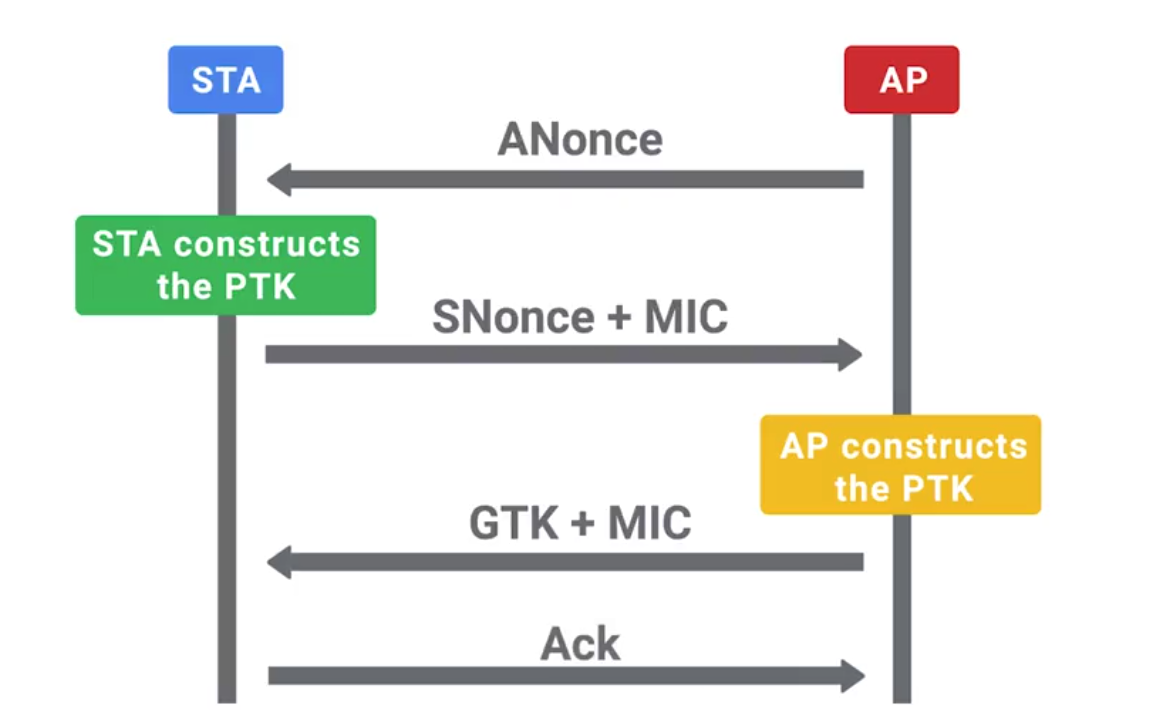
PTK (Pairwise Transient Key) is generated using the PMK, AP nonce, Client nonce, AP MAC address and client MAC address. Actually made up of five individual keys, each with their own purpose.
- Two keys are used for encryption and confirmation of EAPoL packets, and the encapsulating protocol carries these messages.
- Two keys are used for sending and receiving message integrity codes.
- And finally, there’s temporal key, which is actually used to encrypt data. Since this type of traffic must be readable by all clients connected to an AP, this GTK is shared between all clients. It’s updated and re-transmitted periodically, and when a client disassociates the AP.
Wireless Hardening
If 802.1X is too complicated for a company, the next best alternative would be WPA2 with AES/CCMP mode.
A long and complex passphrase that wouldn’t be found n a dictionary would increase the amount of time and resources and attacker would need to break the passphrase.
If your company values security over convenience, you should make sure that WPS isn’t enabled on your APs.
Packet Sniffing (Packet Capture)
The process of intercepting network packets in their entirety for analysis.
Promiscuous Mode: A type of computer networking operational mode in which all network data packets can be accessed and viewed by all network adapters operating in this mode.
Port Mirroring: Allows the switch to take all packets from a specified port, port range, or entire VLAN and mirror the packets to a specified switch port.
Monitor Mode: Allows us to scan across channels to see all wireless traffic being sent by APs and clients.
Wireshark and TCPDump
TCPDump is a super popular, lightweight, command-line based utility that you can use to capture and analyze packets.
Wireshark is a great tool for network traffic analysis that provides way more powerful complex filtering and easier navigation.
Intrusion Detection/Prevention Systems (IDS/IPS)
IDS or IPS systems operate by monitoring network traffic and analyzing it.
Network Intrusion Detection System (NIDS): The detection system would be deployed somewhere on a network where it can monitor traffic for a network segment or subnet.
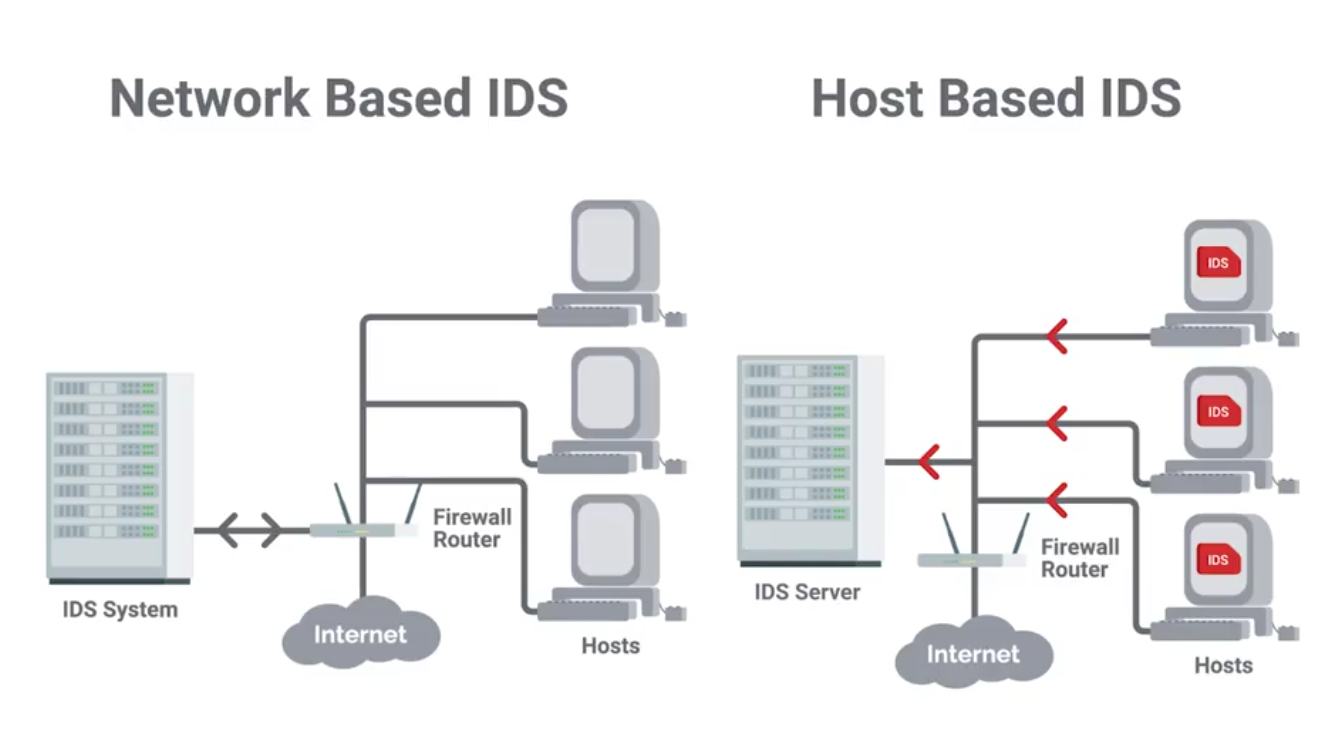
Signatures
Unique characteristics of known malicious traffic.
They might be specific sequences of packets, or packets with certain value encoded in the specific header field.
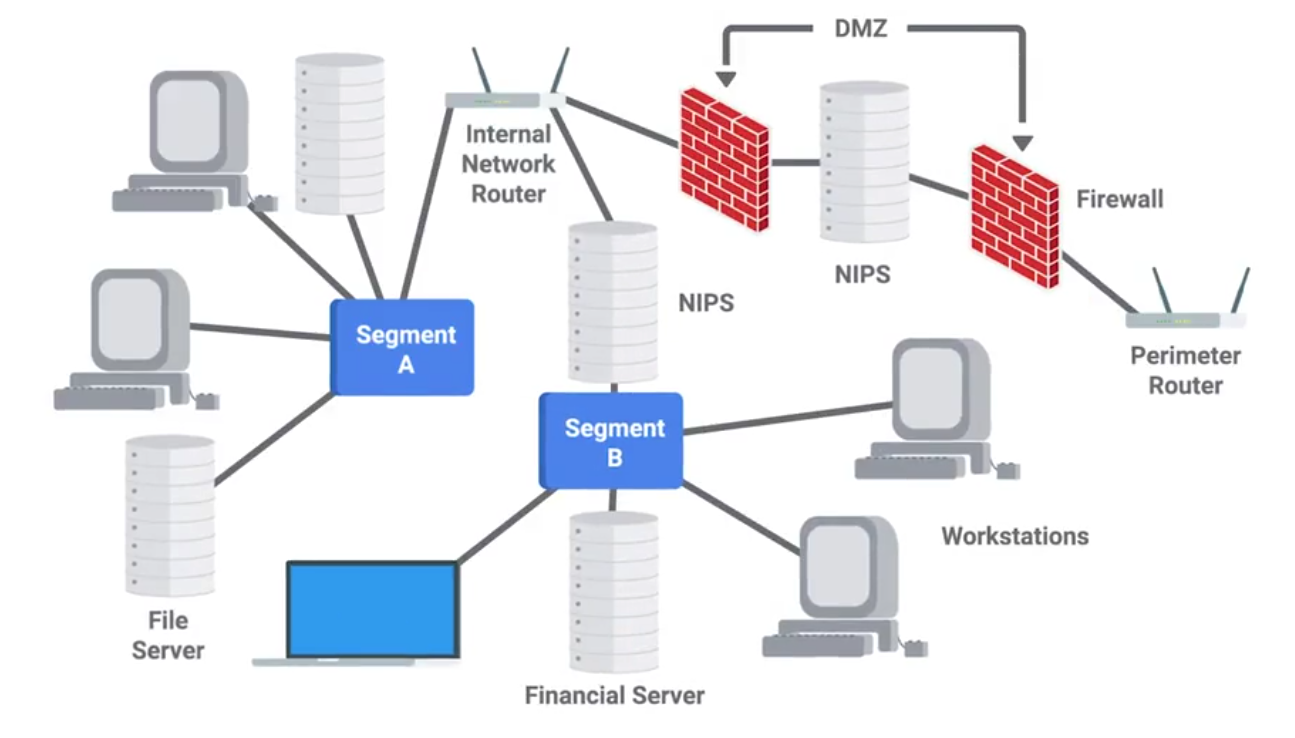
Unified Threat Management (UTM)
UTM options and configurations
UTM hardware and software options:
- Stand-alone UTM network appliance
- Set of UTM networked appliances or devices
- UTM server software application(s) Extent of UTM protection options:
- Single host
- Entire network UTM security service and tool options can include:
- Firewall
- Intrusion detection system (IDS)
- Intrusion prevention system (IPS)
- Antivirus software
- Anti-malware software
- Spam gateway
- Web and content filters
- Data leak/loss prevention (DLP)
- Virtual Private Network (VPN)
Stream-based vs. proxy-based UTM inspections
- Stream-based inspection, also called flow-based inspection
- Proxy-based inspection
Benefits of using UTM
- Cost-effective
- Flexible and adaptable
- Offers integrated and centralized management
Risks of using UTM
- Can become a single point of failure in a network security attack
- Might be a waste of resources for small businesses
Module 5 - Defense in Depth
Intro to Defense in Depth
The concept of having multiple, overlapping systems of defense to protect IT systems.
Disabling Unnecessary Components
- Attack Vector: The method or mechanism by which an attacker or malware gains access to a network or system.
- Attack Surface: The sum of all the different attack vectors in a given system.
The less complex something is, the less likely there will be undetected flaws.
Telnet access for a managed switch has no business being enabled in a real-world environment.
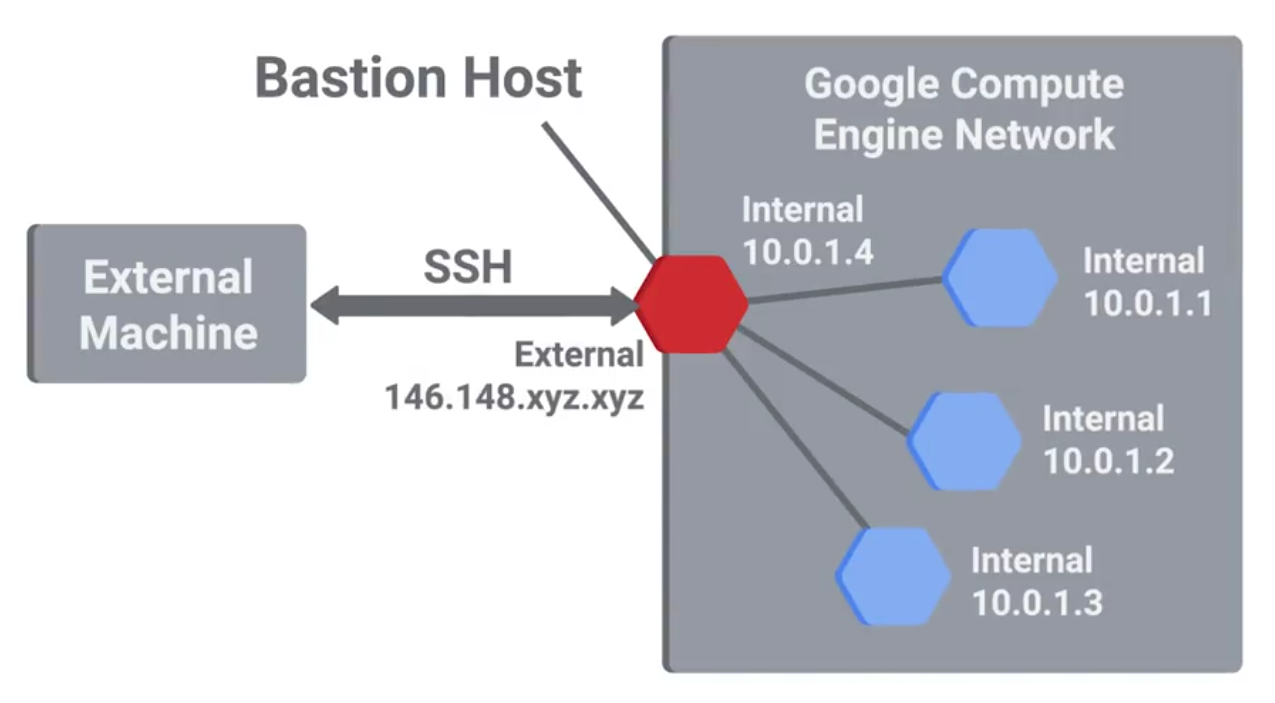
Host-Based Firewall
Protect individual hosts from being compromised when they’re used in untrusted, potentially malicious environments.
A host-based firewall plays a big part in reducing what’s accessible to an outside attacker.
If the users of the system have administrator rights, then they have the ability to change firewall rules and configurations.
Logging and Auditing
SIEMS (Security Information and Event Management Systems) - A centralized log server with some extra analysis features too.
Normalization: The process of taking log data in different formats and converting it into a standardized format that’s consistent with a defined log structure.
Once logs are centralized and standardized, you can write automated altering based on rules.
Popular SIEM tools:
- rsyslog
- Splunk Enterprise Security
- IBM Security Qradar
- RSA Security Analytics
Windows Defender Guide
Microsoft 365 Defender Services
- Defender for Endpoint
- Defender Vulnerability Management
- Defender for Office 365
- Defender for Identity
- Azure Active Directory Identity Protection
- Defender for Cloud Apps
Using Microsoft 365 Defender
- Identities
- Data
- Devices
- Apps
- Incidents
- Alerts
- Advanced hunting
- Threat Analytics
- Secure score
- Learning hub
- Reports
Antimalware Protection
Lots of unprotected systems would be compromised in a matter of minutes if directly connected to the internet without any safeguards or protections in place.
Antivirus software will monitor and analyze things, like new files being created or being modified on the system, in order to watch for any behavior that matches a known malware signature.
Antivirus software is just one piece of our anti-malware defenses.
Binary whitelisting software operates off a white list. It’s a list of known good and trusted software and only things that are on the list permitted to run. Everything else if blocked.
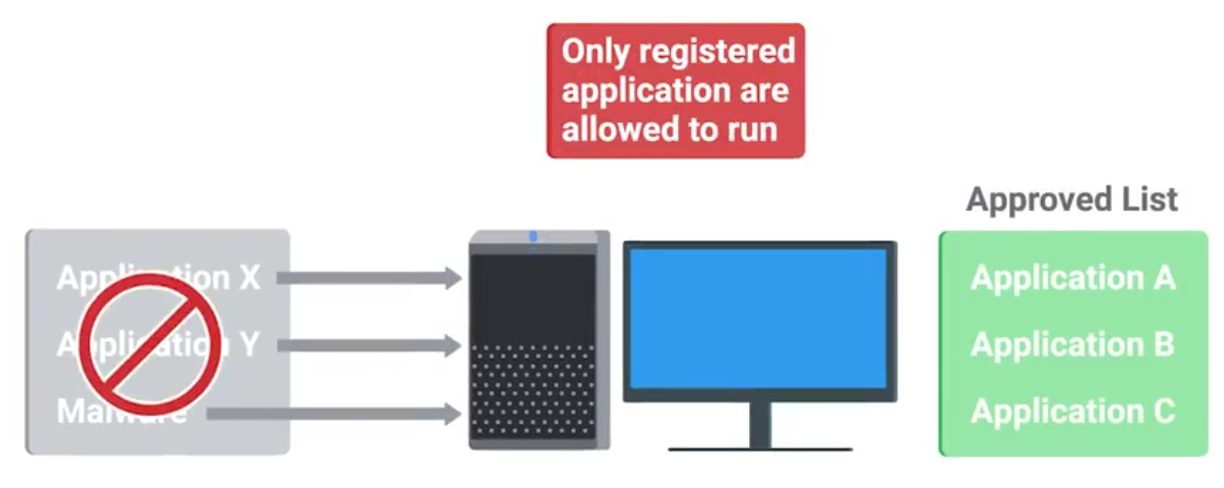
Software signing or coding signing:
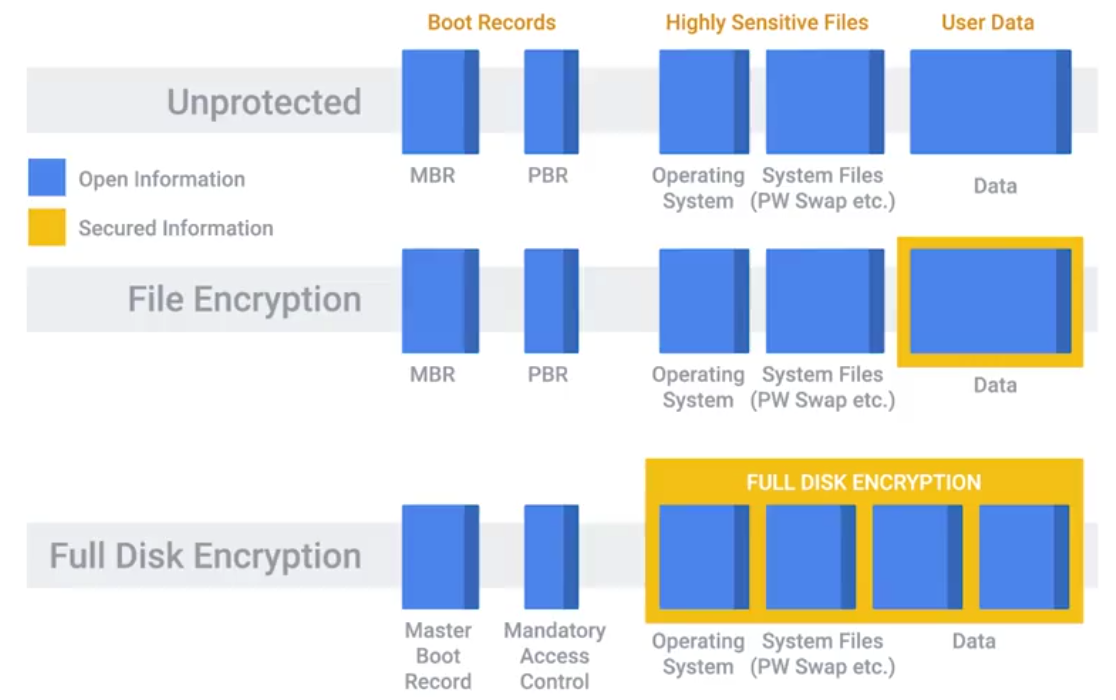
Disk Encryption
Secure Boot: Uses public key cryptography to secure these encrypted elements of the boot process - does by integrated code signing and verification of the boot files.
Secure boot is configured with Platform key
The public key corresponding to the private key used to sign the boot files - written to firmware and is used at boot-time verify the signature of the boot files.
When you implement a full disk encryption solution at scale, it’s super important to think about how to handle cases where passwords are forgotten.
Key Escrow: Allows the encryption key to be securely stored for later retrieval by an authorized party.
File-Based Encryption: Where only some files or folders are encrypted and not the entire disk.
Home directory or file-based encryption only guarantees confidentiality and integrity of files protected by encryption.
Software Patch Management
As an IT Support Specialist, it’s critical that you make sure that you install software updates and security patches in a timely way, in order to defend your company’s systems and networks.
The best protection is to have a good system and policy in place for your company. Critical infrastructure devices should be approached carefully when you apply updates.
There’s always the risk that a software update will introduce a new bug that might affect the functionality of the device.
Application Policies
A common recommendation, or even a requirement, is to only support or require the lastest version of a piece of software.
It’s generally a good idea to disallow risky classes of software by policy. Things like file sharing and piracy-related software tend to be closely associated with malware infections.
Understanding what your users need to do their jobs will help shape your approach to software policies and guidelines. Helping your users accomplish tasks by recommending or supporting specific software makes for a more secure environment.
Browser Extensions that require full access to web sites visited can be risky, since the extension developer has the power to modify pages visited.
Module 6 - Creating a Company Culture for Security
Security Goals
If your company handles credit card payments, then you have to follow the PCI DSS, or Payment Card Industry Data Security Standard.
PCI DSS objectives:
- Build a maintain a secure network and systems.
- Protect cardholder data.
- Maintain a vulnerability management program.
- Implement strong access control measures.
- Regularly monitor and test networks.
- Maintain a information security policy.
Measuring and Assessing Risk
Security is all about determining risks or exposure; understanding the likelihood of attacks; and designing defenses around these risks to minimize the impact of an attack.
Security risk assessment starts with threat modeling.
Typically, any kind of user data is considered high value, especially if payment processing is involved.
Vulnerability Scanner: A computer program designed to assess computers, computer systems, networks or applications for weaknesses.
- Nessus
- OpenVAS
- Qualys
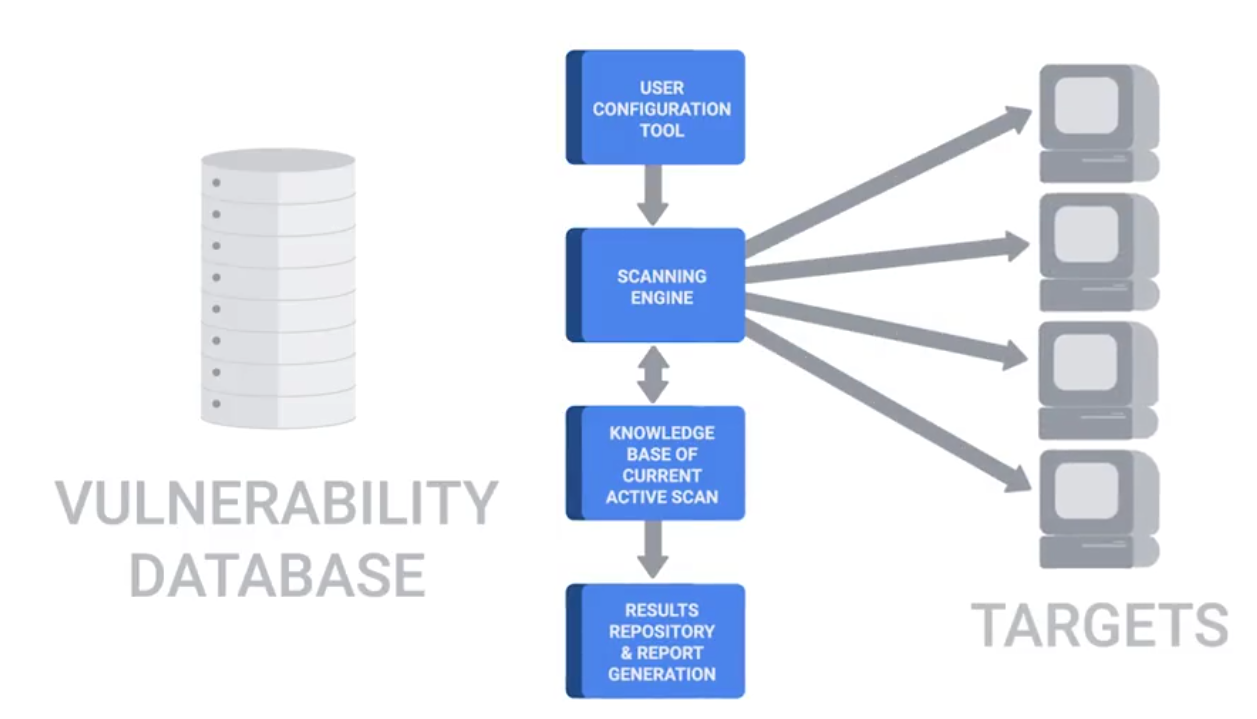
Penetration Testing: The practice of attempting to break into a system or a network to verify the systems in place.
Privacy Policy
It’s about overseeing the access and use of sensitive data.
It’s a good practice to apply the principle of least privilege here, by not allowing access to this type of data by default.
Any access that doesn’t have a corresponding request should be flagged as a high-priority potential breach that needs to be investigate as soon as possible.
Data-handling policies should cover the details of how different data is classified.
Once different data classes are defined, you should create guidelines around how to handle these different types of data.
User Habits
You can build the world’s best security systems, but they won’t protect you if the users are going to be practicing unsafe security.
You should never upload confidential information onto a third-party service that hasn’t been evaluated by your company. It’s important to make sure employees use new and unique passwords, and don’t reuse them from other services.
A much greater risk in the workplace that users should be educated on is credential theft from phishing emails. If someone entered their password into a phishing site, or even suspects they did, it’s important to change their password as soon as possible.
Third-Party Security
If they have subpar security, you’re undermining your security defenses by potentially opening a new avenue of attack. If you can, ask for a third-party security assessment report.
Security Training
Helping others keep security in mind will help decrease the security burdens you’ll have as an IT support specialist.
Incident Reporting and Analysis
The very first step of handling an incident is to detect it in the first place. The next step is to analyze it and determine the effects and scope of damage.
Once the scope of the incident is determined, the next step is containment.
- If an account was compromised, change the password immediately.
- If the owner is unable to change the password right away, then lock the account
Severity includes factors like what and how many systems were compromised, and how the breach affects business functions. The impact of an incident is also an important issue to consider.
Data exfiltration: The unauthorized transfer of data from a computer.
Recoverability: How complicated and time-consuming the recovery effort will be.
Incident Response
Regulated data
- Protected health information
- Credit card or payment card industry (PCI) information
- Personally identifiable information (PII)
- Federal information security management act (FISMA) compliance
- Export administration regulations (EAR) compliance
Digital rights management (DRM)
- Restrict users
- Set expiration dates
- Limit access
End User Licensing Agreement (EULA) - specifying certain rights
Chain of custody - Tracks evidence movement through its collections, safeguarding and analysis life-cycle.
Incident Response and Recovery
Update firewall rules and ACLs if an exposure was discovered in the course of the investigation. Create new definitions and rules for intrusion detection systems that can watch for the signs of the same attack again.
BYOD (Bring Your Own Device) policies and solutions:
- Develop BYOD policies
- Enforce BYOD policies with MDM software
- Distribute MDM settings to multiple OSes through EMM systems
- Require multi-factor authentication (MFA)
- Create acceptable use policies for company data and resources
- Require employees to sign NDAs
- Limit who can access data
- Train employees on data security
- Back up data regularly
Interview notes
- Network security: disable unnecessary services and consider what are needed
- Know what are allowed and have control on them: whitelisting software
- network monitoring to see traffic
- Have a different network segment to connect unknown machines
- WPA2 encryption: stronger encryption
- Have employees change passwords and strong. Educate them
- Two-factor authentication: having an additional verification more than password: bio-metric, chip or key.