Table of Contents
- Module 1 - Introduction to Networking
- Module 2 - The Network Layer
- Module 3 - The Transport and Application Layers
- Module 4 - Networking Services
- Module 5 - Connecting to the Internet
- Module 6 - Troubleshooting and the Future of Networking
Module 1 - Introduction to Networking
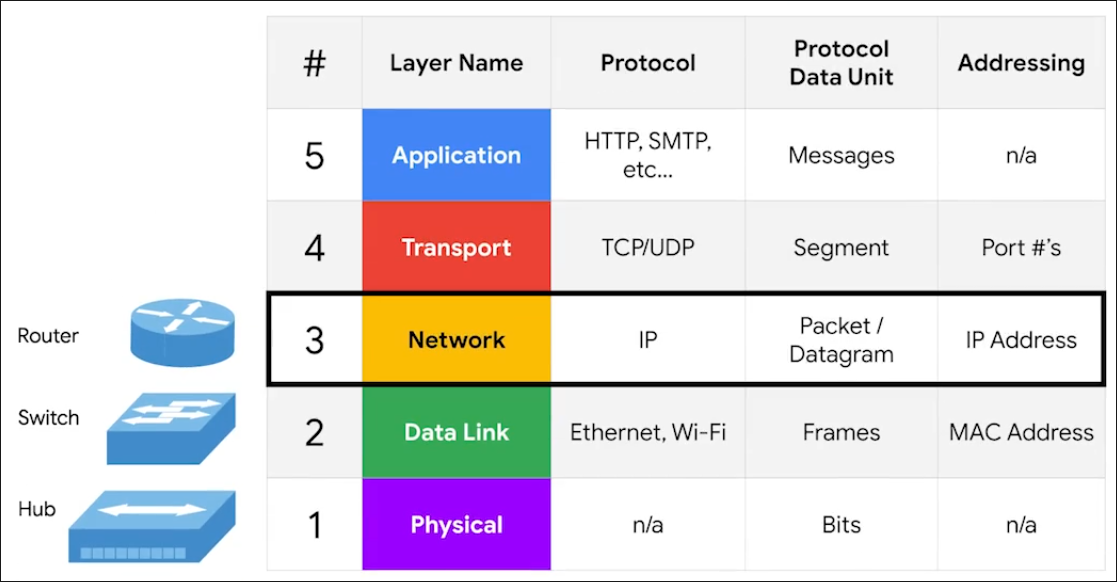
Protocol - Defined sets of standards for communication.
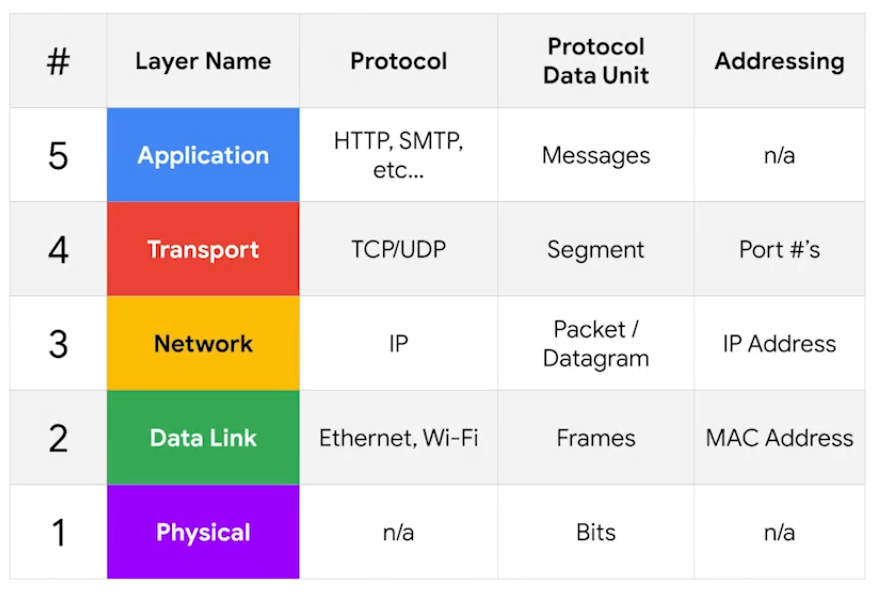
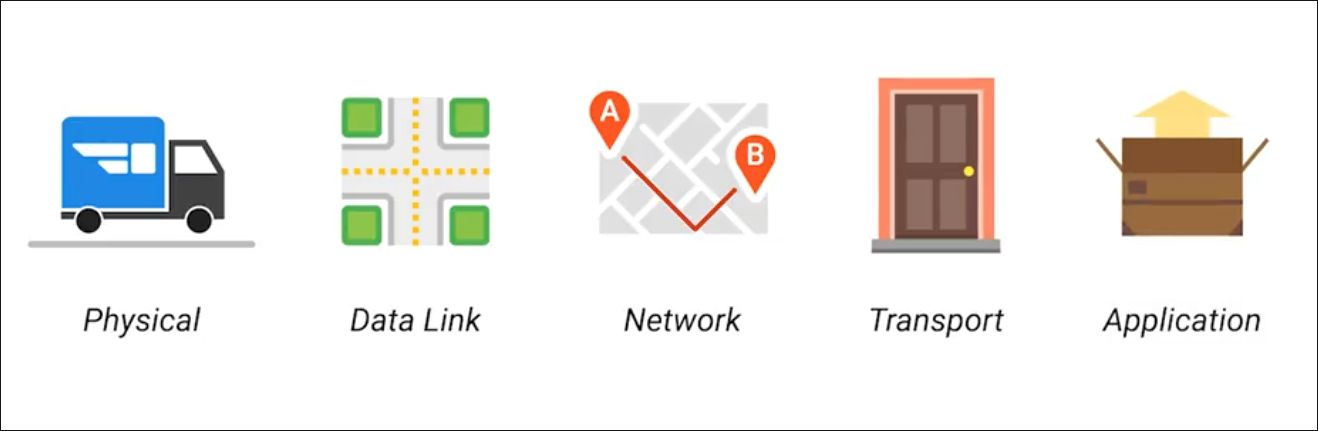
Physical Layer
Physical devices that interconnect computers, about signal are sent between networks.
- e.g. Cabling, connectors
Data Link Layer (Network Interface)
Responsible for defining a common way of interpreting these signals so network devices can communicate.
- e.g. Ethernet standards
Network Layer (Internet Layer)
Allows different networks to communicate with each other through devices.
- Internetwork - A collection of networks connected connected through routers.
- Responsible to deliver through routers. (e.g. Routers, IP)
Transport Layer
Sorts out which client and server programs are supposed to get that data. Mostly TCP/UDP responsible for ensuring data gets to right application running on those nodes.
Application Layer
The interface between end-user applications and the underlying network services. (e.g. Browser)
Cables
Common forms of copper twisted-pair cables - Cat5, Cat5e, and Cat6.
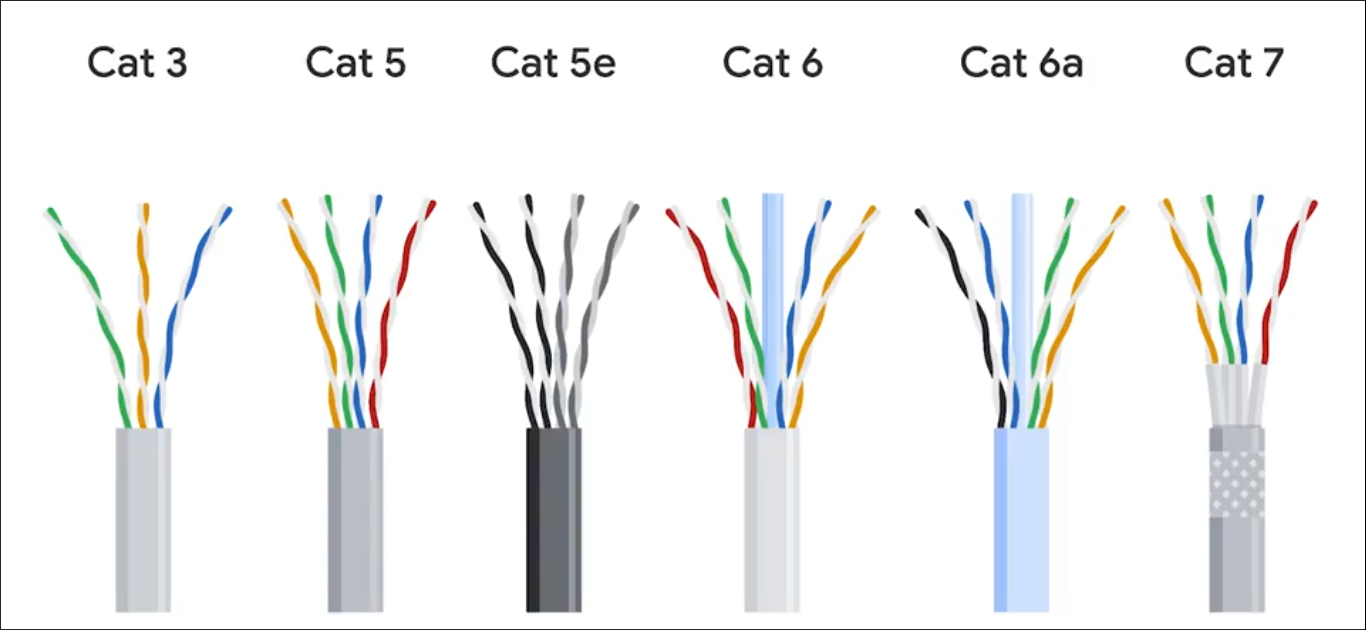
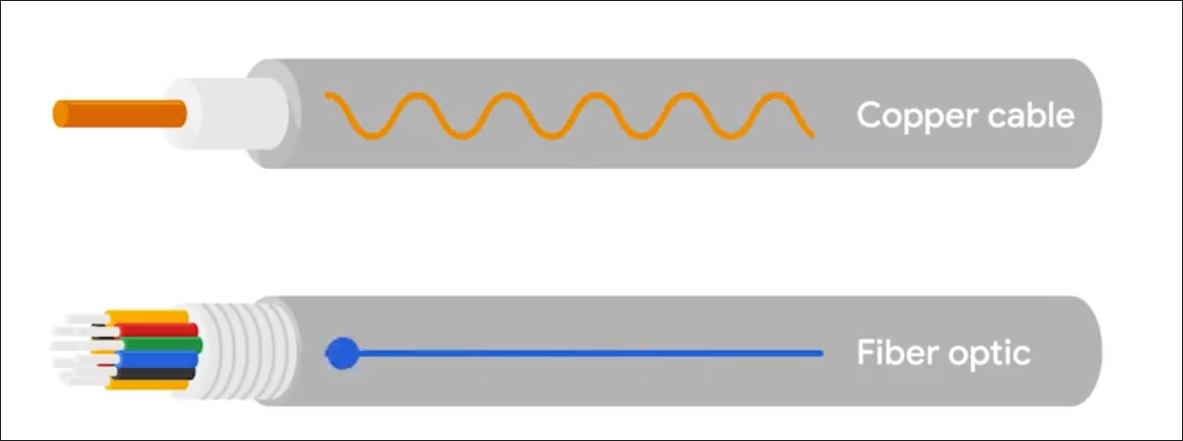
Crosstalk - When an electrical pulse on one wire is accidentally detected on another wire. (Cat5 is replaced by Cat5e) Fiber cables - Contain individual optic fiber - tiny tubes made out of glass (width of human hair). Mostly seen in data centers and ensures quicker, no potential data loss - but expensive.
Hubs, Switches and Routers
Hub - broadcasts them out to all other connected ports without analyzing or processing the data. Forwards all incoming data to every other connected device. Nodes in the network of hub can only send data one at a time.
Switch - communicates by forwarding data packets based on MAC addresses, and intelligently directs data frames only to the specific device.
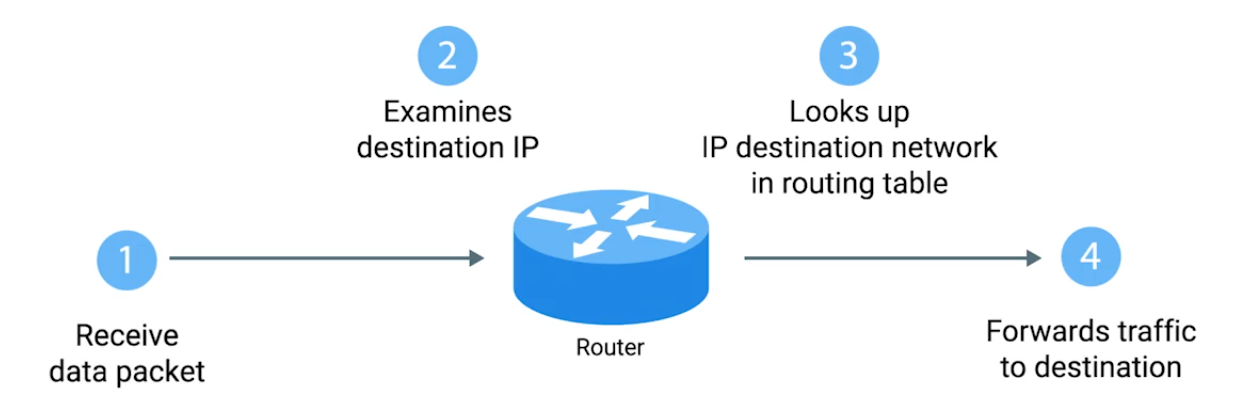
Router - uses IP to transmit IP packets contains both the data and source & destination IP addresses. Directing traffic efficiently by examining packet headers and consulting its routing table to determine the best path for each packet - across different networks.
- Routers are Global Guides for getting traffic to the right places in a world of large complex internet. (e.g. between you and web server)
Border Gateway Protocol (BGP) - Routers share data via BGB, letting them learn about the most optimal paths to forward traffic.
Servers and Clients
Each node is primarily an either Server or Client.
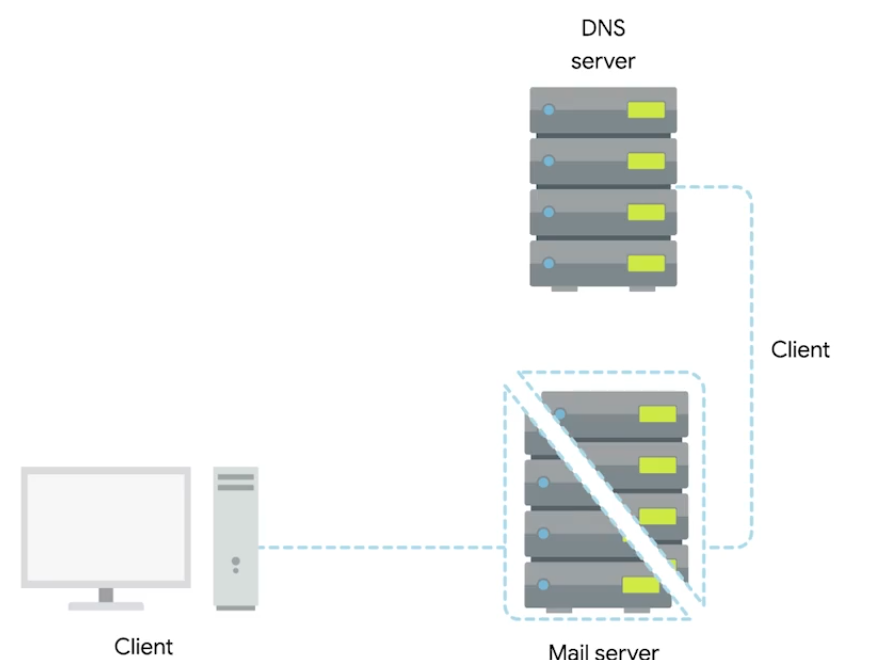 Even though Mail server acts as a server, it is a client of DNS server.
Moving Bits Across the Wire
Bit - Smallest representation of data (1 or 0).
Modulation - A way of varying the voltage of this charge moving across the cable (line coding).
Twisted Pair Cabling and Duplexing
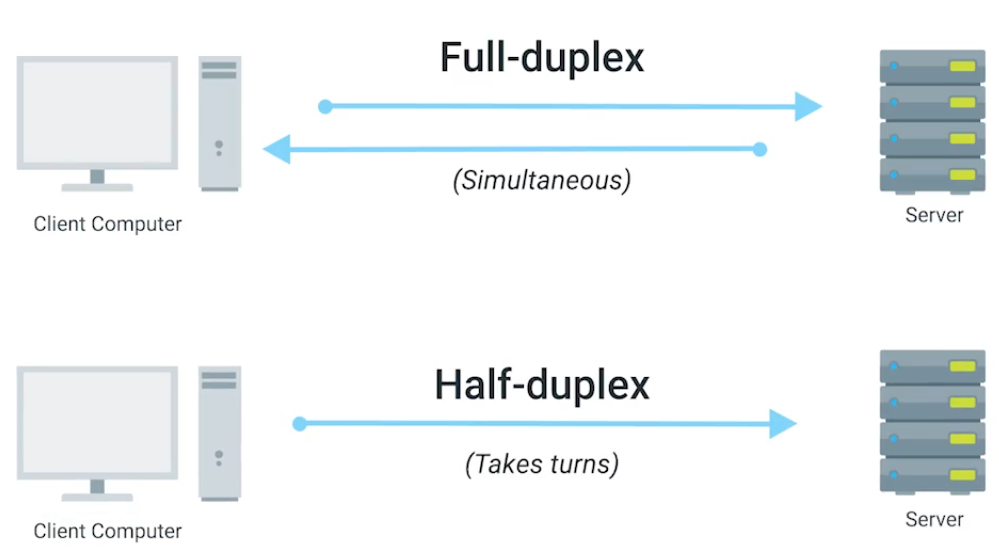
Duplex - The concept that information can flow in both directions.
Simplex - unidirectional.
Ethernet Over Twisted Pair Technologies
- UTP - The most common and least expensive - business and home networks. Basic protection against electromagnetic interference (EMI), radio frequency interference (RFI), and crosstalk interference.
- STP - Uses a braided aluminum/copper shielding to encase the four twisted underneath. (industrial environment)
- FTP - Foiled twisted pair: uses a thin foil shield that wraps around the bundle of twisted pair wires. (industrial environment)
- Straight-through cable - pins on one end are wired to the same corresponding pins on the other end (pin-to-pin wiring scheme).
- Crossover Cables - typical setup for T568A on one end and T568B on the other (direct device-to-device communication under older Ethernet standards like 10BASE-T and 100BASE-TX).
Network Ports and Patch Panels
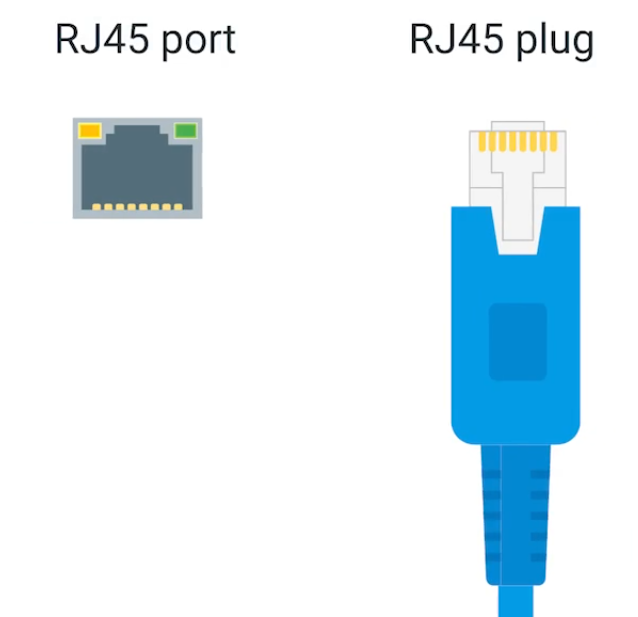
RJ45 - Registered Jack, used primarily for Ethernet networking to link devices.
 | 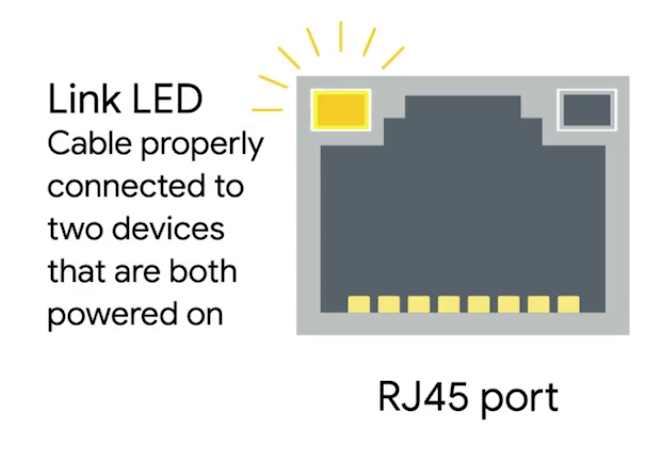 | 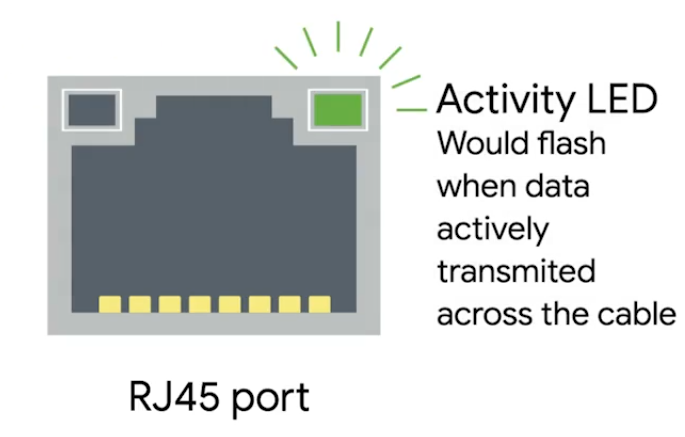 |
|---|
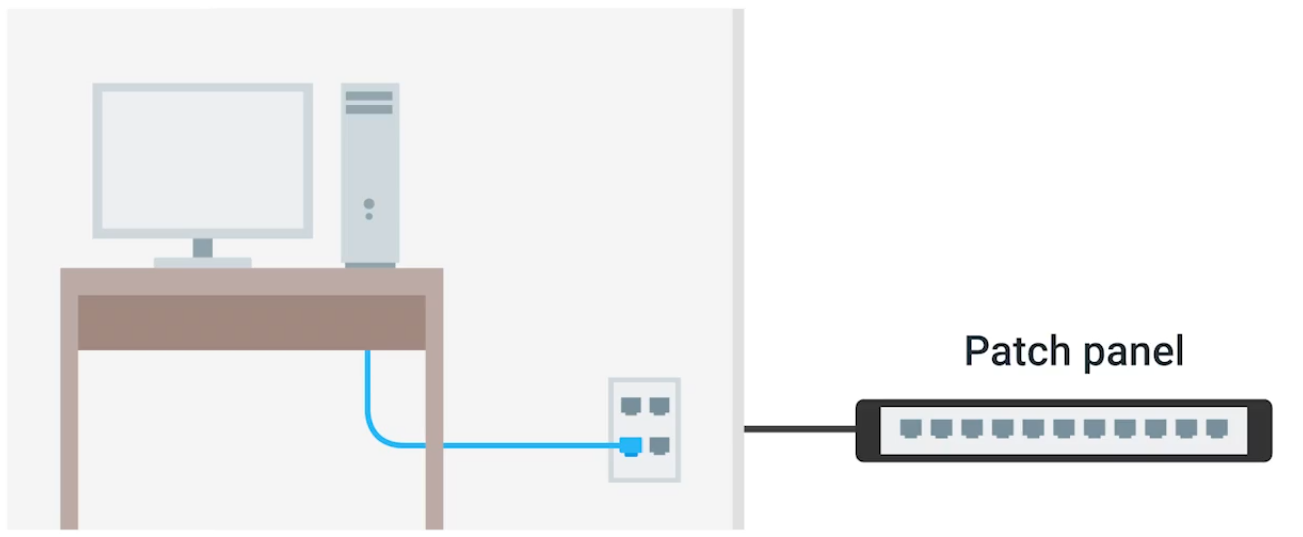
Patch panel - as a central point for organising and managing the vast network of cables. Administrators can easily establish, modify, or terminate links between different network components. Structured cabling is important in enterprise networking - clear where cables terminate.
Cabling Tools
| Picture | Description |
|---|---|
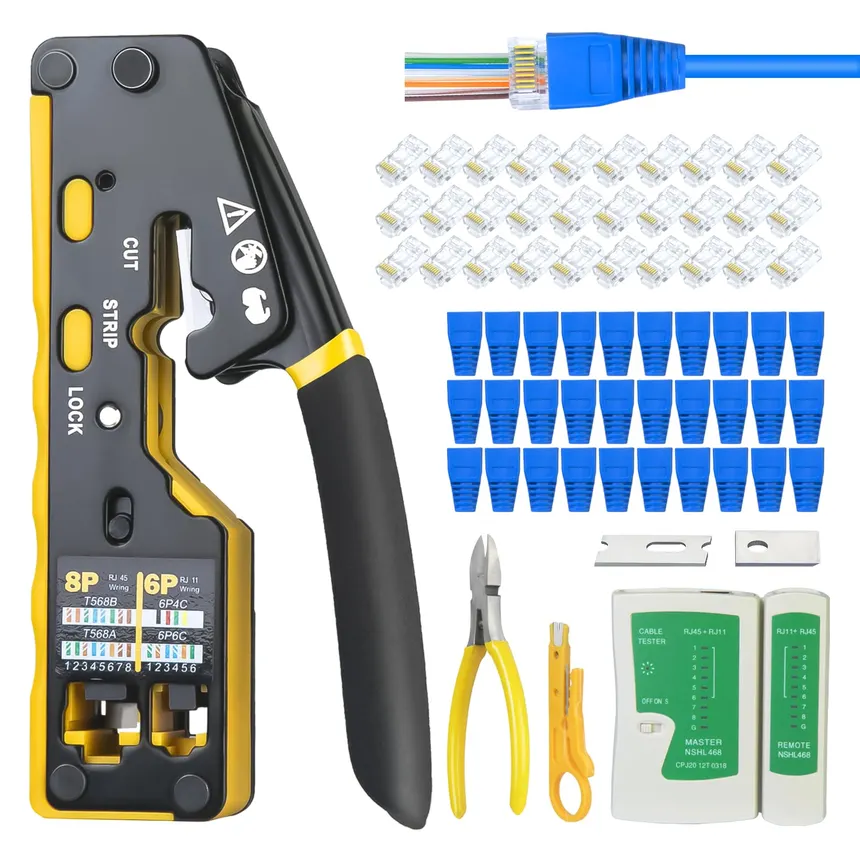 | Crimper Securely attaching connectors, such as RJ45 connectors, to the ends of Ethernet cables without soldering - squeeze down or crimp wires. |
 | Cable Stripper To remove the protective rubber coating from Ethernet cables (UTP and STP) to expose the individual conductors for termination with connectors like RJ45 plugs or keystone jacks. |
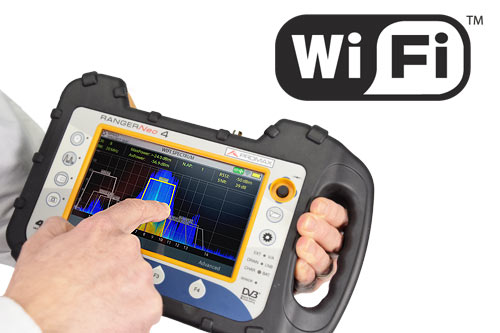 | Wi-Fi Analyzer Visualizes the RF environment, identify sources of interference, and optimize wireless network performance in an area. Collects data about the WiFi and its circumstances. |
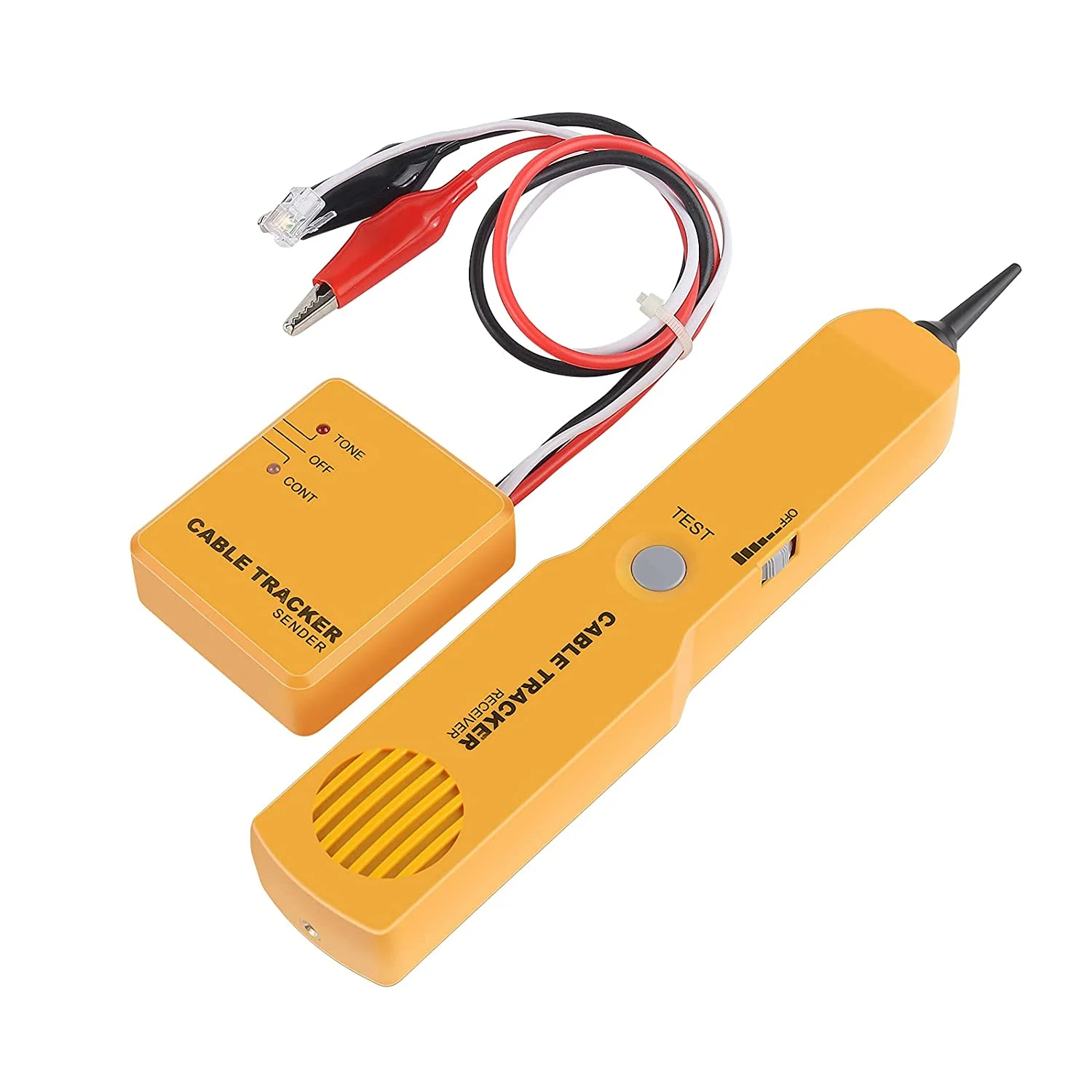 | Toner Probe Finding Ethernet and other internet connectors (Cat 5, Cat 6, …) through walls, ceilings, or within cable bundles where they are not physically accessible. |
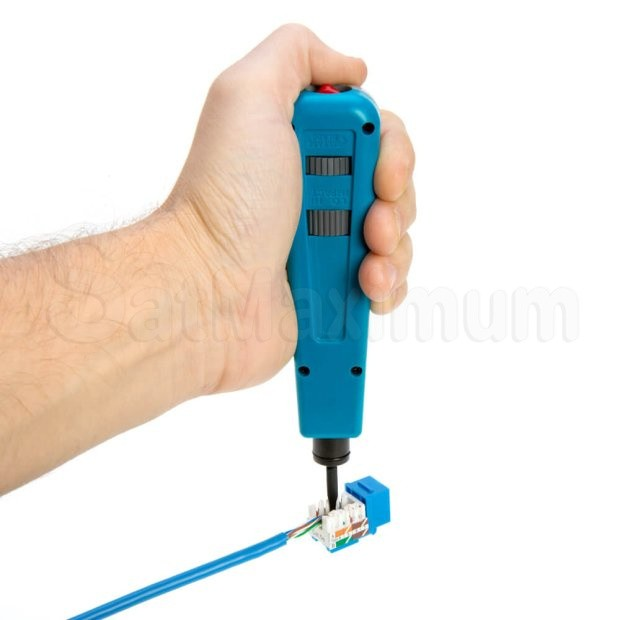 | Punch Down Tool Punching down wires into punch down panels or jacks. First the protective covering is taken off the wires, then the wires are punched into place. |
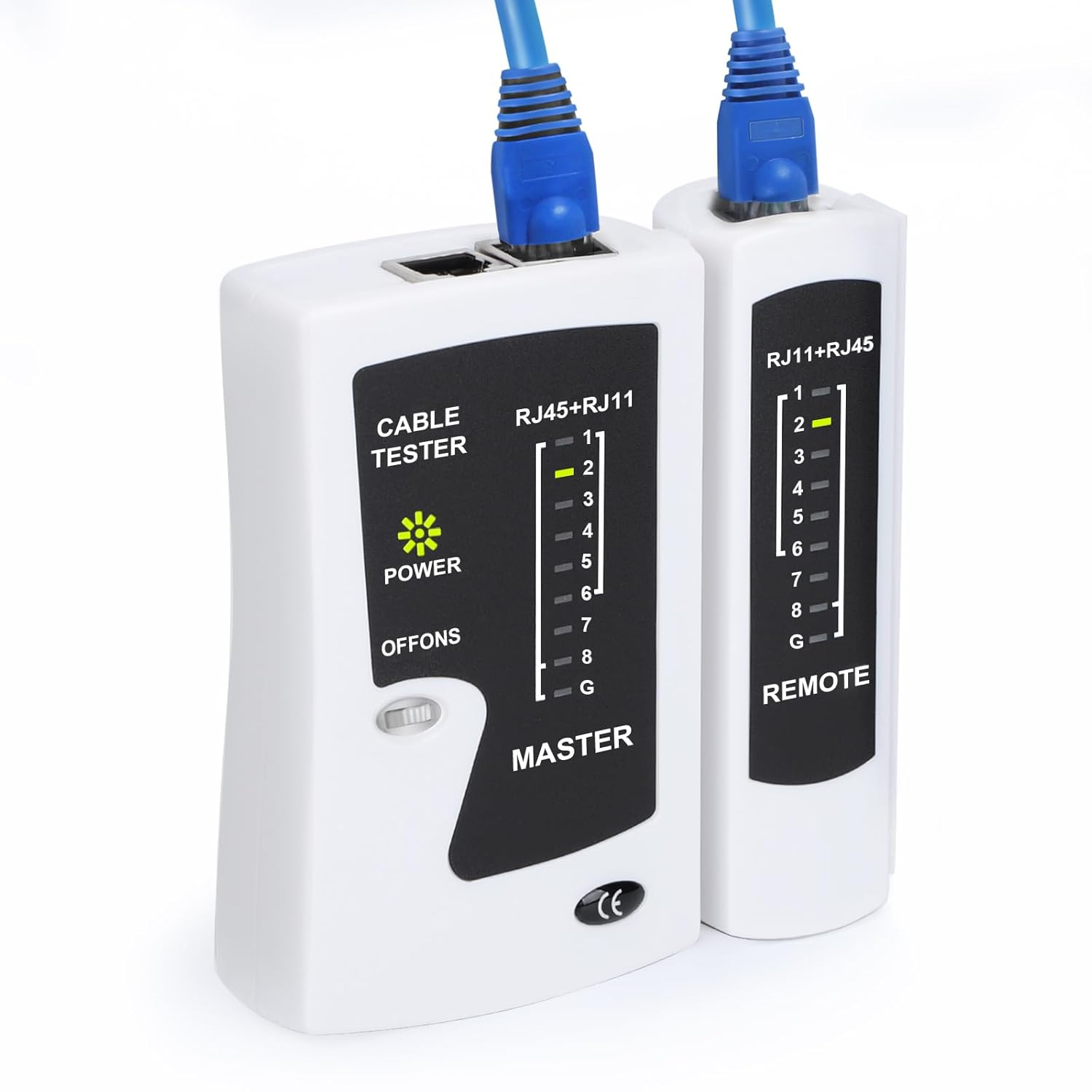 | Cable Tester To detect common wiring faults - open connections (breaks in a wire), shorts (where wires touch unintentionally), crossed pairs, reversed pairs, and incorrect wiring. |
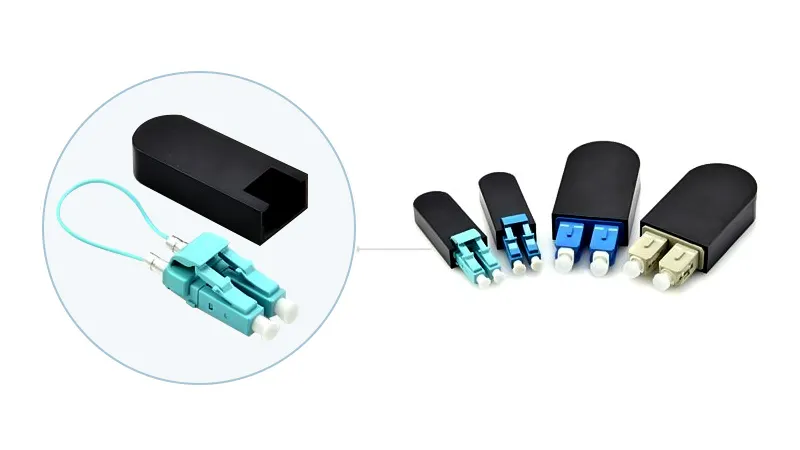 | Loopback Plug Hardware diagnostic tool used in networking to test the functionality of physical ports and interfaces |
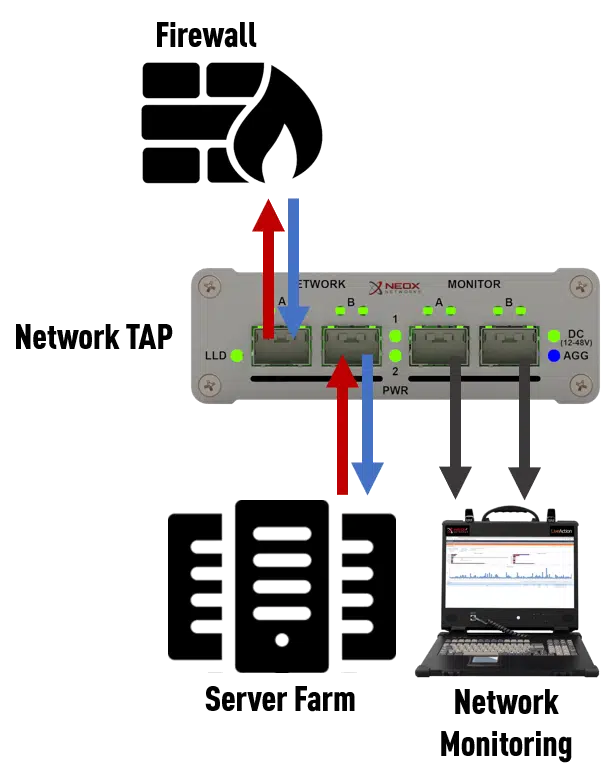 | Network Tap Monitors and captures data flowing through a network, providing a non-intrusive, passive method for accessing network traffic. |
Ethernet and MAC Addresses
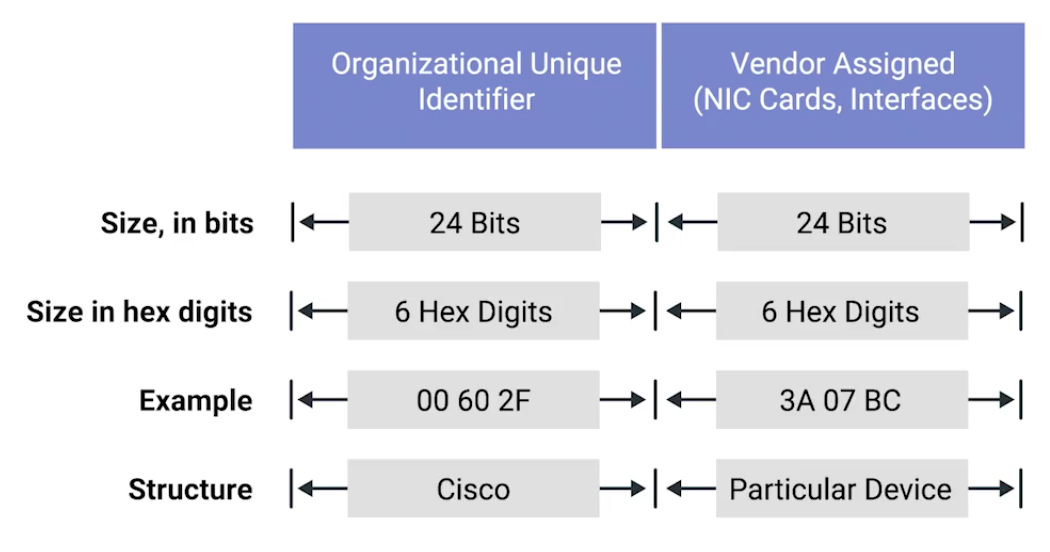
MAC - Media Access Control, a globally unique identifier attached to network interface.
- 48-bit, six groups of two hexadecimal numbers.
- First three octets - Organizationally Unique Identifier (OUI)
Unicast, Multicast, and Broadcast
| Name | Description |
|---|---|
| Unicast | One-to-one communication model. e.g. 4A-30-10-21-10-1A, the first octet is 4A in hexadecimal - 01001010. The least significant bit (the rightmost) is 0 - this is a unicast address.This frame will be sent to all devices on the collision domain, but only the device with the matching MAC address will receive and process it. 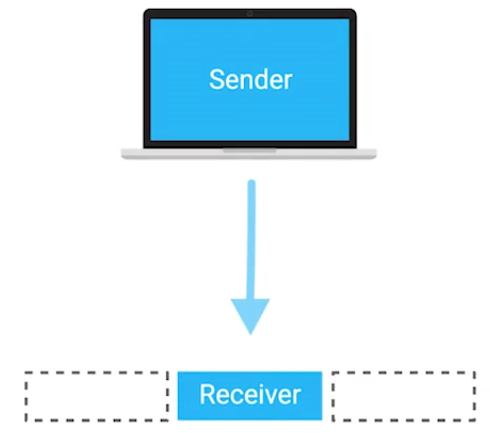 |
| Multicast | One-to-many communication model. e.g. 01:00:5E:00:01, the first octet is 01 - 0000 0001 in binary. The least significant bit is 1 - it is a multicast address. This specific address falls within the range 01:00:5E:00:00 to 01:00:5E:7F:FF, which is reserved for IPv4 multicast addresses.While the switch treats the frame as multicast and floods it to all ports, the receiving NICs decide whether to accept the frame based on whether they are subscribed to that specific multicast group. 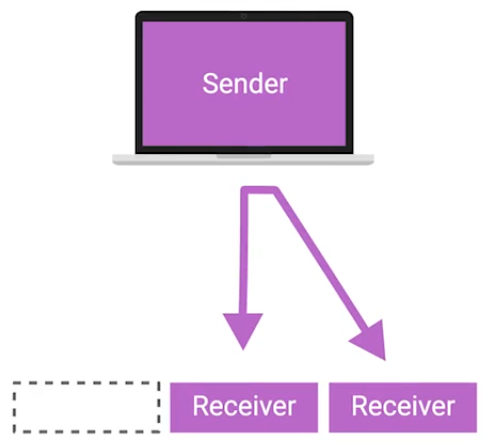 |
| Broadcast | One-to-all communication model. On the data link (Layer 2), a broadcast is identified by a destination MAC address FF:FF:FF:FF:FF, which all devices on the network recognize as a broadcast intended for everyone.The message is delivered to every device on the local network, although only the relevant device(s) will process it, while others will typically ignore it. 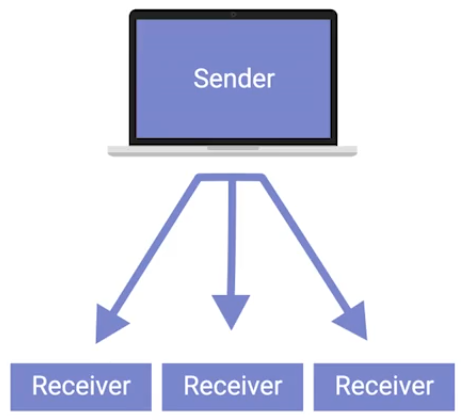 |
Dissecting an Ethernet Frame
Data packet - any single set of binary data being sent across. Data packets in Ethernet level, it is Ethernet frame - highly structured collection of information in specific order.

| Unit | Bytes | Description |
|---|---|---|
| Preamble | 7 | 8 bytes, first 7 bytes act partially as buffer between frames and can be used by the network interfaces to synchronize internal clocks they use to regulate the speed at which they sent data. |
| Start Frame Delimiter (SFD) | 1 | Signals to a receiving device that the preamble is over, and the actual frame contents will now follow. |
| Destination Address | 6 | The hardware address of the intended recipient. |
| Source Address | 6 | Where the frame originated from. MAC Address: 48 bits, or 6 bytes long. |
| Ether-type | 4 | Used to describe the protocol of the contents of the frame. |
| VLAN (Virtual LAN) | 2 | If a VLAN header is present, the Ether-type field follows it. |
| Payload | 46-1,500 | The actual data being transported - 46 to 1,500 bytes long - data contains from Network, Transport, and Application layers. |
| Frame Check Sequence (FCS) | 4 | Checksum value for the entire frame. - Cyclical redundancy check (CRC) - Important concept for data integrity. Checksum number should be same anytime performing against a set of data. - In Ethernet frame, it can ensure if the data transmission is corrupted and needs re-transmissions. |
Module 2 - The Network Layer
IPv4 Addresses
 |
|---|
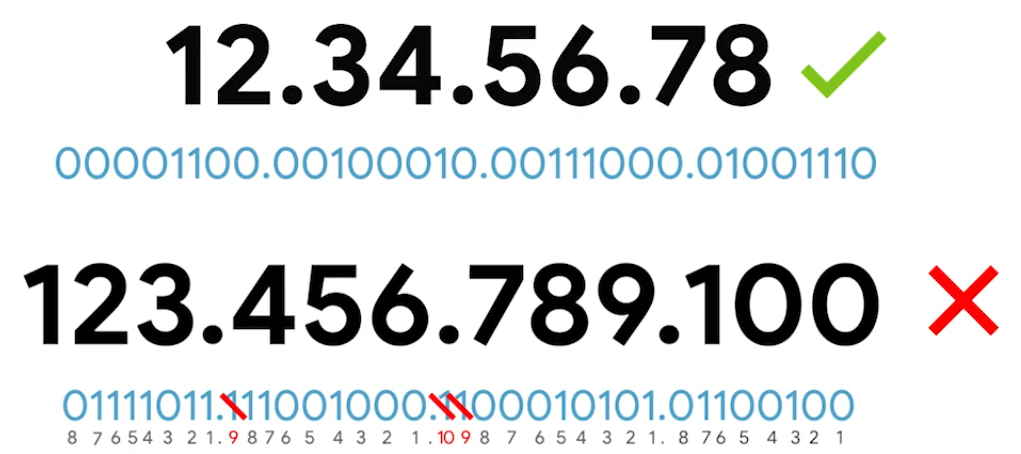
IP address represented in 32-bits long and 4 octets - (normally represented in decimal 0-255) |
IP addresses belong to networks, not to the devices attached to those networks. Same MAC address - but different IP address assigned to it.
- DHCP (Dynamic Host Configuration Protocol) - Dynamic IP address mainly used for clients.
- Static IP address - mostly reserved for servers.
IPv4 Datagram and Encapsulation
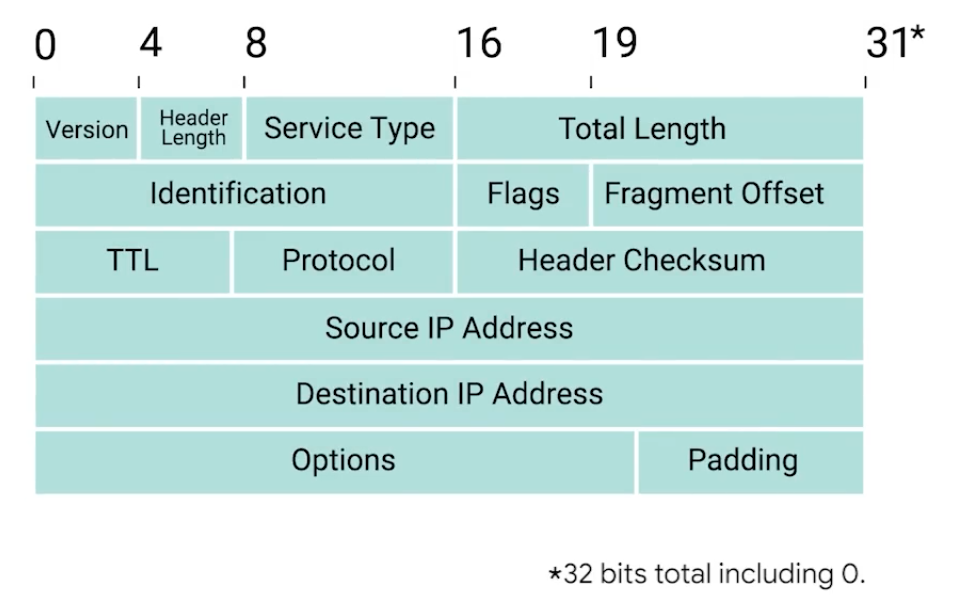
IP Datagram - structured series of fields that are strictly defined.
| Unit | Bits | Description |
|---|---|---|
| Version | 4 | Indicates what version of IP version is being used - common is IPv4 |
| Header Length | 4 | Declares how long the entire header is - almost always 20 bytes in dealing with IPv4 |
| Service Type | 16 | Specify details about quality of service (QoS). Routers can decide which IP datagram maybe more important based on the Service Type. |
| Total length field | 16 | Indicates the total length of the IP datagram. |
| Identification | 16 | Groups messages together. - The IP layer splits data into individual packets when amount of data is larger than a single datagram. 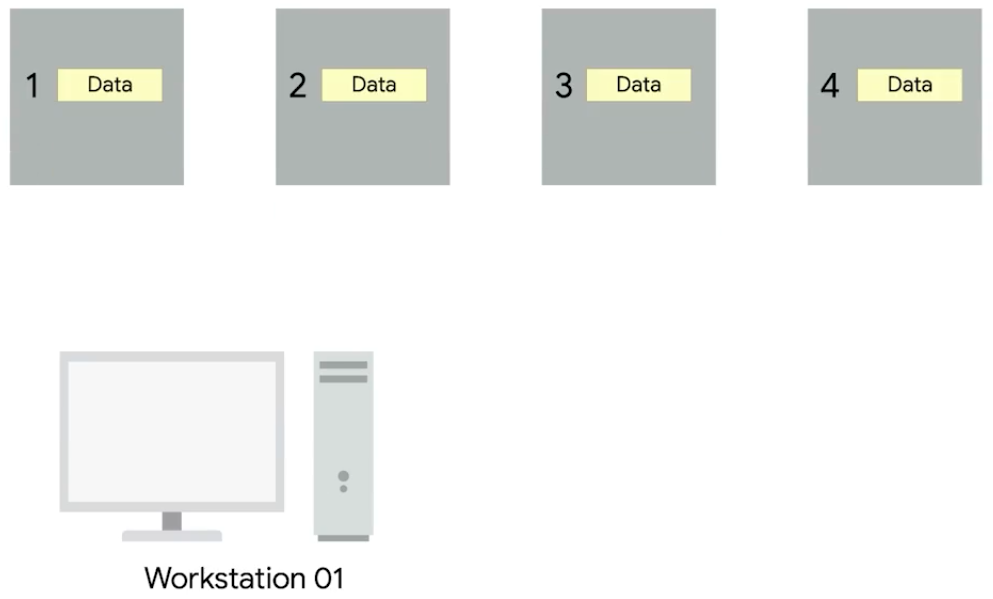 |
| Flags | — | Indicates if a datagram is allowed to be fragmented or has already been fragmented. |
| Fragment Offset | — | Indicates the starting position of the data in a fragment.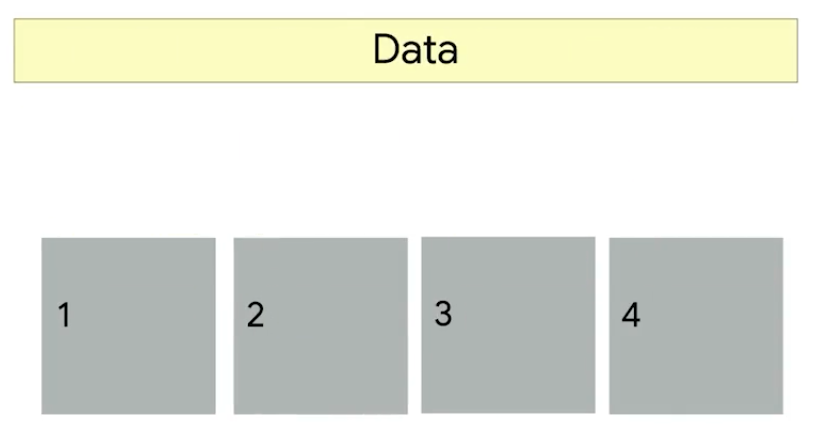 |
| TTL (Time to live) | 8 | Indicates how many routers hops a datagram.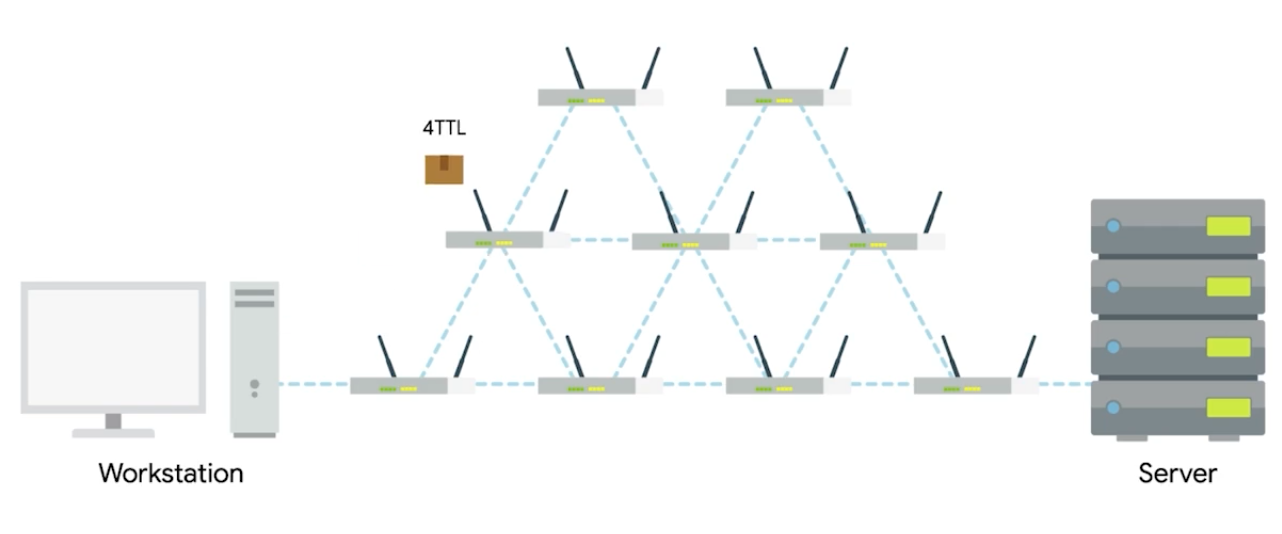 |
| Protocol | 8 | Contains data about what transport layer protocol is being used. (e.g. TCP, UDP) |
| Header Checksum | 13 | Checksum of the contents of the entire IP datagram header. |
| Source IP Address | 32 | Sender of the packet |
| Destination IP Address | 32 | Final or intermediary recipient |
| Options | — | Used to set special characteristics for datagrams - testing purposes. |
| Padding | — | A series of zeros used to ensure the header is the correct total size. |
| The entire concept of datagram is encapsulated as the payload of Ethernet frame. | ||
| ![[Pasted image 20250905175940.png | 400]] |
IPv4 Address Classes
IP Addresses - network ID and host ID.
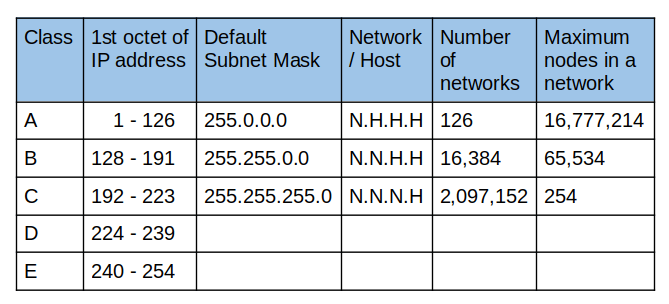
Address Resolution Protocol (ARP)
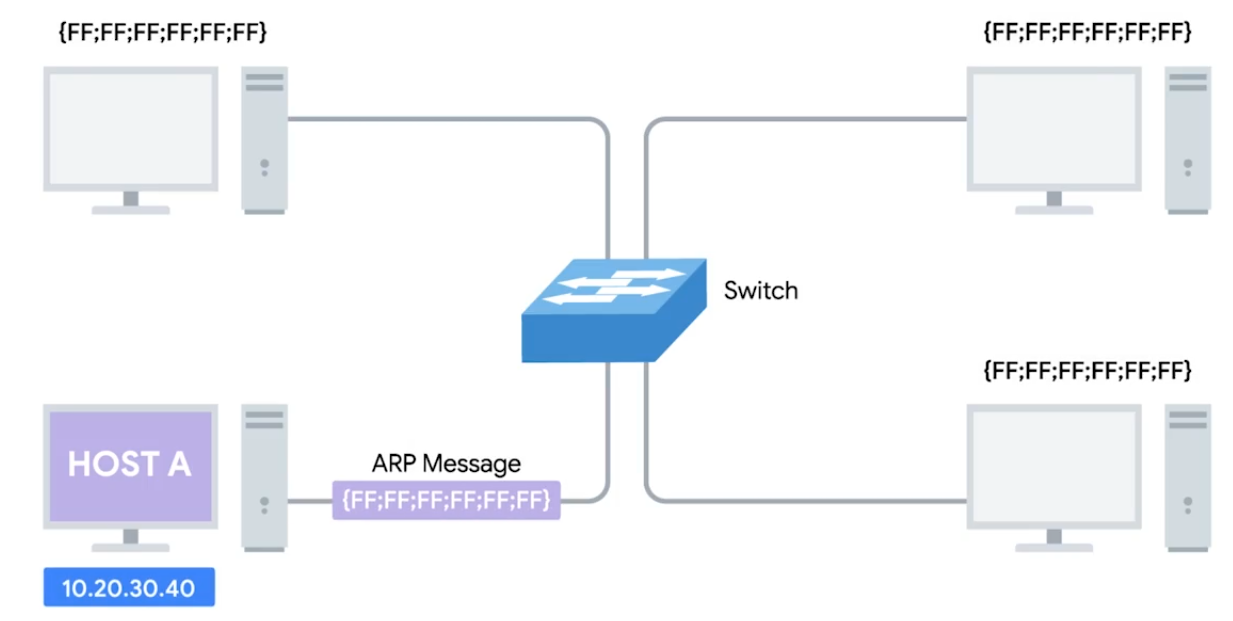
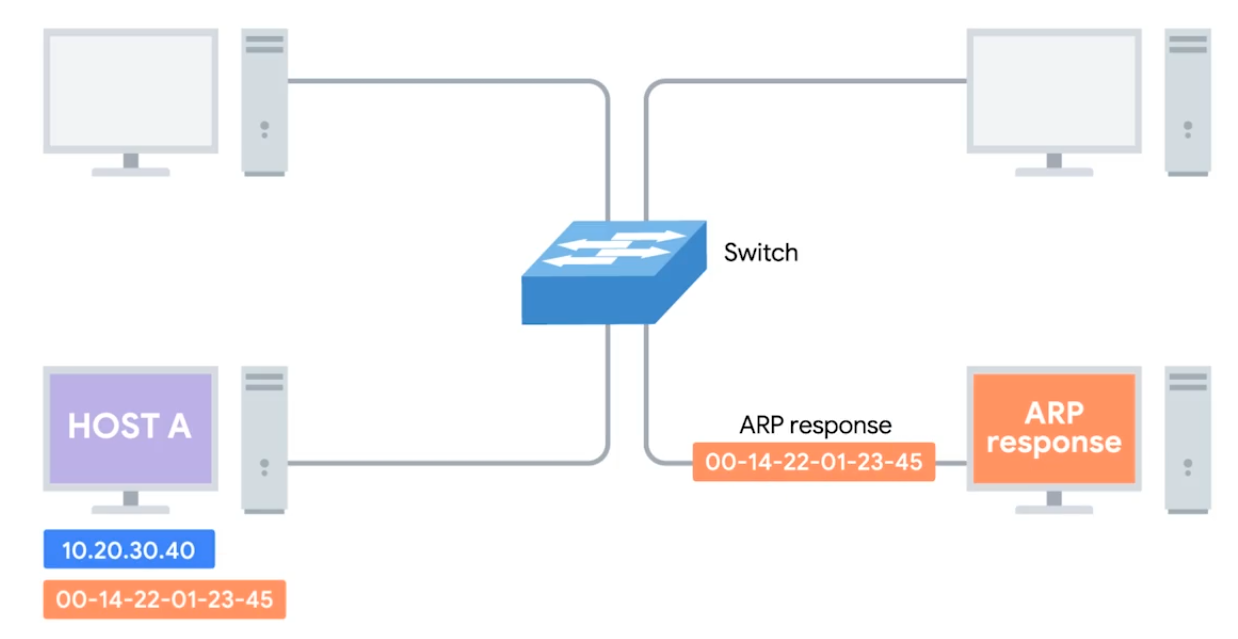
ARP - A protocol used to discover the hardware address of a node with a certain IP address. ARP table - A list of IP addresses and the MAC addresses associated with them.
ARP table entries generally expire after a short amount of time to ensure changes int he network are accounted for.
 |  |
|---|
Subnetting
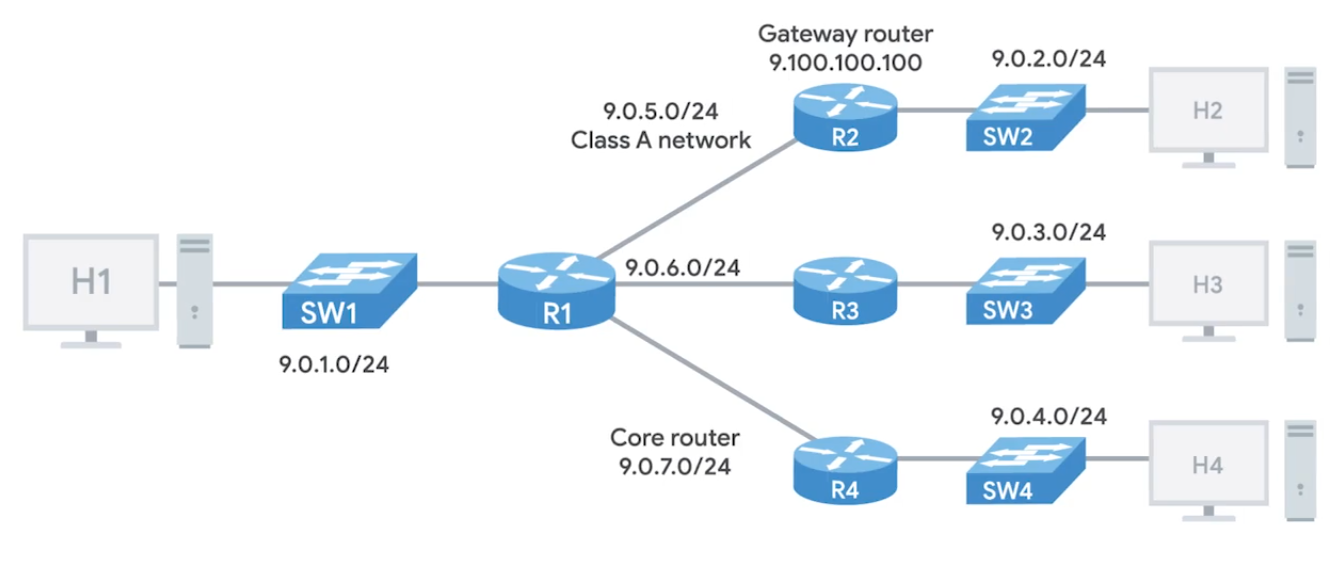
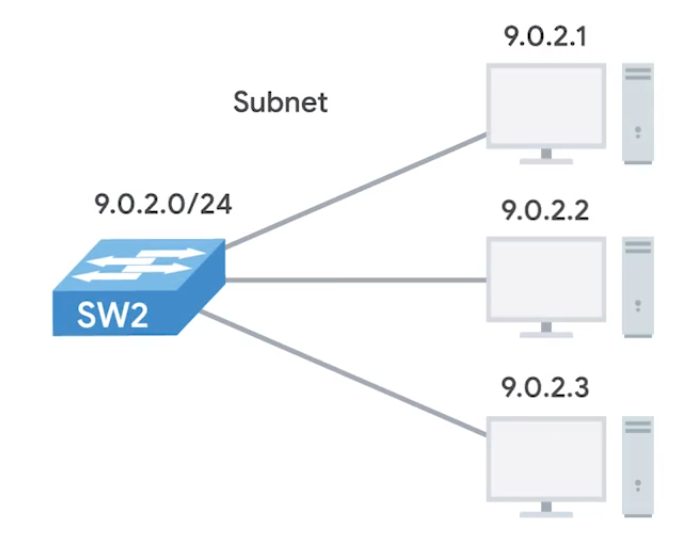
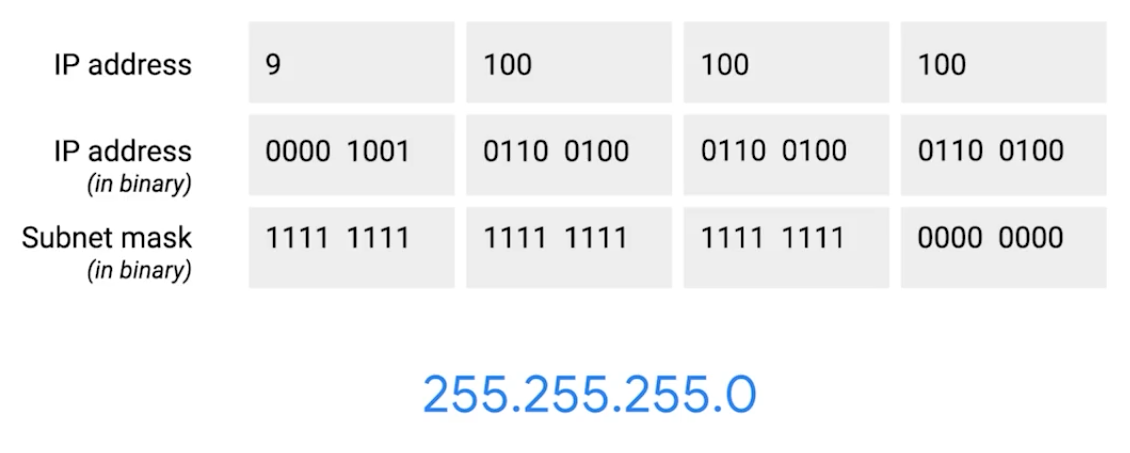
Dividing a large network into smaller, more manageable networks.
Incorrect subnetting setups are common problem - IT support might run into.
 |  |
|---|
Subnet Masks
 |
|---|
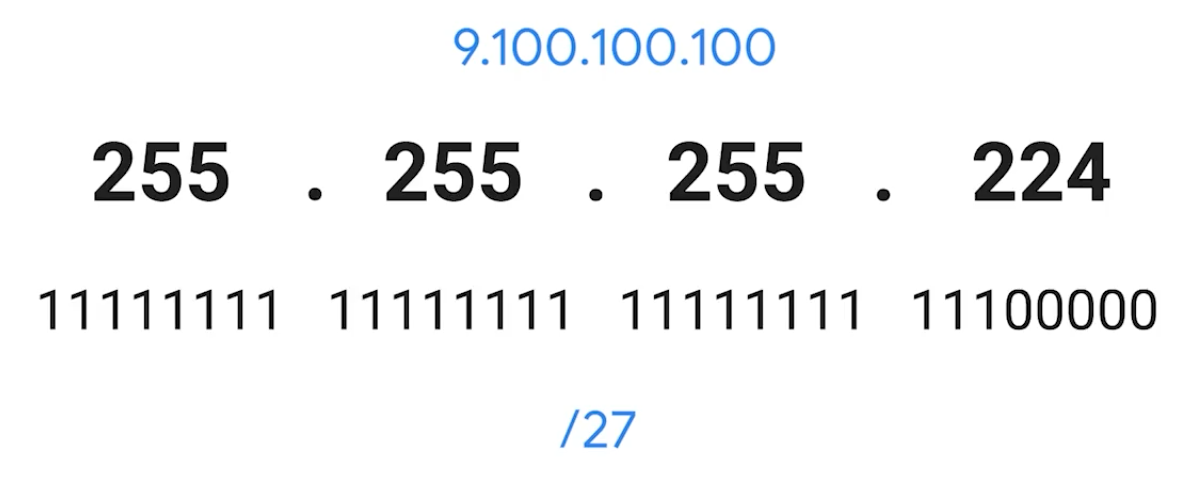 |
CIDR (Class-Inter Domain Routing)
A method for allocating IP addresses and routing internet traffics. Demarcation point - Describes where one network or system ends and another one begins.
Basic Routing Concepts
 |
|---|
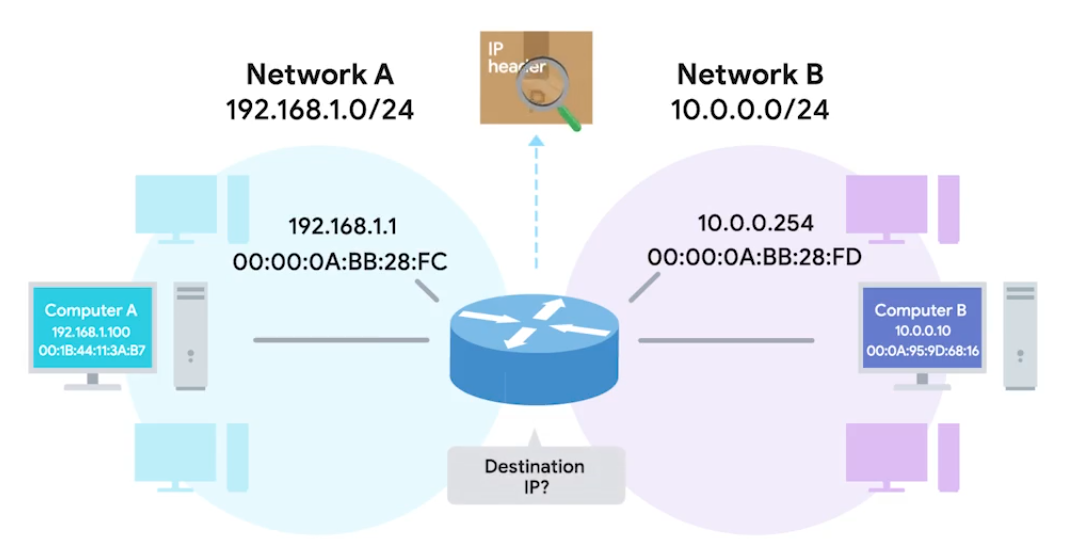 |
Routing Tables
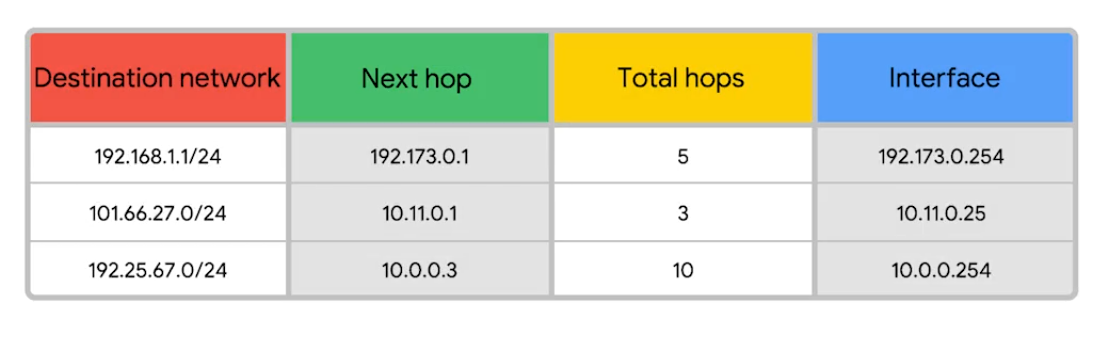
Destination Network - Contain a row for each network that the routers knows about. Next Hop - The IP address of the next router that should receive data intended for the destination networking quesiton. Total hops - There will be lots of paths at all points, it can change overtime, it finds the shortest path and tracking. Interface - Which of the interface to forward.
Interior Gateway Protocols
Routing protocols - special protocols the routers use to speak to each other and share information.
- Interior gateway protocols - Link state routing protocols (algorithm) and distance-vector protocols
- Exterior gateway protocols - Used for exchange of information between independant autonomous systems.
Exterior Gateways, Autonomous Systems, and the IANA
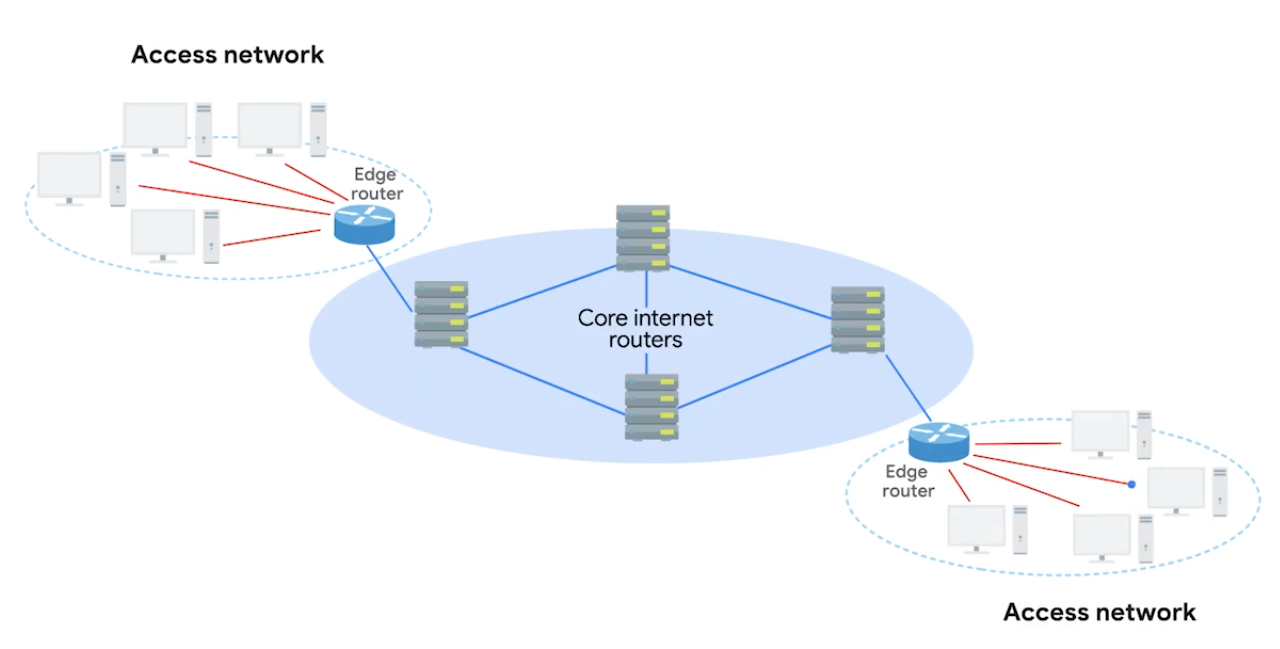
IANA - Internet Assigned Numbers Authority, non-profit organization that helps manage things like IP address allocation. Alongside, also responsible for ASN. ASN - Autonomous system number, numbers assigned to individual autonomous systems.
Non-Routable Address Space
The ranges of Is set aside for use by anyone that cannot be routed to. Every devices connected to the network doesn’t have to communicate
RCH 1918 - 10.0.0.0/8, 172.16.0.0/12, /192.168.0.0/16 free for anyone to use in internal networks (AS).
Module 3 - The Transport and Application Layers
The Transport Layer
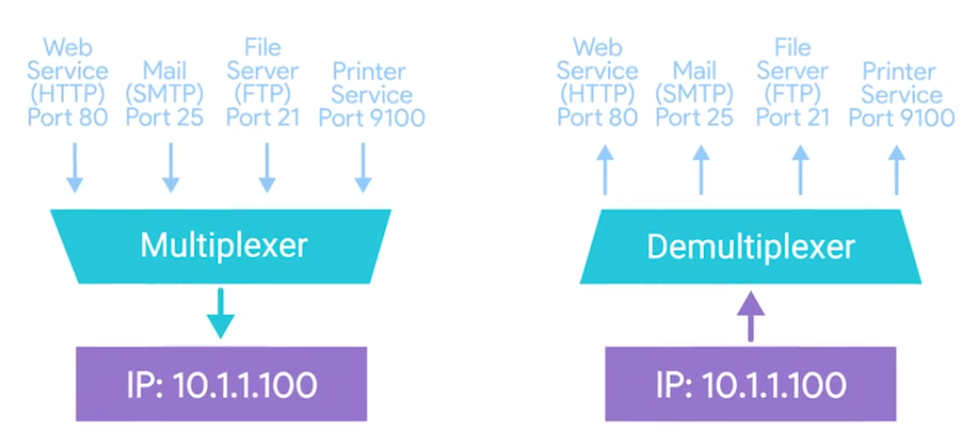
Multiplexing - Ability to direct traffic toward many different receiving services. Demultiplexing - Taking traffic and delivering it to the proper receiving service.
Through ports, ports (16 bits) are used to direct traffic to specific services - running on a networked computers.
Dissection of a TCP Segment
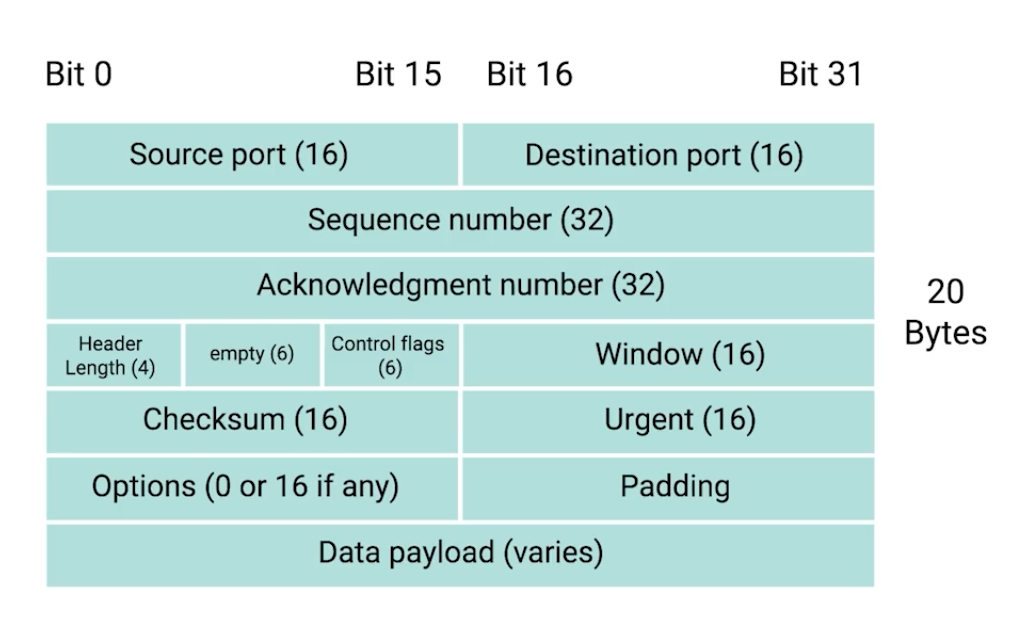
- Sequence number - used to reassemble the message at the receiving end of the segments that are received out of order.
- Acknowledgement number - an acknowledgement for the previous bytes being received successfully.
- Data offset field - communicates how long the TCP header for this segment is.
- Window - window size of the sending TCP in bytes.
- Checksum - checksum for error control. It is mandatory in TCP as opposed to UDP.
- Urgent - used to point to data that is urgently required that needs to reach the receiving process at the earliest.
TCP Control Flags and the Three-way Handshake
Control Flags -
- URG (urgent)
- ACK (acknowledged)
- PSH (push): Instructs the receiving network stack to immediately deliver the data to the application layer without waiting for the buffer to fill up with more data.
- RST (reset): Reset the connection
- SYN (synchronize): Synchronize sequence numbers - used when first establishing and make sure the receiving end knows to examine the sequence number field.
- FIN (finish): connection can be closed and terminate.
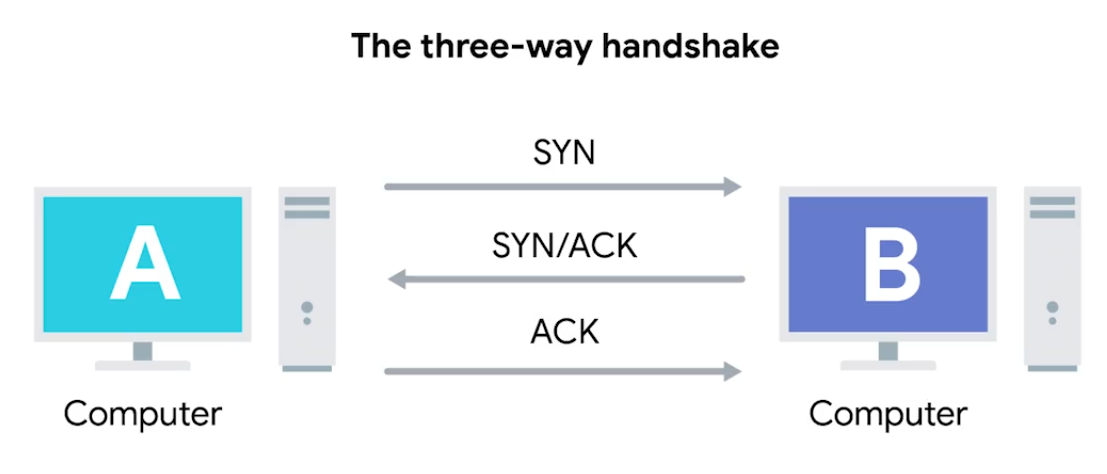 Once the three-way handshake is complete, the TCP connection is established:
A sends a TCP segment to B with a
SYNflag sent. A: “Let’s establish a connection and look at mysequence numberfield, so we know where this conversation starts.”B then responds with a TCP segment, where both
SYNandACKflags are set. B: “Sure, let’s establish a connection and I acknowledge yoursequence number.”Then, A responds again with just the
ACKflag set. A: “I acknowledge your acknowledgement. Let’s start sending data.”
Since both sides have now send SYN/ACK pairs to each other, a TCP connection in this state is operation in full duplex.
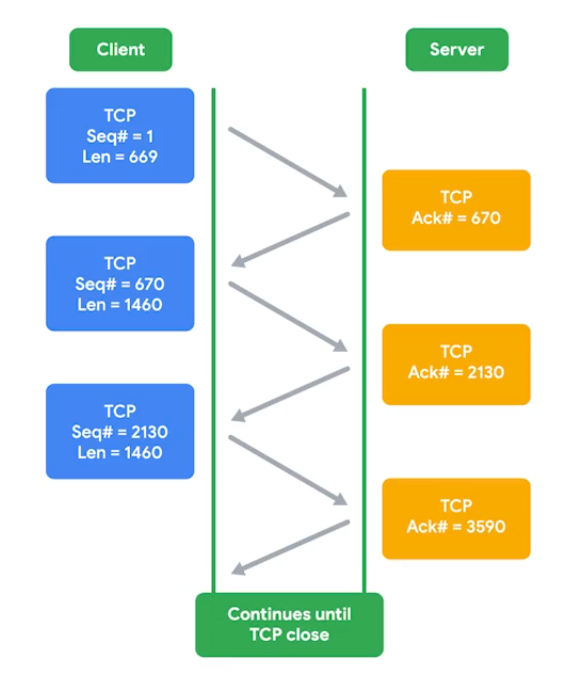
Handshake - ensure that they’re speaking the same protocol, and able to understand each other.
TCP Socket States
Socket - The instantiation (implementation defined somewhere) of an end-point in a potential TCP connection.
| State | Description |
|---|---|
| LISTEN | A TCP socket is ready and listening for incoming connections. Seen on server-sides only. |
| SYN_SENT | A synchronization request has been sent, but the connection hasn’t been established yet. Seen on client-sides only. |
| SYN_RECEIVED | A socket previously in a LISTEN state has received a synchronization request and sent a SYN/ACK back. Server-side only. |
| ESTABLISHED | The TCP connection is in working order and both sides are free to send each other data. Both side: Client and Server side. |
| FIN_WAIT | A FIN has been sent, but the corresponding ACK from the other end hasn’t been received yet. |
| CLOSE_WAIT | The connection has been closed at the TCP layer, but the the application that opened the socket hasn’t released its hold on the socket yet. |
| CLOSED | The connection has been fully terminated and that no further communication is possible. |
| State names can be vary on on OS to OS. |
Connection-oriented and Connectionless Protocols
Connection-oriented protocol: Establishes a connection, and uses this to ensure that all data has been properly transmitted. In transport layer, every data transimitted is acknowledged. Connectionless protocol: UDP doesn’t rely on the connection.
System Ports VS Ephemeral Ports
- Network Services listens to specific ports for incoming data requests.
- Ports are used in Transport Layer - establish a network connection & deliver data - TCP “segment” used.
- Once a TCP segment tells a service to listen for requests through a port, that listening port becomes a socket.
Three categories of ports
Ports represented by a single 16-bit (65535 different port IDs)
- System Ports: ports
1through1023. Reserved for common applications - FTP (port21) and Telnet over TLS/SSL (port992).
Modern OSs do not use system ports for outbound traffic.
- User Ports: ports
1024through49151. Vendors register user ports for specific server applications - by IANA but not all. - Ephemeral Ports (Dynamic or Private Ports): ports
49152through65535. Used as temporary ports for private transfers - outbound, only clients uses.
How TCP is used to ensure data integrity
TCP segment specifices ports connected for network data transfer - other info about data being transferred (along requested data). The TCP protocol sends acks between service-client to show that sent data received. Then uses checksum verification.
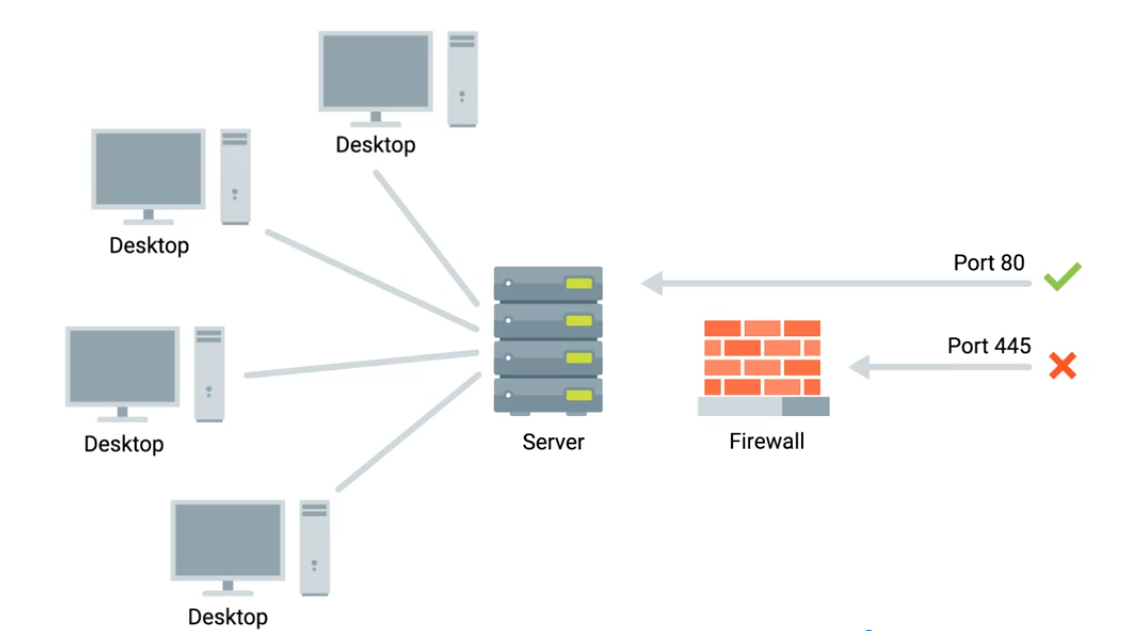
Ports security
Malicious actors might also use port scanning to search for open and unsecured ports or to find weak points in your network security. Use a firewall and only open sockets as needed.
Firewalls
Blocks traffic that meets certian criteria - independant network devices.
The Application Layer and the OSI Model
- Has many standardized Protocols to work with - all need to be in same protocol in order to communicate. OSI Model is often used in academic settings and various networking certification organizations. Session layer - facilitate the communication between actual applications and the transport layer. Presentation layer - responsible for making sure that the unencapsulated application layer data is able to be understood by the application in question - encryption and compression.
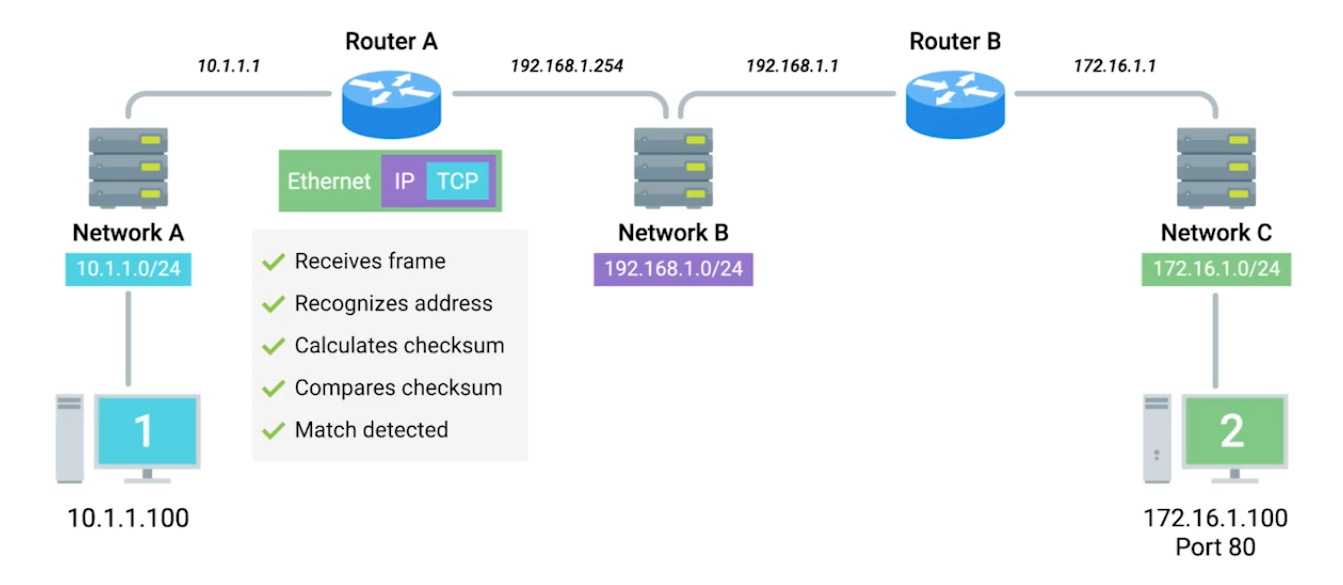
All the Layers Working in Unison
Module 4 - Networking Services
DNS - A global and highly distributed network service that resolves strings of letters into IP addresses for you.
Domain Name - The term we use for something that can be resolved by DNS.
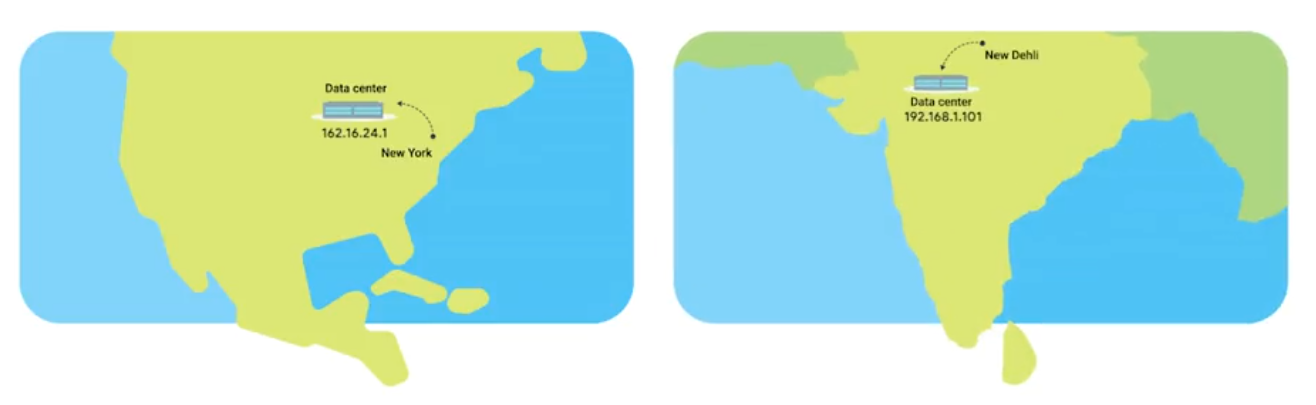
The Many Steps of Name Resolution
- IP address
- Subnet mask
- Gateway for a host
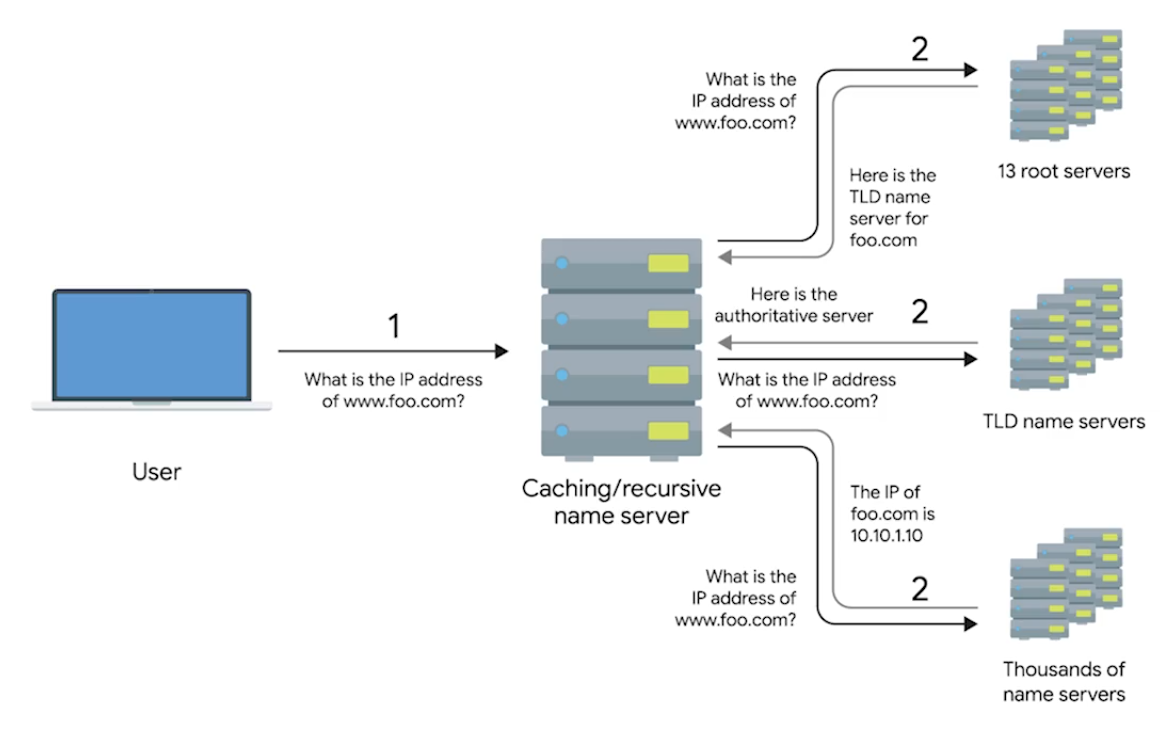
- A name server configured (DNS server) Anycast - route traffic to different destinations depending on the factors (location, congestions, or link health). Top-Level Domain (TLD) - represents the top of the hierarchical DNS name resolution system (facebook.com, to point a look up server, the organization itself that runs the site).
Name Resolution
- Caching and Recursive name servers - to store known doamin name lookups for a certain amount of time. Recursive name servers perfrom full DNS resolution requests.
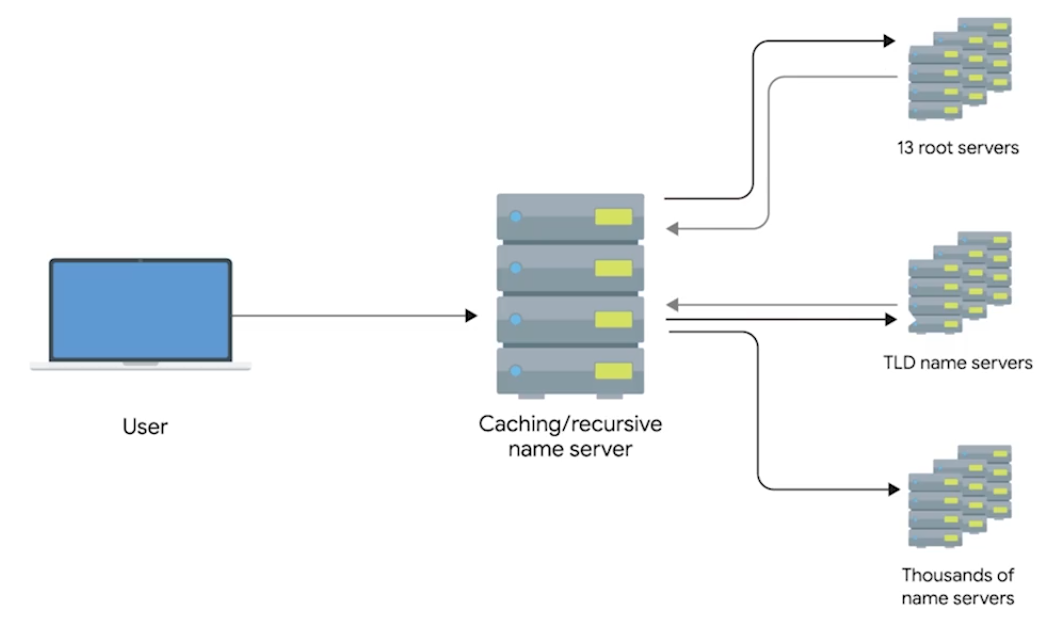
DNS and UDP
DNS using UDP - grand total of 8 packets, while TCP is 44 packets at minimum.
Resource Record Types
A Record - Used to point a certain domain name at a certain IPv4 IP address. Uses Round Robin to balance multiple traffics.
-
One computer lookup microsoft.com - 10.1.1.1, 10.1.1.2, 10.1.1.3, 10.1.1.4. On next one computer, but in changed order - 10.1.1.2, 10.1.1.3, 10.1.1.4, 10.1.1.1.
-
Quad A Record - Similar to A Record, but returns an IPv6.
-
CNAME Record (Canonical Name) - Used to redirect traffic from one donmain name to another.
By setting up a CNAME that points microsoft.com at
www.microsoft.com, you’d only have to change the A recordwww.microsoft.com.
- Mail Exchange (MX) - This resource record is used in order to deliver email to the correct server.
- Service Record (SRV) - Used to define the location of various specific services. Can be defined to return the specifics of many difference services.
- Text Record (TXT) - Originally intended to be used only for associating some descriptive text with a domain name for human consumption.
Anatomy of a Domain Name
www.google.com - .com is a the last part of domain name - TLD (Top Level Domain)
- ICANN (The Internet Corporation for Assigned Names and Numbers) - sister organization of IANA - helping to control both the global IP spaces along with the global DNS system.
- Domains - demarcate where control moves from a TLD name server to an authoritative name server.
www.google.com - google wwwportion is known as sub-domain Fully Qualified Domain Name (FQDN) - combine all of these parts together. Complete FQDN is limited to total 255 characters.
DNS Zones
Allowing for easier control over multiple levels of a domain.
 Each office has around 200 people with their own uniquely named desktops, this would be 600 A Records to keep track of in a single zone.
Instead, split up into their own zone - each with their own DNS zone.
Each office has around 200 people with their own uniquely named desktops, this would be 600 A Records to keep track of in a single zone.
Instead, split up into their own zone - each with their own DNS zone.
A total of 4 Authoritative name servers will be required - one for
largecompany.comand one for each of the subdomains.
- Zone Files - Simple configuration files that declare all resource records for a particular zone.
- Start of Authority (SOA) - Declares the zone and the name of the name server that is authoritative for it.
- NS Records (usually find along with SOA) - Indicate other name servers that might also be responsible for this zone.
- Reverse Lookup Zone Files - These let DNS resolvers ask for an IP and get the FQDN associated with it returned.
- Pointer Record (PTR) - Resolves an IP to a name.
Overview of DHCP
Every clients in modern TCP/IP-based networks needs:
- IP Address
- Subnet mask
- Gateway
- Name Server
- DHCP (Dynamic Host Configuartion Protocol) - An application layer, automates the configuration process of hosts on a network.
- Dynamic Allocation - A range of IP addresses is set aside for client devices and one these IPs is issued to these devices when they request one.
- Assignment Allocation - A range of IP addresses is set aside for assignment purposes.
- Fixed Allocation - Requires a manually specified list of MAC address and their corresponding IPs.
- Network Time Protocol - Used to keep all computers on a network synchronized in time.
DHCP in Action
Application layer protocol - relies on Transport, Network, Data link, and Physical.
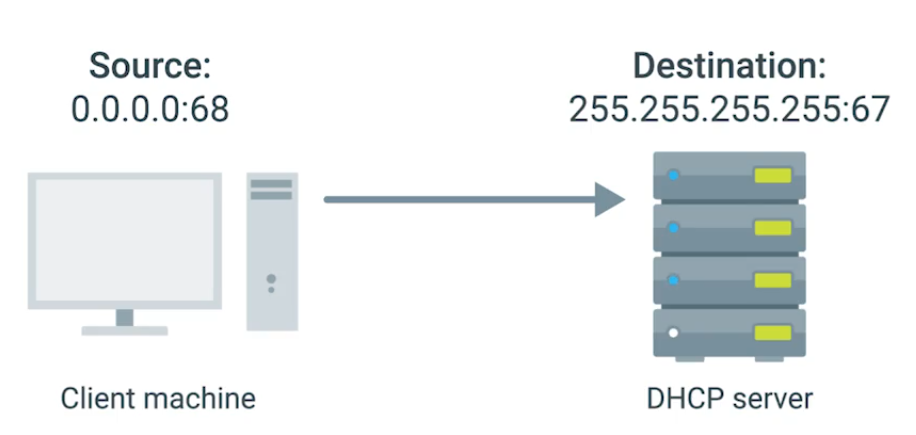
- DHCP Discovery - the process by which a client configured to use DHCP attempts to get network configuration information. Has 4 steps.
1. DHCP Server Discovery
DHCP listens on UDP port 67 - DHCP discovery message are always sent from UDP port 68.
- This broadcast message is delivered to every node in LAN.
- If DHCP is present, the request message will be recieved.
2. DHCP Offer
Since DHCP offer is also broadcast, it reach every machine on the network. The original client would recognize that was intented for itself - by inclusion of MAC address in broadcast message.
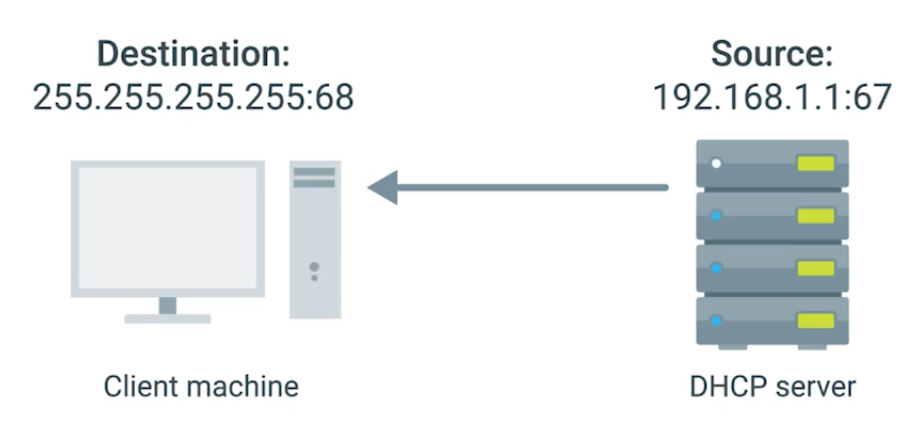
3. DHCP Request
“I’d like to have an IP that you offered to me.” IP hasn’t assigned yet, and again sent. DHCP server receives the DHCP request message - then DHCP ACK.
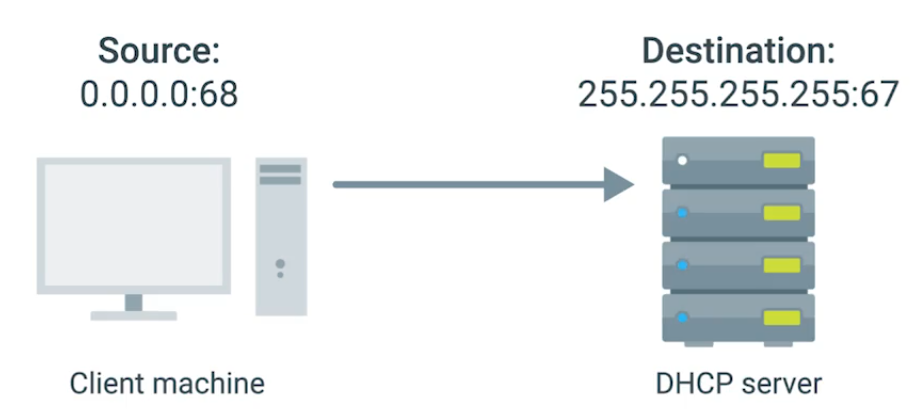
4. DHCP Acknowledgement
Client use the configuration information and set up its own network layer configuration.
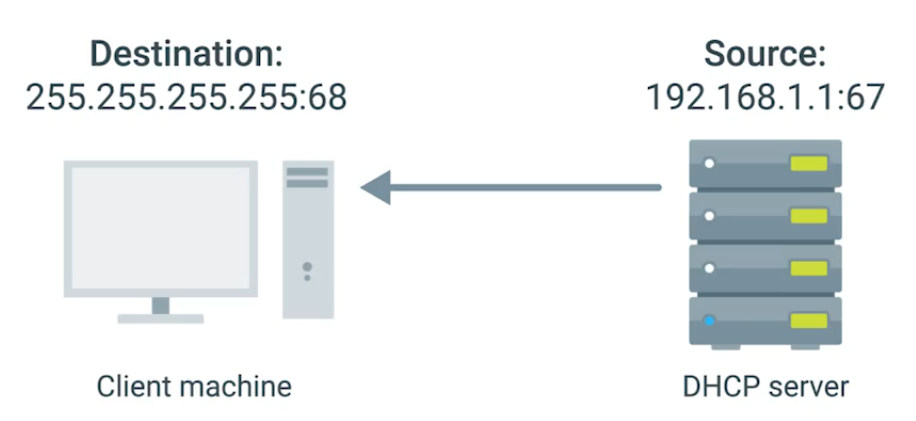
DHCP Lease - Certain amount of time availabe to client before it expires. Which then you can have another IP pool by DHCP.
Basic of NAT
NAT - technology allows a gateway (router or firewall), to rewrite the source IP of an out going IP datagram while retaining the original IP in order to rewrite it into the response.
IP Masquerading - Hides actual IP when it gets to router sending to Computer 2 in network B, knowing it only comes from router, actually computer 1 in network A sends it.
NAT and the Transport Layer
Port Preservation - A technique where the source port chosen by a client is the same port used by the router.
Outbound connections choose a source port at random from Ephemeral ports (49,152 through 65,535).
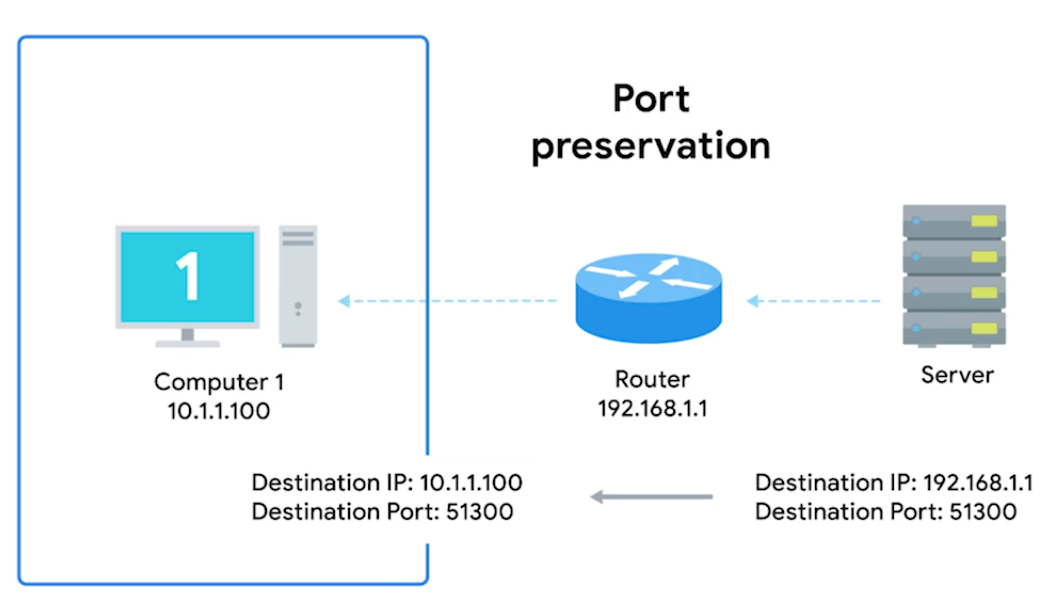
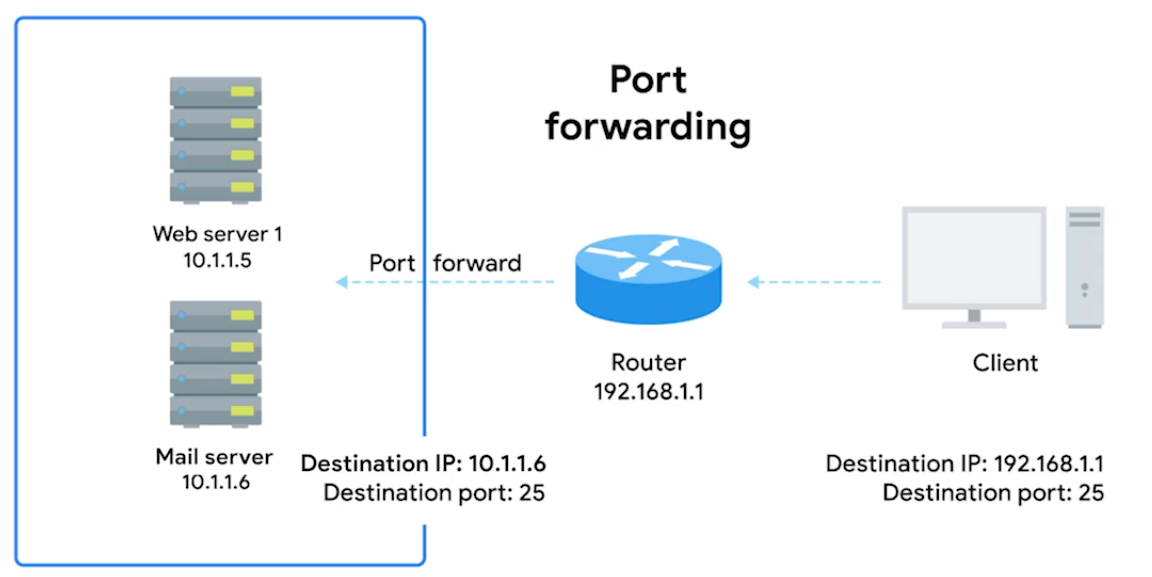
Port Forwarding (Transport layer) - A technique where specific destination ports can be configured to always be delivered to specific nodes. This allows for complete IP Masquerading.
IPv4 Exhaustion
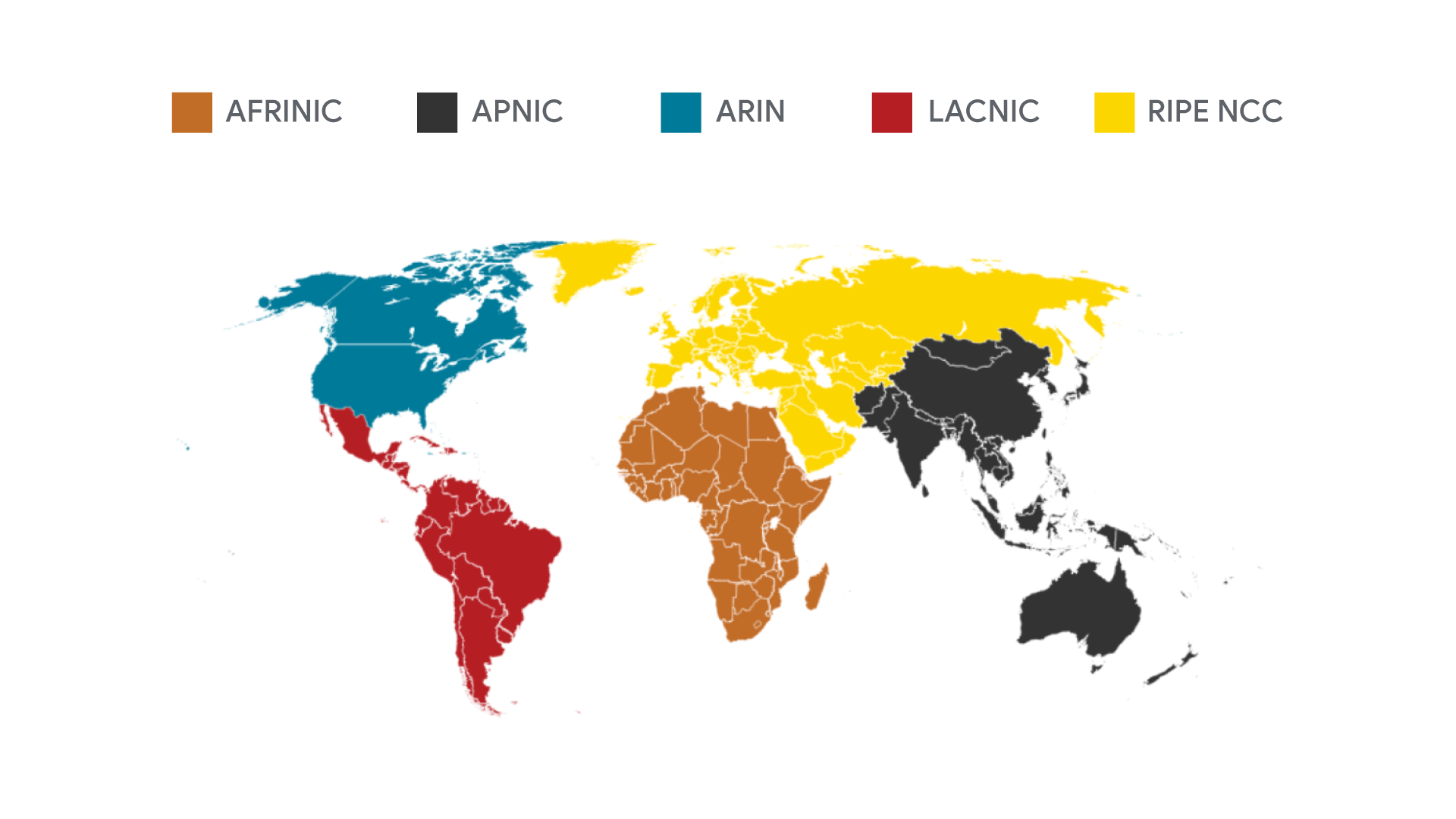
IANA assigns IP address blocks to the five Regional Internet Registries (RIRs).
- AFRINIC- Africa
- ARIN - USA, Canada, and parts of the Caribbean
- APNIC - Most of asia, australia, New Zealand, and Pacific Island nations
- LACNIC - Central America, South America, and the remaining parts of the Caribbean not covered by ARIN.
- RIPE - Europe, Russia, Middle East, and portions of Central Asia.
Your computer gets its IP address directly from an RIR, not the IANA.
Virtual Private Networks
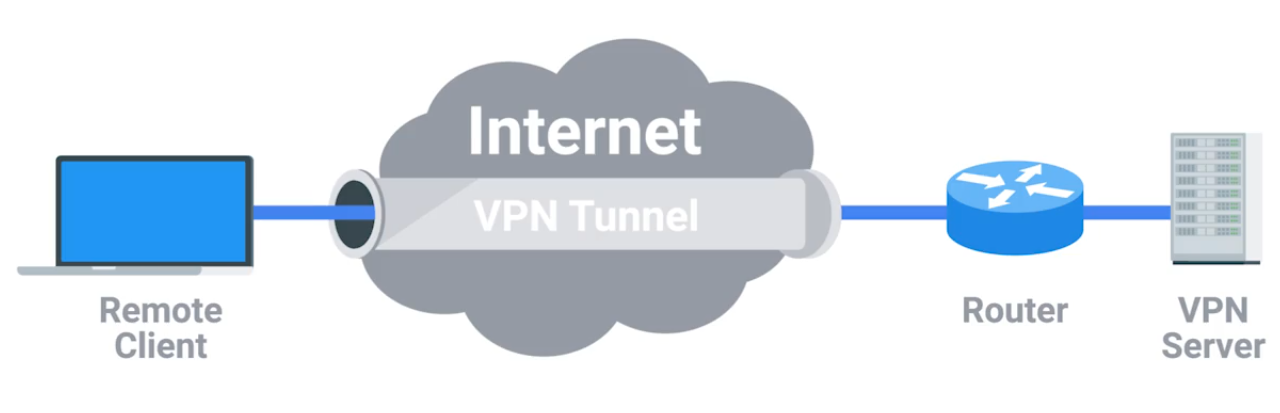
The Tunnelling Procotols. Works by using the payload session at the Transport layer.
Proxy Services
A server that acts on behalf of a client in order to access another service.
Reverse Proxy - A service that might appear to be a single server to external clients, but actually represents many servers living behind it. (Like load balancing)
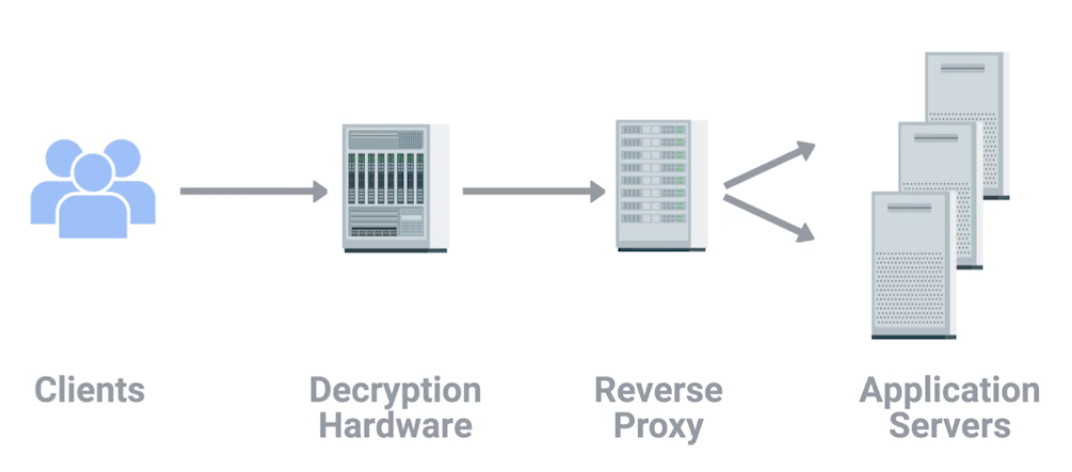
Proxies are any server that acts a intermediary between a client and another server.
Module 5 - Connecting to the Internet
Dial-up and Modems
A dial-up connection uses POTS (Plain Old Telephone Service - analog) for data transfer, and gets its name because the connection is established by actually dialing a phone number.
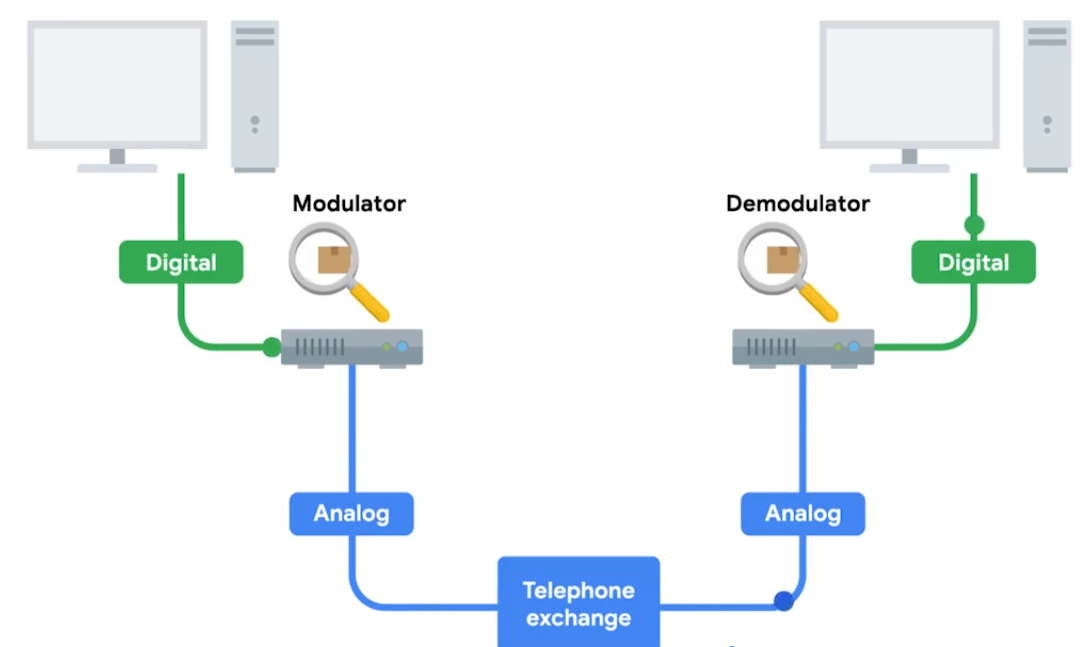
Baud Rate - A measurement of how many bits can be passed across a phone line in a second. Modems take data - interpret and turn into audible wavelengths that can be transmitted over POTS.
What is Broadband
Any connectivity tech that isn’t dial-up internet. T-Carrier Tech - Originally invented by AT&T in order to transmit multiple phone calls over a single link.
24 Telephone channels - 64 Kbps - total bandwidth of 1.544 Mbps - for both voice/data transmission.
T-Carrier Tech
Invented by AT&T. T1 - Transmission System 1
Digital Subscriber Lines (DSL)
For more faster internet - voice-to-voice call speeds
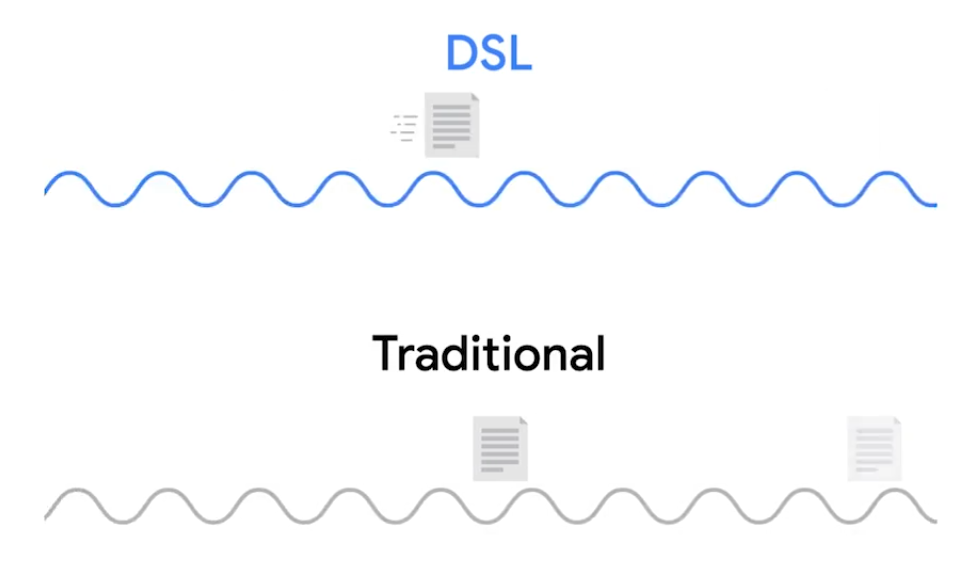
DSL the two common types were
- ADSL - Asymmetric Digital Subscriber Line, different speed for outbound and incoming data - faster download speed and slower upload speed.
- SDSL - Symmetric Digital Subscriber Line, same upload and download speed, upper cap of 1.544 Mb/s (same as T1 line). Further developments - HDSL -High-bit-rate Digital Subscriber Line.
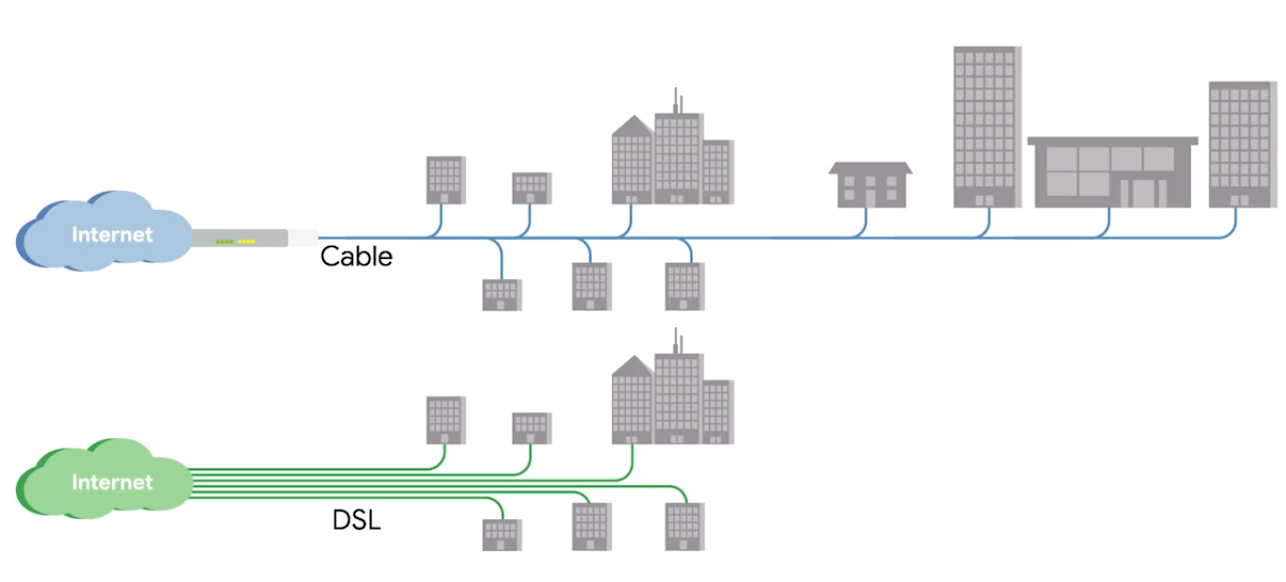
Cable Broadband
Cable Modem - The device that sits at the edge of a consumer’s network and connects it to the cable modem termination system, or CMTS.
Fiber Connections
-
FTTX - Fiber To The X, where X can be one of many things.
-
FTTN - Fiber To The Neighborhood, data delivery to a single physical cabinet.
-
FTTB - Fiber To The Building/Basement/Business, data delivery to an individual building.
-
FTTH - Fiber To The Home, data deliver to each individual residence in a neighborhood or apartment building.
-
(FTTH and FTTB may also refer to as) FTTP - Fiber To The Premises, instead of modems, the demarcation point for fiber tech is known as ONT.
Optical Network Terminator (ONT) - Converts data from protocols the fiber network can understand, to those that more traditional, twisted-pair copper networks can understand.
ONT serves as the demarcation point between the wide-area network (WAN) provided by the internet service provider (ISP) and the local area network (LAN) at the subscriber’s premises.
BroadBand Protocols
Broadband communications require a set of instructions, rules, and communication to various network layer protocols to support operation.
Point to Point Protocol (PPP)
A byte-oriented protocol - for high-traffic transmissions. At Data Link layer, between two devices on same network. Designed to link devices - endpoints do not need be same vender.
Configuring PPP
- Multilink connection provides a method for spreading traffic across multiple distinct PPP connections.
- Compression increase throughput by reducing the amount of data in the frame.
- Authentication occurs when connected devices exchange authentication messages using one of two methods:
- Passoword Authentication Protocol (PAP) - hard to obtain plaintext from if passwords are compromised.
- Challenge Handshake Authentication Protocol (CHAP) - three-way handshake authentication periodically confirms the identity of the clients.
- Error Detection - Frame Check Sequence (FCS) and looped link detection.
- Frame Check Sequence (FCS) - number included in the frame calculated over the Address, Control, Protocol, Information, and Padding fields used to determine if been data loss during transmission.
- Looped Link Detection in PPP detects looped links using magic numbers - A magic number is generated randomly at each end of the connection, when looped message is received, the device checks the magic number against its own. If the line is looped, the number will match the sender’s magic number, and the frame is discarded.
Sub-Protocols for PPP
Two sub-protocols occur on Network Layer when the network decides what physical path the information will take - set for the endpoints.
- Network Control Protocol (NCP) used to negotiate optional configuration parameters and facilities for the Network Layer. There’s NCP for each higher layer protocol used by the PPP.
- Link Control Protocol (LCP) initiates and terminates connections automatically for hosts - configures the interfaces at each end like magic numbers and selecting for optional authentication.
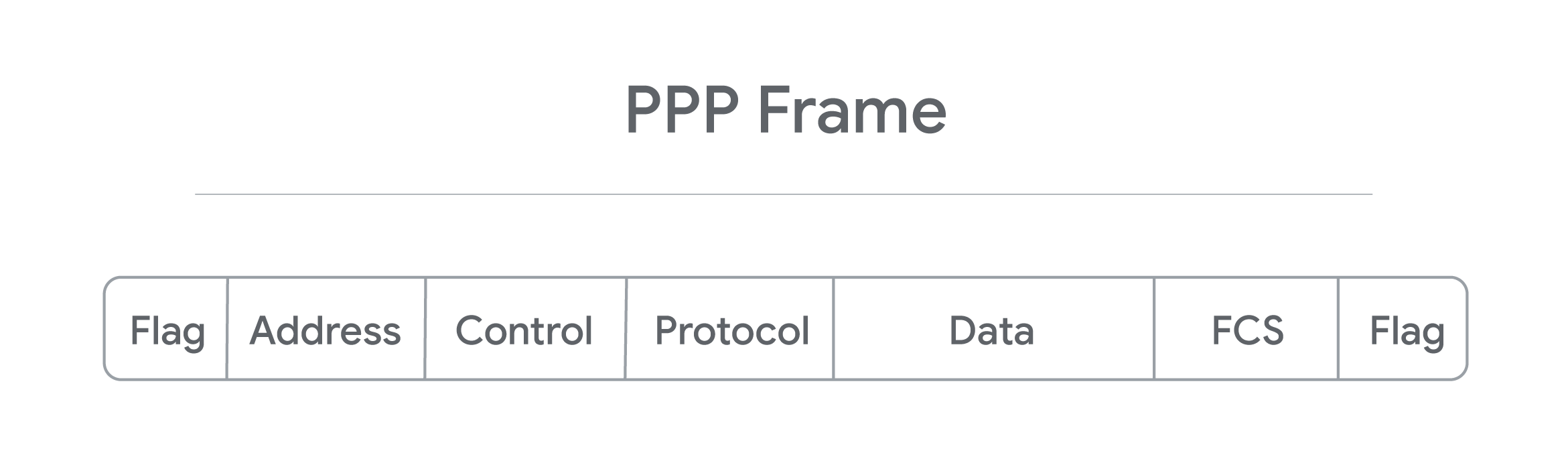
- Flag: a single byte and lets the receiver know beginning of the frame. Depending on encapsulation - may or may not be a start or end flag.
- Address: a single byte, contains broadcast address.
- Control: a single byte required for various purposes, also allows a connectionless data link.
- Protocol: one to three bytes - identify the network protocol of datagram.
- Data: info you need to transmit stored and has a limit of 1,500 bytes/frame.
- FCS: 2 or 4 bytes used to verify data is intact upon receipt at endpoint.
Encapsulation
Prcoess which each layer takes data from previous layer and adds headers and trailers for the next layer to interpret.
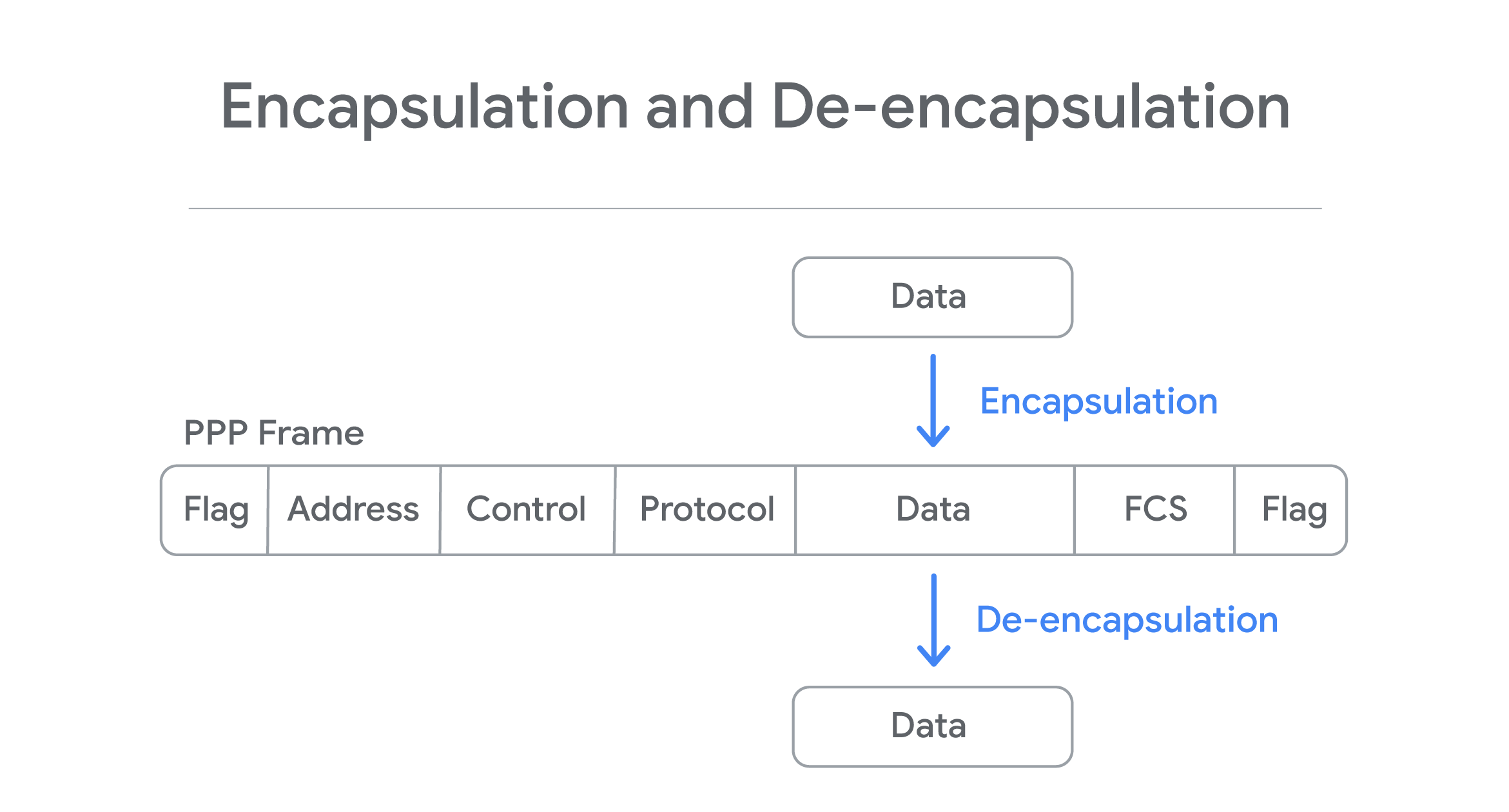
Process is reversed in other endpoint - De-encapsulation.
Point to Point Protocol over Ethernet (PPPoE)
A way of encapsulating PPP frames inside an ethernet frame. PPPoE is solution for tunneling packets over DSL connection service provider’s IP network and from there to the rest of the internet. Provides (like PPP) authentication, encryption, and compression, though primarily uses PAP.
- Common use case is PPPoE using DSL services - PPPoE modem-router connets to DSL service or when a PPPoE DSl modem is connected to a PPPoE-only router using Ethernet cable.
- PPP is strictly point-to-point, so frames can only go to intended destination. PPPoE requires ethernet connections step - multi-access enabled (every node connects to another) - Discovery Stage - establishes a session ID to identify the hardware address. Ensures data gets routed to correct place.
PPP encapsulates data, so any PPP configured devices can communicate without issue. PPPoE is an extra layer of encapsulation for standard PPP frames, to enable data to be sent over ethernet connections.
Wide Area Network Technologies (WAN)
You’re as a sole IT support, you setup a router and configure it to perform NAT. Connect DNS and DHCP server to make network configuration easier. You sign a contract with a ISP (delivers link to internet). You configure VPN server accessiable via port forwarding. Can have employees to connect the office from anywhere.
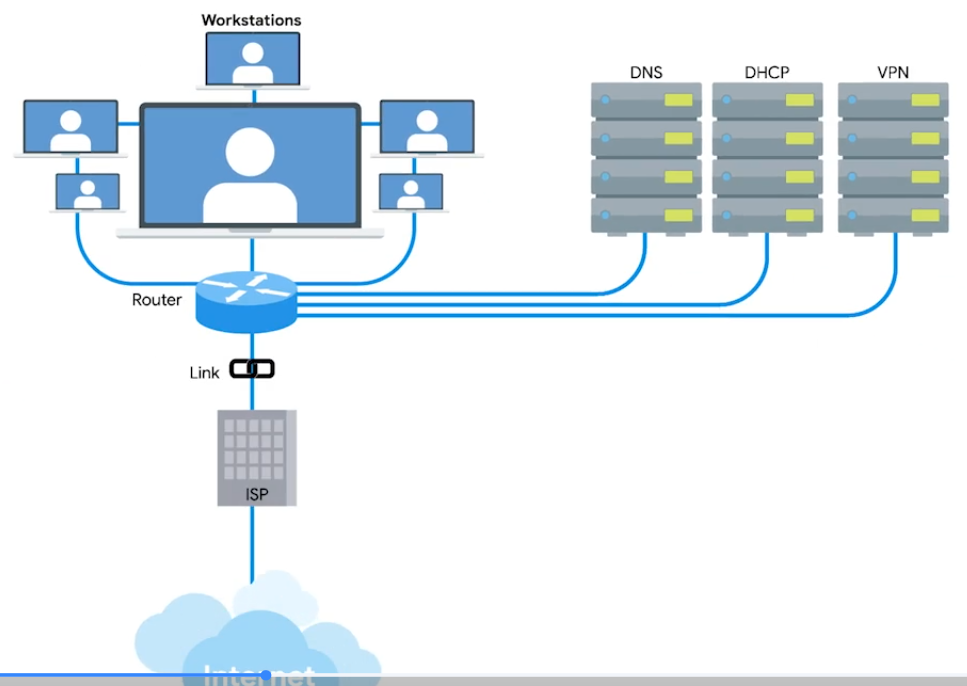
Your CEO decides new office open - with WAN
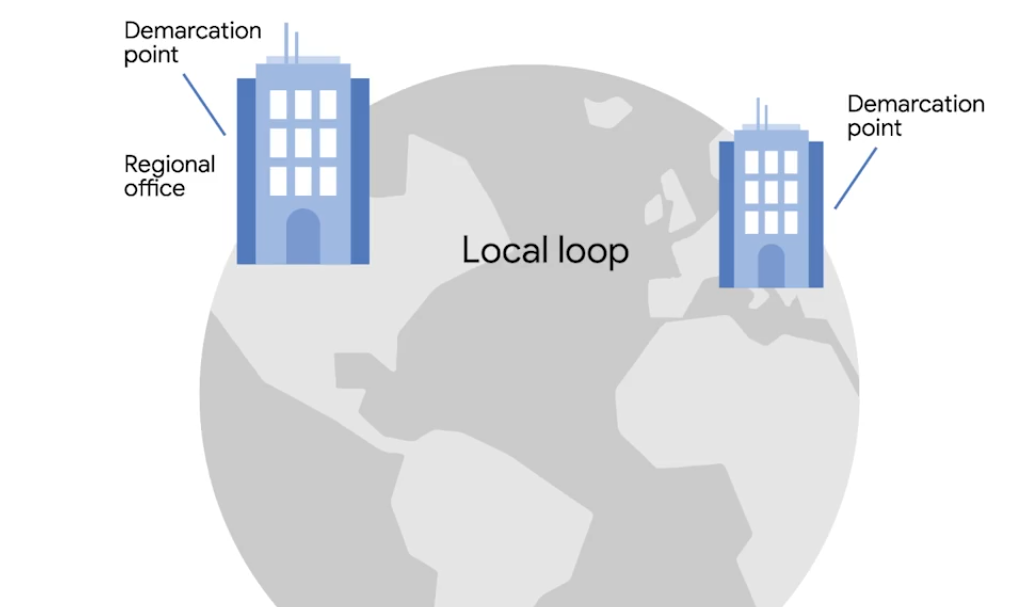
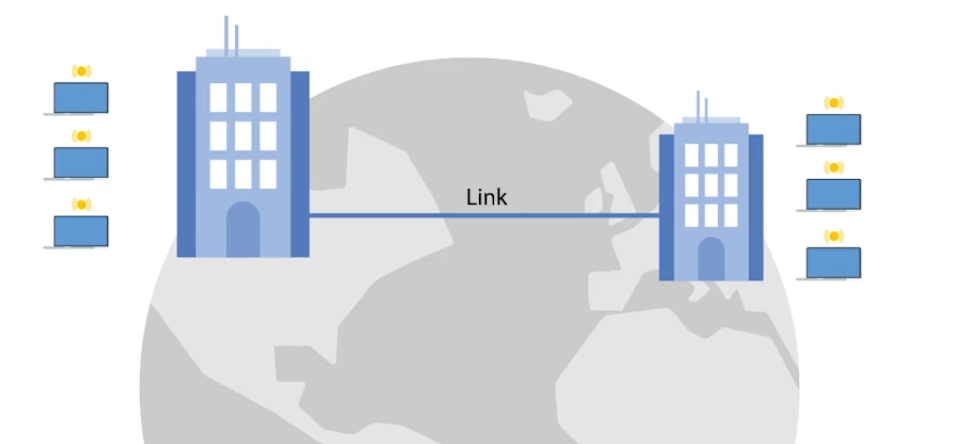
WAN - Acts like a single network, but spans across multiple physical locations. Usually require to contract a link with ISP across the internet.
 |  |
|---|---|
| One network at one side and another network on the other. Each of those networks ends at a demarcation point - where the ISPs network takes over The area between each demarcation point and the ISP’s actual core network is called Local Loop. Local loop would be like a T carrier line or high speed optical connection to the provider’s local regional office. Connects to ISP’s core network and internet at large. s |
WAN Protocols V2
WANs connected through internet connections provided by ISPs in each locale. Regional WANs can be formed by connecting multiple LAN sites using equipment cables leaded form regional ISP. Security for WANs across the public internet can be configured through VPNs.
Physical VS Software-Based WANs
- WAN router (Border/Edge routers): Intermediate systems to route data amongst LAN member groups fo WAN (WAN endpoints) using private connection. Facilitates na organization’s access to a carrier network. Has digital modem interface for the WAN - works at OSI Link Layer, and Ethernet interface for LAN.
- Software-Defined WAN (SD-WAN): Software developed to address unique needs of cloud-based WAN envs. Used alone or in conjuction with traditional WAN. Simplifies how implemented, managed, and maintained. Overall cost is less than equipping and maintaining a traditional WAN. SD-WANs reduce operational costs by replacing the need for expensive lines leased from an ISP by linking regional LANs together to build a WAN.
WAN Optimization
- Compression: Reduce file size through algorithms. Need apps that offer same compression/decompression algorithm to encode and decode.
- Deduplication: Prevents being stored multiple times within a network. One copy is kept in central location. All other “copies” are actually file pointers to the single copy of the file.
- Protocol Optimization: Improves the efficiency of networking protocols - that need higher bandwidth and low latency.
- Local Caching: Reduce the need to resent the same info every time the file is accessed. Traffic Shaping controls the flow of network traffic:
- bandwidth throttling - traffic volume during peak use times.
- rate limiting - capping max data rates/speeds.
- use of complex algorithms - classifying and priortizing data.
WAN Protocols
Used in conjunction with WAN routers - distinguish betwen private LAN and the related public WAN.
- Packet Switching: Data transmission - messages broken into multiple packets. Each packet contains header - info on how to reassemable and intended destination. As mesaure to prevent corruption - packets triplicated - sent separartely over optimal routes through internet. Once reach destination, they reassembled. Triplicate copies are compared with another to detect and correct any data corruption occurred during transmission (at least 2/3 of copies should match). If can’t be reassembled and/or corruption is evident in all three copies, destination requests to resend.
- Frame Relay: Old tech designed for Integrated Services Digital Network (ISDN) lines. However, now used in other network interfaces. Frame Relays used to transmit data between endpoints of a WAN through a packet switching (works at OSI data link and physical layers). Frame Relay Network transport packets in frames for faster communication and minimize error checks.
- Permanent Virtual Circuits (PVCs) - Long-term data connections. Stays open even when data is not being transmitted.
- Switched Virtual Circuits (SVCs) - Temporary session connections for sporadic communications.
- Asynchronous Transfer Mode (ATM): older, encodes data using asynchronous time-division multiplexing. Encoded packaged into small, fixed-sized cells. Can send over long distance, useful for WAN communications. Uses routers as end-points between ATM networks. Replaced for most part by IP.
- High Level Data Control (HLDC): Encapsulation or Data Link protocol delivers frames through network - start/end flags, controls, FCS, and protocol used. Developed use multiple protocols to replace Synchronous Data Link Control (SDLC) - used only one protocol. Has three modes to define relationship:
- Normal Response Mode (NRM) - Primary node must give permission to secondary node to transmit.
- Asynchronous Response Mode (ARM) - Primary node allows the secondary node to initiate communication.
- Asynchronous Balaned Mode (ABM) - Both nodes can act as either primary or secondary nodes. Each initiate communications without permission.
- Packet over Synchronous Optical Network (SONET) or Synchronous Digital Hierarchy (SDH): Communiation protocol used for WAN transport - defines how P2P links over fiber optics cables.
- Multiprotocol Label Switching (MPLS): Optimizing network routing. Repalces inefficient table lookups for long network addrs wiht short path labels - directs data from node to node.
Intro to Wireless Networking
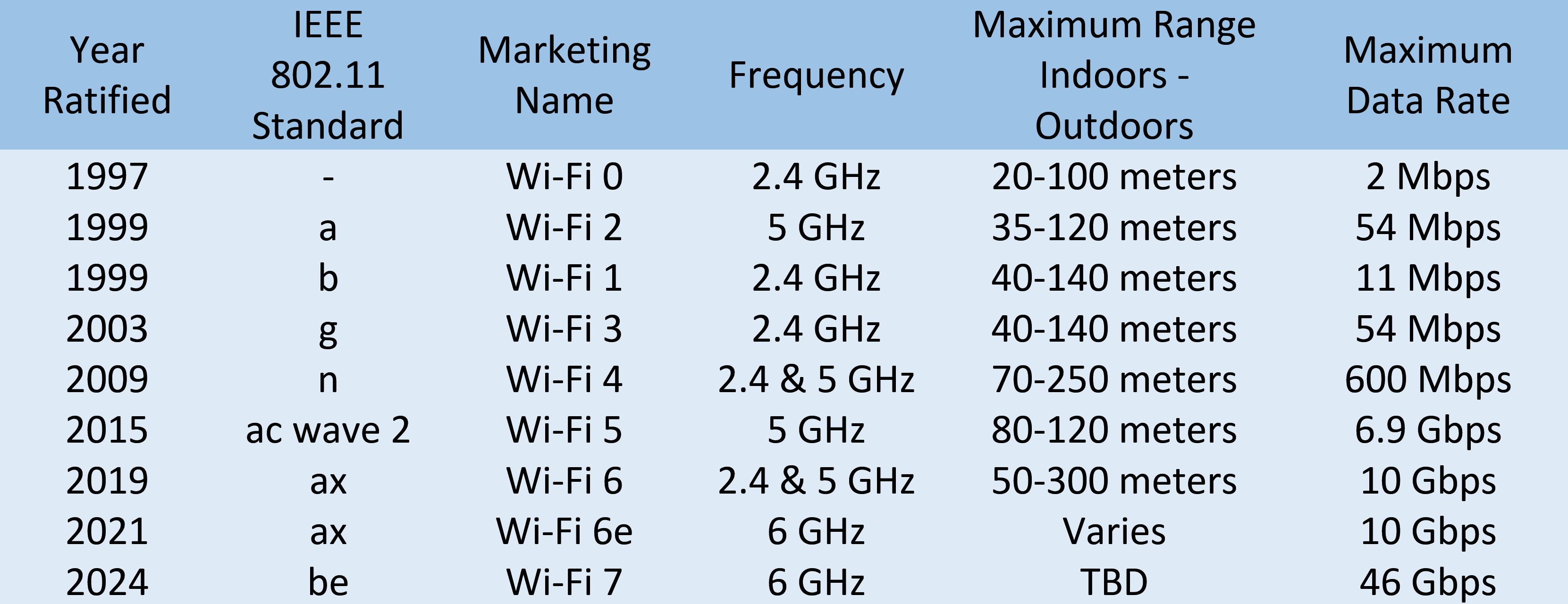
Most common: 2.4 GHz and 5 GHz. Specifications for how should wireless communicate is defeined by IEEE 802.11 standards:
- 802.11b
- 802.11a
- 802.11g
- 802.11n
- 802.11ac
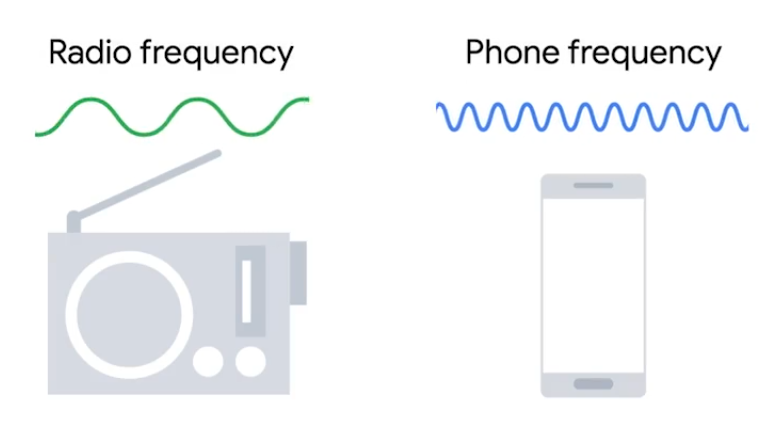
Frequency band - A certain section of the radio spectrum.
In North America, FM radio transmissions operate between 88 and 108 MHz (FM Broadcast Band).
802.11 defining how we operate at both Physical and the Data Link layers.
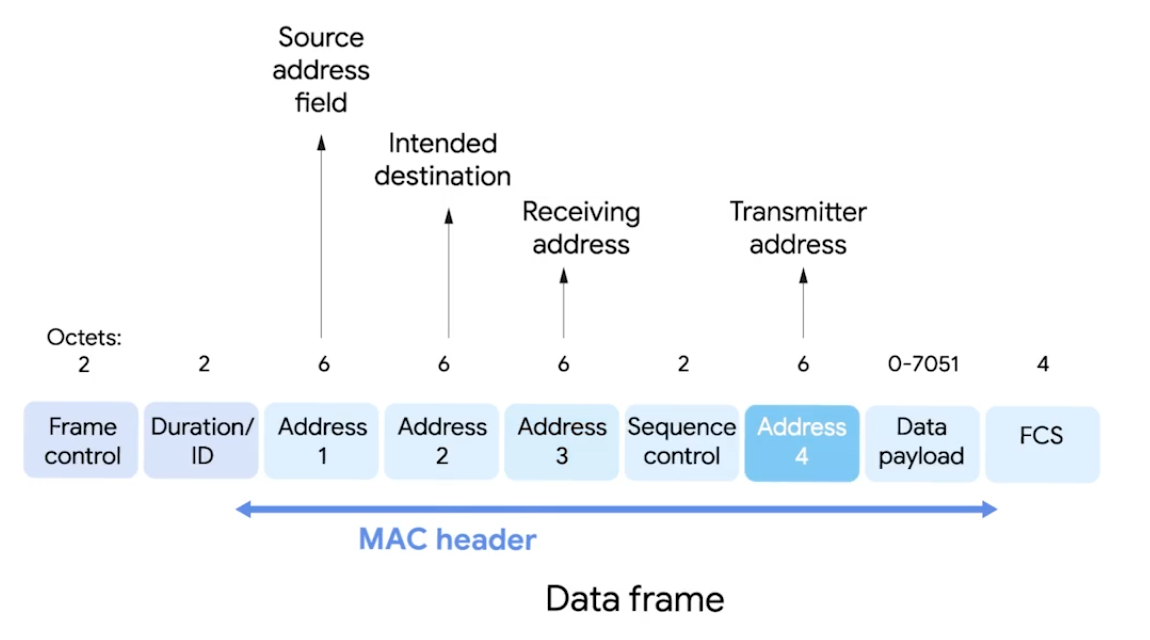
-
Frame Control - 16 bits, describes how should be processed e.g version used.
-
Duration/ID - how long total frame is, so reciever knows how long should to listen.
-
Sequence Control Field - 16 bits, sequence numbers - keep track of ordering frames.
-
Data Payload - all data of protocols further up the stack.
-
FCS - checksum - cyclical redundancy check.
-
Receiver Address - MAC address of AP that should receive the frame.
-
Transmitter Address - MAC address of whatever has just transmitted the frame.
In lots of situations, destination and receiver addr might be the same. Usually, source and transmitter addr also the same. But depends on arch.
Wireless Access Point - bridges the wireless and wired portions of a network.
Wi-Fi 6
- Channel Sharing - shortens time it takes to send.
- Target Wake Time (TWT) - speed and increases battery life.
- Multi-User MIMO (Multiple Input/Output) - transfer simultaneously for high bandwidth apps.
- 160 MHz Channel Utilization - bandwidth capability.
- 1024 Quadrature Amplitude Modulation - Combines two signals into a single channel - more data encoded.
- Orthogonal Frequency Division Multiple Access (OFDMA) - bandwidth splitting.
- Transmit Beamforming - higher data rates by targeting each connected device.
Alphabet Soup: Wi-Fi Standards
802.11 Wireless-Fidelity (Wi-Fi) standards - alphabet-coded updates: a, b, g, n, ac, ad, af, ah, ax, ay, and az.
2.4 GHz
- 150 feet (45 m) to 300 feet (92 m), through solid objects. But, bad interference with BlueTooth/Microave 2.4 GHz freq. 5 GHz
- More channels, fewer interference, 2 Gbps speed. But, limited 50 feet (12 m) to 100 feet (30 m).
IoT Data Transfer Protocols
- Request/Response Model, Publish/Subscribe Model (hosts|clients)
IoT collects physical location (temp), equipment data (maintainance status), and metered data (electricity usage).
- HTTP/HTTPS: Information transfer on WWW with TCP or UDP - ports 80 or 8080.
- Machine-to-Machine (M2M): low-power devices, machines, and systems. Representational State Transfer (REST), Service-oriented Architectures (SOA), Message Oriented Protocols.
- Message Queue Telemetry Transport (MQTT): data-centric interaction protocol - uses simple publish-subscribe model. Supports QoS, TCP, Secure Sockets Layer (SSL) and Transport Layer Security (TLS).
- Constrained Application Protocol (CoAP): Applications like building automation and smart energy management.
- Advanced Message Queuing Protocol (AMQP): Open standard for message apps in different organizations and/or platforms.
- Extensible Messaging and Presence Protocol (XMPP): Decentralized, open standard for chat and collaboration tools.
- Data Distribution Server (DDS): API standard and middleware protocol from Object Management Group - Application Layer, uses publish-subscribe communication model.
Wireless Network Configurations
- Ad-hoc Networks - directly speack to each other.
- WLANs - one or more APs as a bridge between wired and wireless.
- Mesh - kind of hybrid.
Wireless Channels
Channels: Individual, smaller sections of the overall freq band used by wireless network. Importantly, helps to avoid Collision Domains.
For example, dealing with 802.11b network, channel 1 operates at 2.412 MHz. Since channel width is 22 MHz, signal really lives between 2.401 MHz and 2.423 MHz. Some channels overlap, but some are far to won’t interfere with each other.
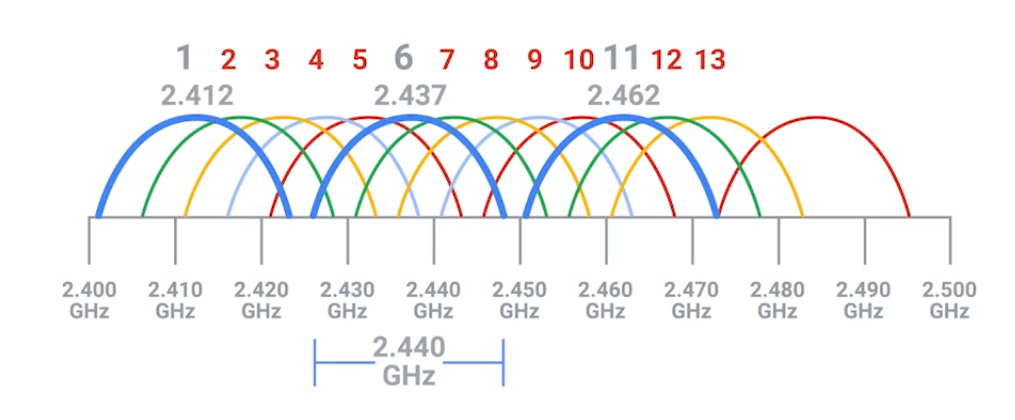
Some APs only perform this analysis when startup. Others dynamically change their channel as needed. You can still experience heavy channel congestion - in dense urban areas with lots of wireless networks.
Wireless Security
Wired Equivalent Privacy (WEP) - Encryption technology for very low level of privacy. (40 bits)
The more bits in a key, the longer it takes for someone to crack the encryption.
Wi-Fi Protected Access (WPA) - uses 128 bit key as default. WPA2 - widely used in modern and update to original WPA - 256-bit key.
MAC Filtering - You configure your APs to only allow for connections from a specific set of MAC addrs belonging to devices you trust.
WPA3 Protocols & Encryption
Intened to replace WPA2 with more new features and repairs.
WPA3-Personal
- Natural Password Selection: easier to remember.
- Increased Ease of Use: doesn’t need to change the way connect.
- Forward Secrecy: if passwd stolen, continue to protect transmitted data.
- Simultaneous Authentication of Equals (SAE): Improves than WPA2-Personal Pre-Shared Key (PSK) handshake protocol. Uses PSK to generate a Pairwise Master Key (PMK): password-based authentication and shared between WAP and Wdevice. Complex, multi-stage process for proving to one another each possess the PMK. SAE authentication reduces brute force attacks, corrects weakness exploited - Key Reinstallation Attacks (KRACKS).
WPA3-Enterprise
For business networks with multiple users, able to addressed exploited weaknesses with improvements.
- Galois/Counter Mode Protocol (GCMP-256): Advanced Encryption Standard (AES) with GCMP-256-bit encryption replaces WPA2 128-bit AES-Counter Mode Protocol (CCMP) Cipher Block Chaining Message Authentication (CBC-MAC) - integrity and confidentiality. Takes more computing power, the protocol makes harder for Meddler-in-the-Middle attack.
- Opportunistic Wireless Encryption (OWE): Improves WPA2 wireless encryption standard of 802.1x Open Authentication and Extensible Authentication Protocol (EAP). In WPA2, EAP required additional support to help it encrypt and authenticate. In WPA3 protocol, OWE replaces EAP with a solution that encrypts and authenticate all wireless traffic. Also, replaces Wi-Fi passwords by assigning a unique key to each device that has permission to access the network. This tech repairs weaknesses found in restaurants, coffee shops, hotels, and airports.
- Wi-Fi Device Provisioning Protocol (DPP): Improves WPA2 Wi-Fi Protected Setup (WPS). WPA3’s DDP uses QR codes of NFC tags to grant passwordless Wi-Fi access.
- 384-bit Hashed Message Authentication Mode (HMAC) with Secure Hash Algorithm (SHA).
- Elliptic Curve Diffie-Hellman Exchange (ECDHE) and Elliptic Curve Digital Signature Algorithm (ECDSA): WPA3 uses for key management and authentication for faster performance. Supported by most browsers. This tech replaces WPA2 4-way handshake.
Cellular Networking
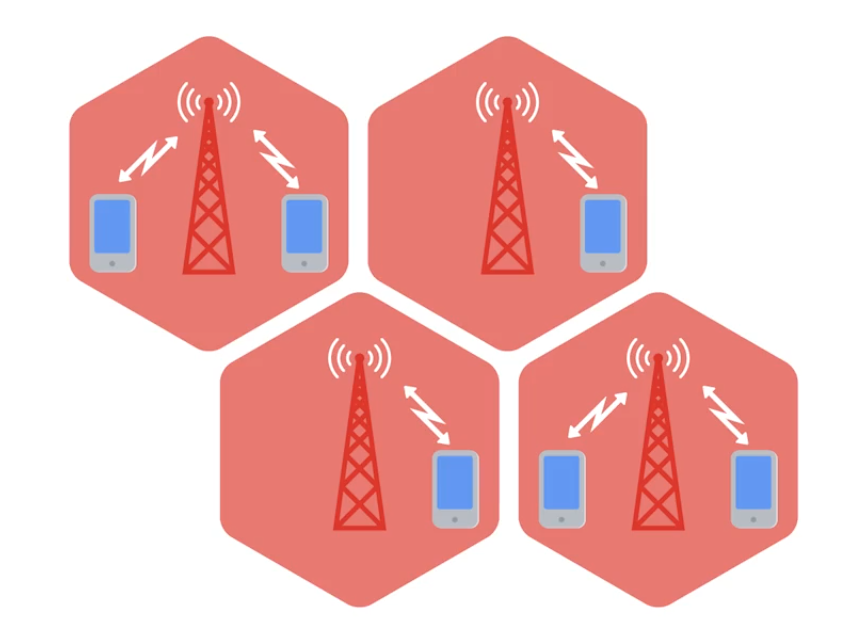
Like Wi-Fi cellular networking operates over radio waves - specifically reseverd for cellular transmissions. Travels long distances - usually over kilometers or miles. Built on cell concept, each cell is assigned a specifc frequency band for use. Neighboring cells are setup to use bands that don’t overlap. (WLAN with multiple APs)
 |  |
|---|
Module 6 - Troubleshooting and the Future of Networking
Ping: Internet Control Message Protocol
ICMP is mainly used by routers or remote hosts to communicate why transmission failed.
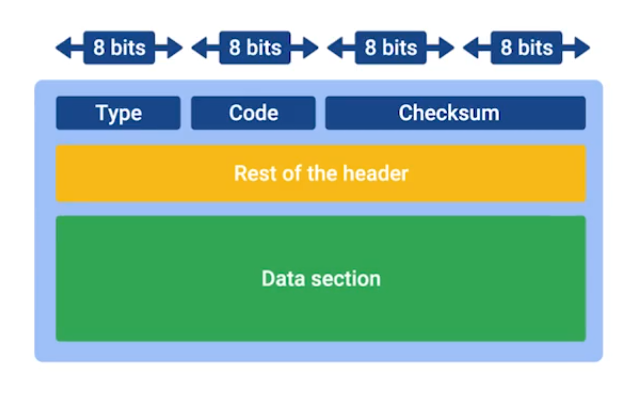
- Type: What type of msg is delivered - destination unreachable or time exeeded.
- Code: Indicates more specific reason - port unreachable.
- Rest of the header: Optionally used for something. The payload for an ICMP packet exists entirely so that the recipient of the message knows which of their transmissions caused the error being reported.
ICMP is not made for human interactions, but for automatically used between network devices.
Ping: lets you send a special type of ICMP message called an Echo Request. (*Hey! Are you there?).
If destination is up and running, it replies ICMP Echo Reply message type.
Traceroute
A utility that lets you discover the path between two nodes, and gives you information about each hop along the way.
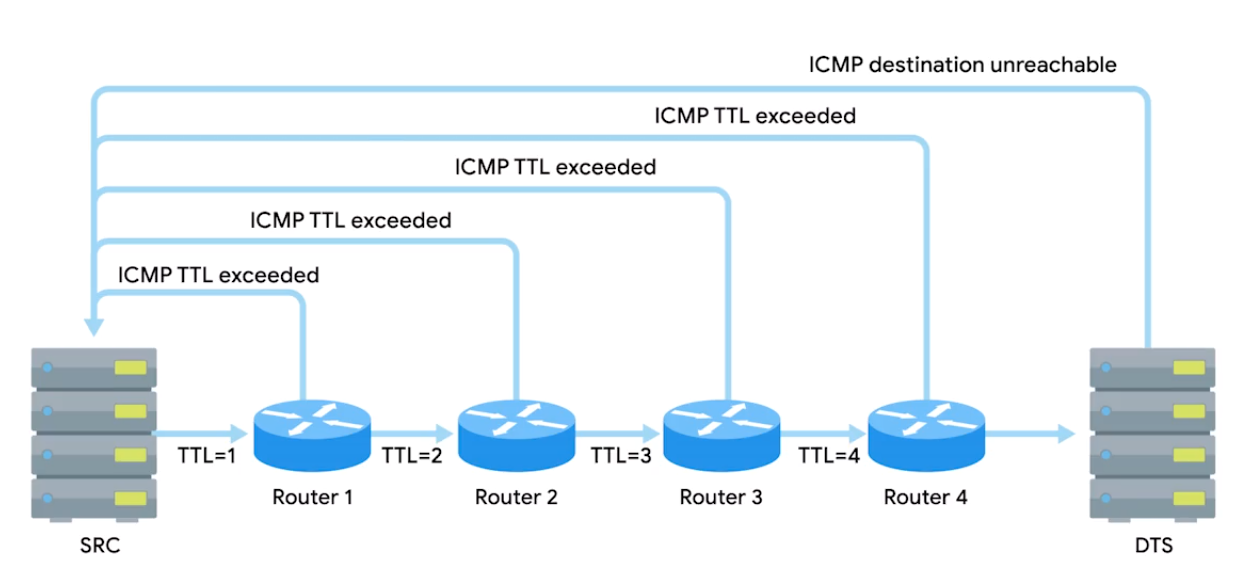
Linux/MacOS: traceroute, mtr (act as long running trace routes) and Windows: tracert, pathping.
In CLI, number of the hop in each line and the round trip time for all three packets. IP of the device at each hop and a hostname if traceroute can resolve one.
Test Port Connectivity
netcatornc- Linux/MacOSTest-NetConnection- Windows
Linux/MacOS
-z zero IO mode, -v verbose (talkative) best for used in scripts.
> nc -z -v google.com 80
google.com [74.125.24.139] 80 (http) open
Tries to establish TCP connection to google.com on specified port 80:
nc [options] <host> <port>Gives more output text than just verbose - detailed:
nc -vv <host> <port>Some protocol require specific source port - this lets you specify:
nc -p <localport> <host> <port>Executes a program after connection estabilished:
nc -e <program> <host> <port>Prevents DNS lookup - use when you have an IP addr and numeric port, and to avoid overhead of DNS:
nc -n <addr> <port>Powershell
Test with specific port -port.
C:\Windows\system32> Test-NetConnection google.com                                                                                               ComputerName           : google.com
RemoteAddress          : 142.251.10.100
InterfaceAlias         : Ethernet
SourceAddress          : 192.168.1.102
PingSucceeded          : True
PingReplyDetails (RTT) : 62 ms
Tests ping and diagnostic info for connection from host google.com on port 80:
Test-NetConnection -ComputerName google.com -Port 80Detailed results:
Test-NetConnection -InformationLevel "Detailed"Test connection from remote host, and specific port:
Test-NetConnection -ComputerName [remote host] -Port [port number]

# Combined
Test-NetConnection -ComputerName www.google.com -Port 80 -InformationLevel Detailed
Route diagnostics to connect to a remote host - with admin privileges:
Test-NetConnection -ComputerName [remote host] -DiagnoseRouting

# With routing constraints
Test-NetConnection -ComputerName [remote host] -constrainInterface [interface number] -DiagnoseRouting -InformationLevel "Detailed"
E.g. Employee having trouble connecting to website, but other sites are loading fine in the browser:
Test-NetConnection -ComputerName www.example.com -Port 80 -InformationLevel DetailedName Resolution Tools
nslookup: displays what server was used to perform the request and the resolution result.
> nslookup coursera.org
Server:		192.168.40.11
Address:	192.168.40.11#53

Non-authoritative answer:
Name:	coursera.org
Address: 18.161.180.115
# Interactive mode
> nslookup
> server 8.8.8.8 # change default name server
> set type=MX # default A record to quad A or other record types e.g. txt
> set debug # detail
Public DNS Server
Level 3 public DNS servers
4.2.2.14.2.2.24.2.2.34.2.2.44.2.2.54.2.2.6
ICANN the top-level organization manages the global DNS.
Most businesses also run their own DNS server to resolve names for internal hosts, instead of IP, being able to name refering to a printer.
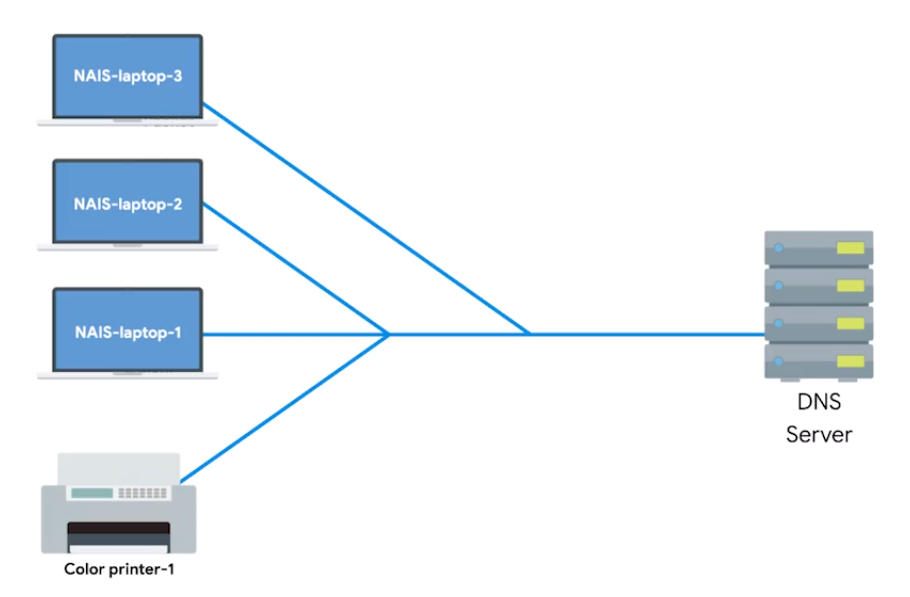
Public DNS server: Name servers specifically set up so that anyone can use them, for free.
Google public DNS servers: 8.8.8.8 and 8.8.4.4
Most public DNS servers are available globally through anycast.
Always do your research before configuring the devices to use one DNS server. Hijacking outbound DNS requests with faulty responses is an easy way to redirect users to malicious sites.
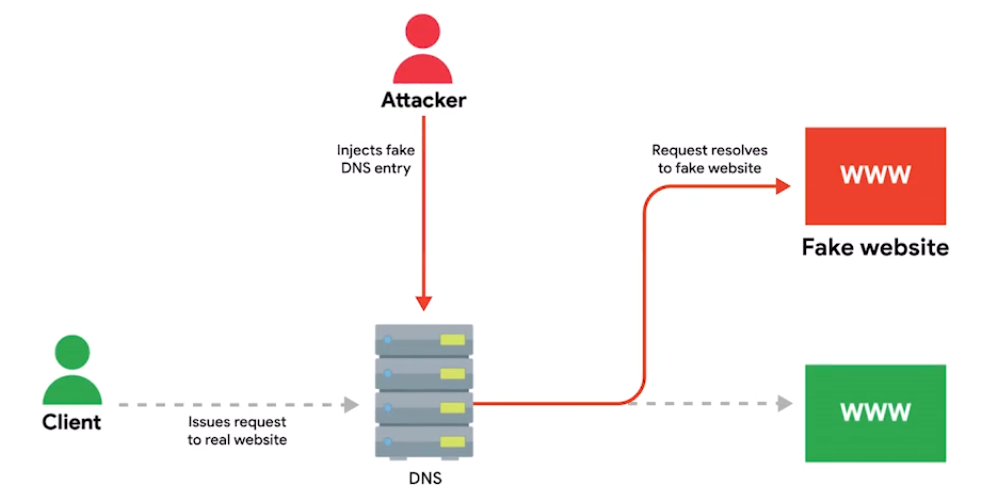
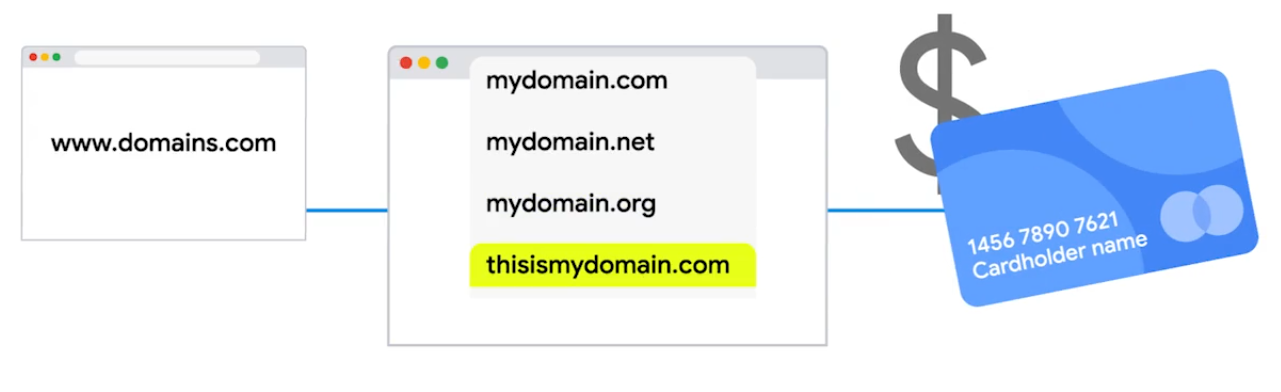
DNS Registration and Expiration
Registrar: An organization responsible for assigning individual domain names to other organizations or individuals.
The recipient registrar will generate a unique string of characters to prove that you own the domain and you’re allowed to transfer it to someone else.
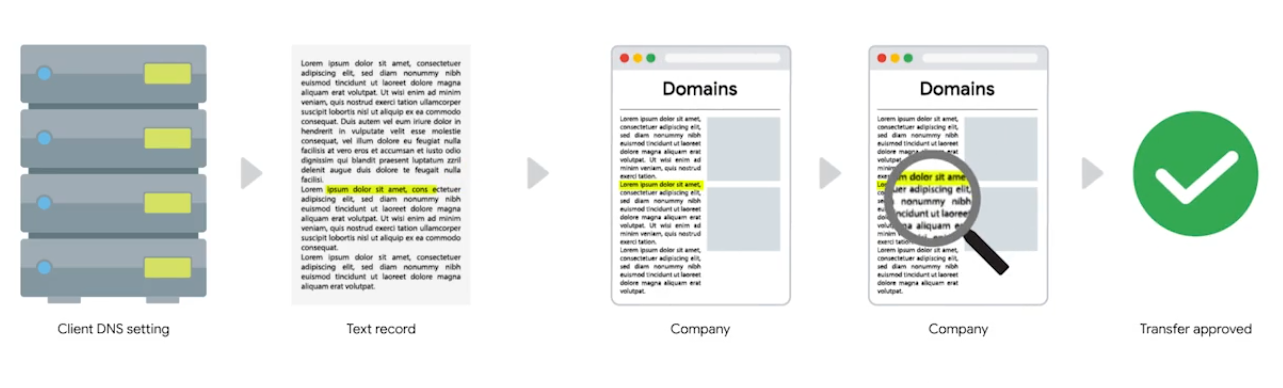
Hosts Files
A flat file that contains, on each line, a network address followed by the host name it can be referred to as.
A loopback address always points to itself - A way of sending network traffic to yourself.
- IPv4:
127.0.0.1, mostly you seen followed by::1 localhost - IPv6:
::1
What is The Cloud?
Cloud Computing: A technological approach where computing resources are provisioned in a shareable way so that lots of users get what they need, when they need it.
- A new model in computing where large clusters of machines let us use the total resources available in a better way. Virtualization: A single physical machine (host), could run many individual virtual instances (guests). Hyprervisor: A piece of software that runs and manages VMs, while also offering these guests a virtual operating platform that’s indistinguishable from actual hardware.
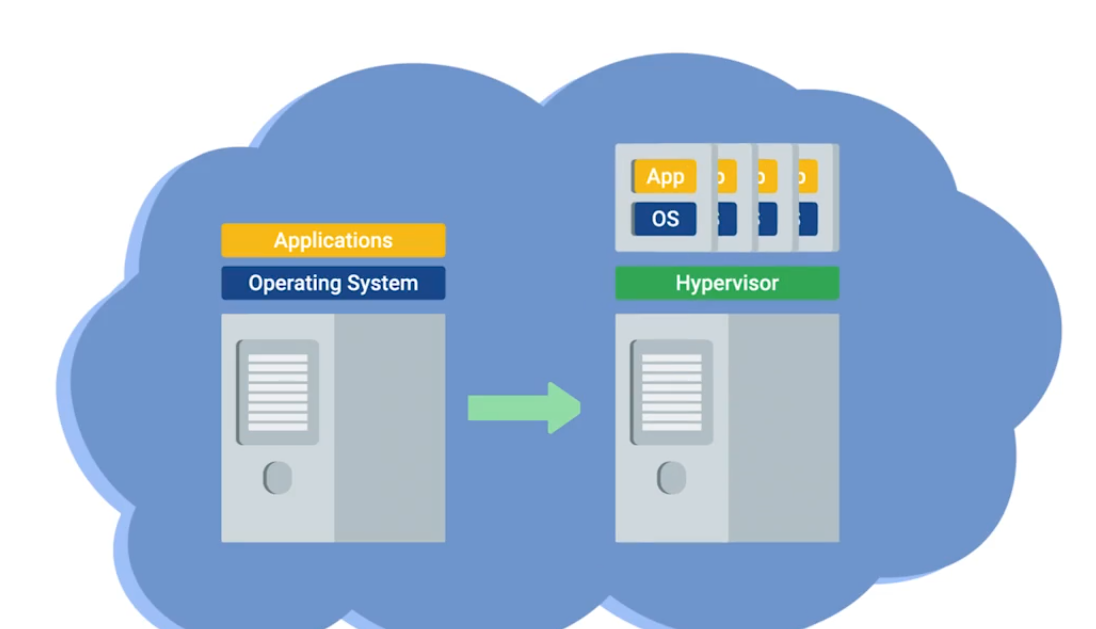
Public Cloud: A large cluster of machines run by another company. Private Cloud: Used by a single large corparation and generally physically hosted on its own premises. Hybrid Cloud: Situations companies run things like their most sensitive proprietary tech on a private cloud, while entrusting their less-sensitive servers to a public cloud.
Everthing/X as a Service
- Infrastructure as a Service (IaaS): You shouldn’t have to worry about building your own network or your own servers.
- Platform as a Service (PaaS): A subset of cloud computing where a platform is provided for customers to run their services.
- Software as a Service (SaaS): A way of licensing the use of software to others while keeping that software centrally hosted and managed. (e.g Gmail for Business, Office 365 Outlook)
IPv6 Addressing and Subnetting
IPv5 was an experimental protocol that introduced the concept of connections. But, later better handled by Transport layer at TCP.
IPv4: 32 bit and IPv6: 128 bit
Notation Method for Shortening - 2 rules
- You can remove any leading zeros from a group.
- Any number of consecutive groups composed of just zeros can be replaced with two colons.
# Example IPv6 address
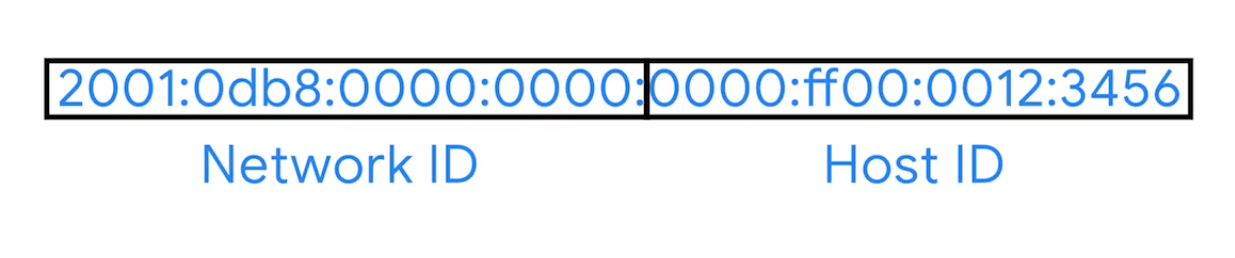
2001:0db8:0000:0000:0000:ff00:0012:3456

# Applied first rule
2001:0db8:0:0:0:ff00:12:3456

# Second rule
2001:db8::ff00:12:3456
Loopback address in IPv4 - 127.0.0.0
in IPv6 - 31 zeros with a one at the end:
0000:0000:0000:0000:0000:0000:0000:0001 (or) ::1
Other Reserved Address Ranges
- Beginning with
FF00:is used for Multicast- A way of addressing groups of hosts all at once.
- Beginning with
FE80::is
| IPv6 Beginning With | Purpose | Description |
|---|---|---|
| FF00: | Multicast | A way of addressing groups of hosts all at once. |
| FE80:: | Link-local Unicast Addresses | Allow for local network segment communications and are configured based upon a host’s MAC address. |
Unlike IPv4, there was never any need to think about splitting it up because it is so huge. Network engs might want to split it for administrative purpose, IPv6 subnetting uses the same CIDR notation.
IPv6 Headers
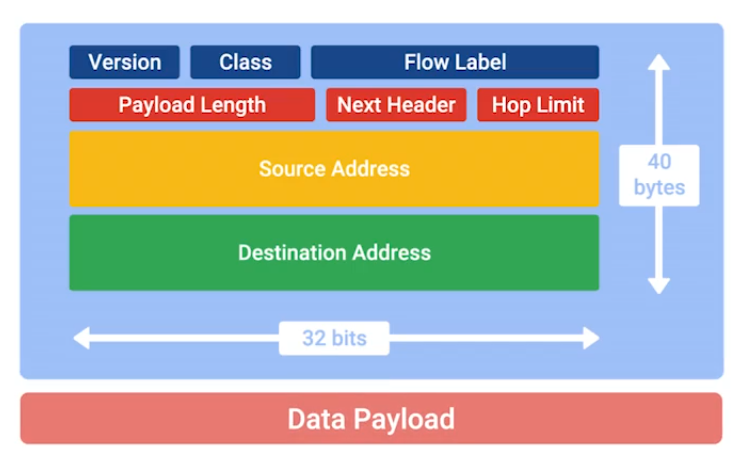
- Version: 4-bit, defines what IP version is in use.
- Class: 8-bit, type of traffic contained within IP datagram, allows for different classes of traffic to receive different priorities.
- Flow label: 20-bit, used in conjuction with traffic Class for routers to make decisions about QoS level for specific datagram.
- Payload Length: 16-bit, how long the data payload section of datagram is.
- Next Header Field: (unique concept to IPv6), what kind of header is immediately after this current one. (like chain of headers form)
IPv6 is four times larger than IPv4, it takes longer to transmit across a link. The header is built to short as possible. Way to do that, take all of the optional field and abstract them away from header itself.
- Hop limit: 8-bit, that’s identical in purpose to the TTL field in an IPv4 header.
- Source Address and Destination Address: each 128 bit.
If the Next Header field specified another header, it would follow at this time. If not a Data Payload, the same length specified in Payload Length field would follow.
IPv6 and IPv4 Harmony
IPv6 Tunnels: Servers take incoming IPv6 traffic and encapsulate it within traditional IPv4 datagram.
They consist of IPv6 tunnel servers on either end of a connection.
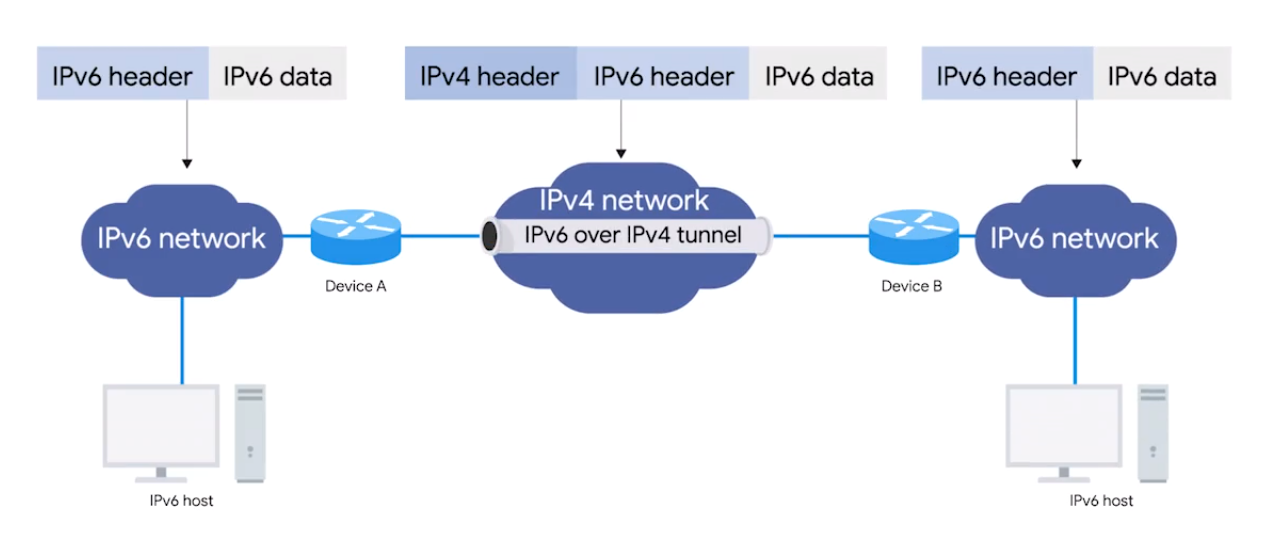
IPv6 Tunnel Broker - Companies that provide IPv6 tunneling endpoints for you, so you don’t have to introduce additional equipment to your network. (So no additional equipment for your network needed)
It’s still new and envolving, there’re lots of competing protocols. The future of networking is the adoption to IPv6 as the main protocol at the Network Layer. One day will no tunnels will be need for specific IPv6 communications.
IPv6 and IPv4 Harmony
Tunnels are created using IPv6 servers on either end of a network connection. A tunnel server at one end takes incoming IPv6 traffic and encapsulates it within a traditional IPv4 datagram.
Encapsulation - the process of transporting a data packet inside the payload of another packet.
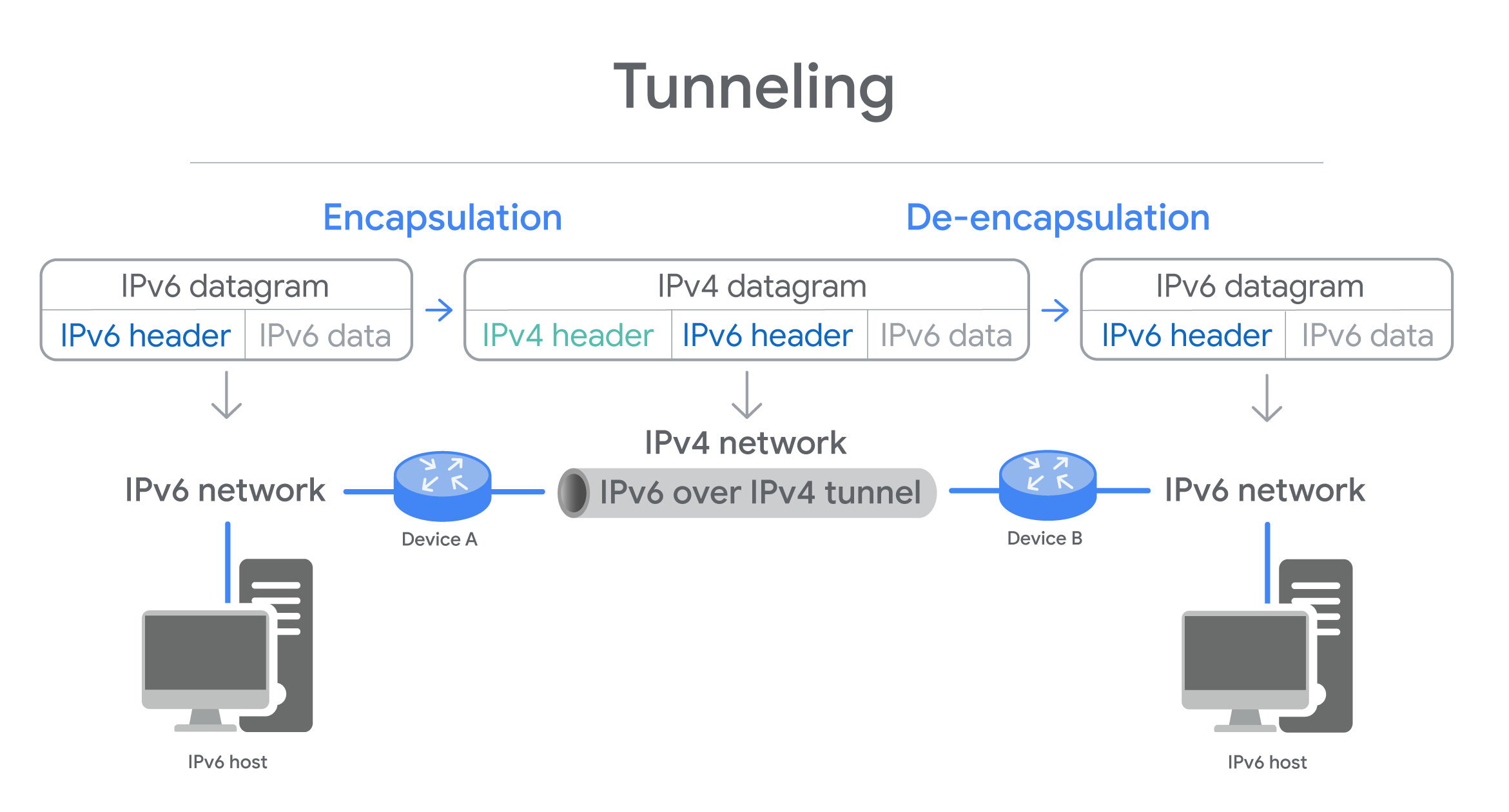
Three Types of Tunnels
- 6in4/Manual Protocol encapsulate IPv6 packets immediately inside an IPv4 packet, without using additional headers to configure the setup of the tunnel endpoints - Manually - Predictable and eaxy to debug. But, makes 6in4/manual protocl difficult to depoly if NAT is used on host.
- Tunnel Setup Protocol specifies rules for negotiating the setup parameters between tunnel endpoints - allows for variety of tunnel encapsulation methods and wider deployment than possible with 6in4/Manual Protocol.
- Anything in Anything (AYIYA) protocol defines a method for encapsulating any protocol in any other protocol. Was developed for tunnel brokers (network tunnel service). Specifies encapsulation, identification, checksum, security, and management operations - can used once the tunnel is established. Allows users behind NAT/dynamic address to maintain connectivity even when roaming between network.
Each protocl has pros and cons, depends on nature of communcating.
Interview Role Play: Networking
Problem: Network was down and can’t access to company’s internal website.
Before fixing things, make sure you what excatly the problem.
Are you receiving error message? Can you tell me the URL? So that I can test that out. What OS are you using? I want you to navigate to command prompt - Start menu > search CMD. Try
ipconfig/o, what is IP address?IP Address is a unique numerical address given to computing devices to communicate on the internet to other computers.
Does the machine use DHCP?
DHCP is Dynamic Host Configuration Protocol automatically assigns IP addresses to computing devices, and it can also send network configurations, too. It’d be important because if the IP address is getting assigned statically, then we have to go in and change it, but it should be getting assigned automatically. DHCP can be configured incorrectly or you could be connected to the wrong network.