Challenge's Scenario
Link to the challenge A server with sensitive data was accessed by an attacker and the files were posted on an underground forum. This data was only available to a privileged user, in this case the ‘root’ account. Responders say ‘www-data’ would be the logged in user if the server was remotely accessed, and this user doesn’t have access to the data. The developer stated that the server is hosting a PHP-based website and that proper filtering is in place to prevent php file uploads to gain malicious code execution. The bash history is provided to you but the recorded commands don’t appear to be related to the attack. Can you find what actually happened?
Q-1: What user (other than ‘root’) is present on the server?
Linux မှာအသုံးပြုမယ့်သူတစ်ယောက်အတွက် Regular User အကောင့်တစ်ခုဖွင့်ပြီးသွားရင် /home အောက်မှာ သူတို့အတွက်ကိုယ်ပိုင် Directory တစ်ခုဆောက်ပါတယ်။ ဒီ Log ကိုနည်းနည်းရှာဖွေလိုက်တော့ Line 21 မှာ Daniel ဆိုတဲ့ User တစ်ယောက်ရဲ့ Directory တွေ့ရပါတယ်။
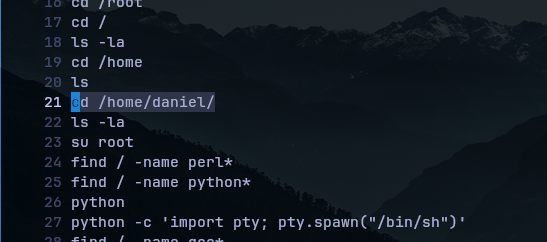
Q-2: What script did the attacker try to download to the server?
log ကိုဆက်ကြည့်ကြည့်မယ်ဆိုရင် Line 32 မှာ Attacker က wget အသုံးပြုပြီး Script တစ်ခု Download လုပ်ခဲ့တာကိုမြင်နိုင်ပါတယ်။ Script ကတော့ linux-exploit-suggester.sh ဆိုတဲ့နာမည်ပါ။
wgetဆိုတာ Web Server တစ်ခုခုဆီကနေ HTTP၊ HTTPS၊ FTP၊ FTPS protocol ဖြင့် လိုချင်တဲ့ဖိုင်တစ်ခုကို Download ဆွဲပေးတဲ့ utility တစ်ခုဖြစ်ပါတယ်။
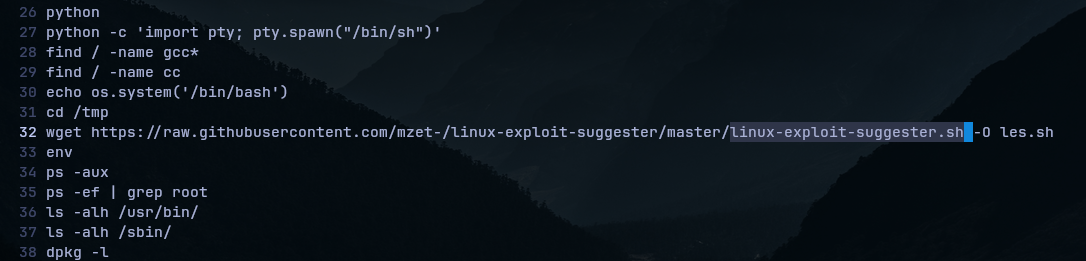
Q-3: What packet analyzer tool did the attacker try to use?
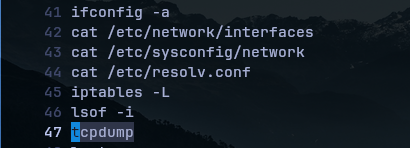
ဒီဟာကတော့ Networking နဲ့ပတ်သက်ပြီး အတွေ့ကြုံရှိဖူးသူတွေအတွက်ကြိုက်ကြိုက်ပေါ့။ Log ရဲ့ Line 41-47 ကြားထဲမှာ Attacker က Network နဲ့သက်ဆိုင်တဲ့ အချက်အလက်တွေရှာဖွေတာရယ်၊ tcpdump ကိုလည်းအသုံးပြုပြီး Real-time packets analysis လုပ်ဖို့ကြိုးစားခဲ့တဲ့ပုံပါပဲ။
Q-4: What file extension did the attacker use to bypass the file upload filter implemented by the developer?
သူတို့ Server မှာအသုံးပြုရဲ့ Filter configuration ကိုမမြင်ရပေမယ့် ကျွန်တော်တို့ Line 63 ကြည့်လိုက်မယ်ဆိုရင် Attacker က /var/www/html/uploads/x.phtml ဖိုင်ကိုဖျက်ပစ်ခဲ့ပါတယ်။

ပြောရမယ်ဆိုရင် Developer ဘက်က .php ဖိုင်တွေကိုလက်မခံဖို့ Filter လုပ်ခဲ့ပေမယ့် .phtml ဖိုင်တွေကျတော့ Filter လုပ်ဖို့မေ့သွားတဲ့ပုံပါပဲ။ ဒါကြောင့် Attacker က Bypass ဖြစ်အောင်သူ့ရဲ့ malicious code တွေကို .phtml ဖိုင်အဖြစ် Upload တင်လိုက်ပြီးတော့ နောက်မှကိုယ့်ဘာသာပြန်ခြေရာဖျောက်တဲ့သဘောမျိုးလို့ ထင်ရပါတယ်။
Q-5: Based on the commands run by the attacker before removing the php shell, what misconfiguration was exploited in the ‘python’ binary to gain root-level access?
Answer option: 1- Reverse Shell ; 2- File Upload ; 3- File Write ; 4- SUID ; 5- Library load
Line 26၊ 27၊ 62 မှာ Attacker က Python အသုံးပြုရင်း /bin/sh ထဲမှာ Shell တစ်ခု spawn လုပ်ခဲ့ပါတယ်။ File တစ်ခုမှာ SUID (Set User ID) ရှိရင်အခြား User တစ်ယောက်က ဒီ File Owner ရဲ့ Permission အတိုင်းအသုံးပြုခွင့်ရှိပါတယ်။ အခု Python (ဒီမှာဆိုပိုင်ရှင်က Root) မှာ SUID ရှိထားခဲ့တော့ အဲ့တာကိုအသုံးချပြီး Attacker က Root Access ကိုရနိုင်သွားတာဖြစ်ပါတယ်။

