Challenge: https://blueteamlabs.online/home/challenge/network-analysis-web-shell-d4d3a2821b
Sandboxing Environment is RECOMMENDED.
Challenge ထဲမှာပါတဲ့ဖိုင်က တကယ့် Malware အစစ်ကို Analyse လုပ်ရတတ်တာကြောင့် ကိုယ်ပိုင် VM တစ်ခုထဲမှာ အန္တရာယ်ကင်းအောင်အသုံးပြုဖို့အသိပေးအပ်ပါတယ်။
Scenario
The SOC received an alert in their SIEM for ‘Local to Local Port Scanning’ where an internal private IP began scanning another internal system. Can you investigate and determine if this activity is malicious or not? You have been provided a PCAP, investigate using any tools you wish.
ဒီ Lab ထဲမှာ pcap ဖိုင်တစ်ခုပေးထားပြီးတော့ Wireshark၊ Tcpdump၊ Tshark တို့ကိုအသုံးပြုရင်းမေးခွန်းတွေအတွက် အဖြေရှာပေးသွားရမှာဖြစ်ပါတယ်။ Easy level မို့လို့ Network protocols၊ Communication methodologies အခြေခံရှိထားတဲ့တွေအတွက် စမ်းကြည့်ဖို့သင့်တော်ပါတယ်။
Q-1. What is the IP responsible for conducting the port scan activity?
Wireshark ပေါ်မှာဘယ် Host တွေအချင်းချင်းဘာတွေပြောနေကြလဲဆိုတာကို ကြည့်ချင်ရင် Conversation Statistics ကို Statistics > Conversations ကနေဝင်ကြည့်နိုင်ပါတယ်။ အဲ့ထဲမှာ Address၊ Ports တွေရဲ့အချက်အလက်တွေကိုရှင်းရှင်းလင်းလင်း မြင်ရပါတယ်။ အခု ခဏလောက်လေ့လာကြည့်လိုက်တော့ သူက TCP Traffic များနေတာတွေရပါတယ်။
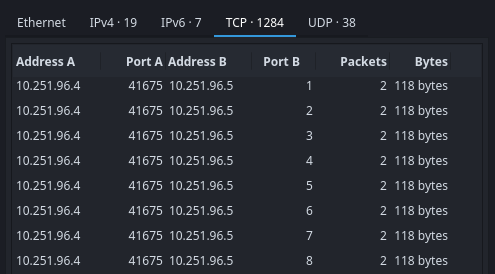
ပုံထဲကိုကြည့်ကြည့်လိုက်ရင် IP 10.251.96.4 ကတခြား IP 10.251.96.5 ကို 2 Packets အလိုက် Port တစ်ခုချင်းဆီကို လိုက်ပို့နေတာကိုတွေ့ရပါတယ်။ ဒါဆို IP 10.251.96.4 ဆိုတဲ့တစ်ယောက်က Port Scanning လိုက်လုပ်နေတဲ့သူဆိုတာ သိလိုက်ရပါတယ်။
Q-2. What is the port range scanned by the suspicious host?
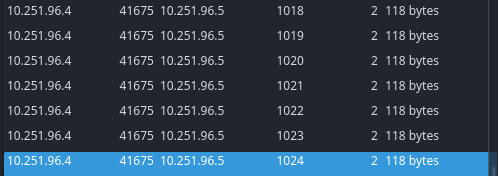
ခုနက Conversation Statistics ကိုဆက်ကြည့်လိုက်မယ်ဆိုရင် Port တစ်ခုချင်းဆီဆက်ဆက်ပြီး Scan လုပ်နေခဲ့တာတွေ့ရပါတယ်။ Port B ပေါ်မှာ Sort လုပ်လိုက်ရင် First port နဲ့ Last port 1-1024 ကိုမြင်နိုင်ပါတယ်။
10.251.96.4begins port scanning on10.251.96.5from port1:
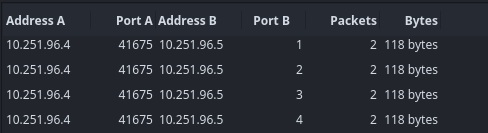
- To port
1024:
Q-3. What is the type of port scan conducted?
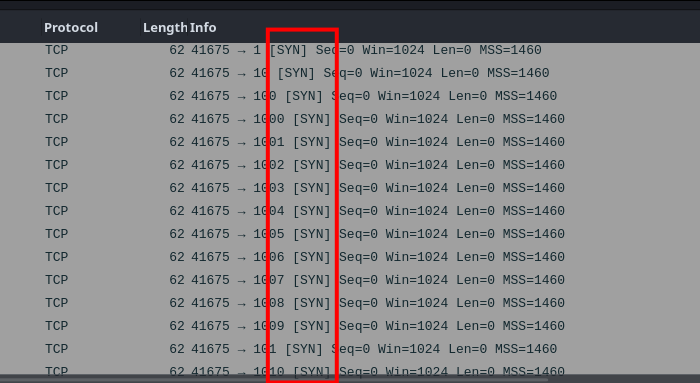
ကျွန်တော်တို့ဒီ Suspicious IP 10.251.96.4 က Port scan ကိုလုပ်တဲ့သူဆိုတော့ သူ့ကိုပဲ Focus ထားပြီး Search filter ပေါ်မှာ ip.src == 10.251.96.4 ထားရင်း သူ့ packet info တွေစစ်ကြည့်လိုက်တဲ့အခါ TCP ပေါ်မှာ SYN requests တွေပို့နေတာတွေ့ရပါတယ်။
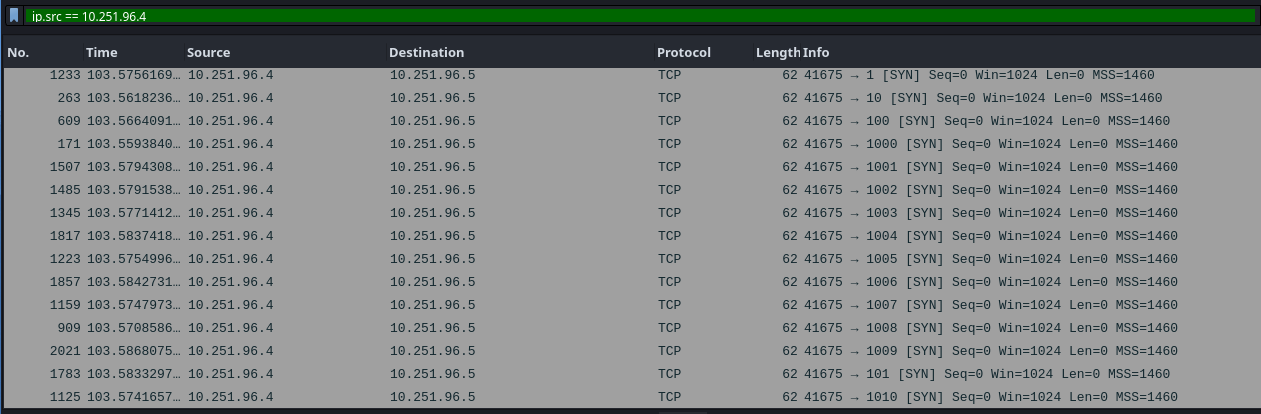
TCP Connection တည်ဆောက်မှုပုံစံက Three-way Handshake ပေါ်အခြေခံထားတာမို့လို့ ပထမဆုံးပို့တဲ့ Request က SYN ဖြစ်ပါတယ်။ SYN ပို့ပြီးလို့ ACK flag ပြန်ရောက်လာတယ်ဆိုရင်တော့ ဒီ Port ဟာ Active/Open ဖြစ်နေတယ်ဆိုတဲ့ အဓိပ္ပာယ်ပါပဲ။ RST flag ဆိုရင်တော့ Closed ဖြစ်နေတဲ့သဘောပေါ့။
အခုပုံမှာ SYN packets တွေဆက်တိုက်သွားနေပုံကတော့ Suspicious IP က TCP SYN scan ပြုလုပ်ခဲ့တာကိုမြင်ရပါတယ်။