
BTLO Challenge: https://blueteamlabs.online/home/challenge/reverse-engineering-a-classic-injection-9791a9b784
Scenario
Analyse the attached EXE sample and find answers to the following questions. Note: The EXE uses shellcode generated by the Metasploit attack framework. Make sure you analyse the sample in contained environment (we recommend a virtual machine where internet access is disabled). The sample is zipped with password “infected”. Sha256 checksum of zip – E04F383BF1F13C1E73F8A57CCD0032EF7 E8059BAE0D6EADC87A2EDC655F3A32D
BTLO Challenge's Warning
This file includes REAL MALWARE. Please be careful when interacting with it. We strongly suggest players create a ‘dirty’ virtual machine to analyse malicious files in.
Tools Used
- Detect It Easy to detect compilers of PE file and malware/RE analysis.
- Cutter for reverse-engineering while keeping the user experience at mind.
- Sysinternals (ProcMon) to watch malware processes and behaviors.
- A Windows VM as a vulnerable machine to execute malware.
Questions & Answers
Q-1. What is the name of the compiler used to generate the EXE?
I had no experience in anything related to RE before, so I basically started with file metadata analysis. So, a PE (Portable Executable) file is the standard binary structure used by Windows, which provides a framework for managing code across different hardware architectures and Windows versions.
I came across so many different tools and what I found for my needs is Detect It Easy. It is a lightweight open-source utility designed for initial triage in malware analysis/RE. It can detect compilers, linkers, packers and protectors embedded in executable files to identify potential malicious code hidden by obfuscation.
So, I scanned the file and we the information:
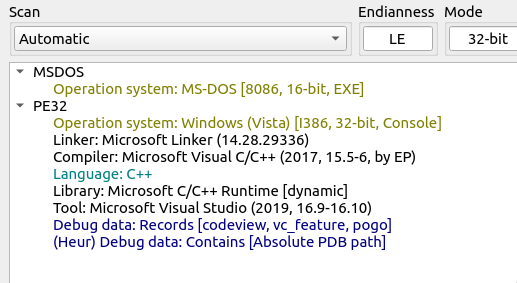
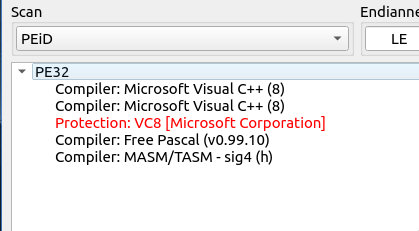
I tried putting these as answers, but the actual answer sits in Scan: PEiD (older Windows tool). We can see that the version in the answer should be C++ 8:
Q-2. This malware, when executed, sleeps for some time. What is the sleep time in minutes?
I understood that the Sleep function is used for Bypassing Evasion Techniques, where the malware intends to delay execution to evade automated sandbox execution (anti-analysis).
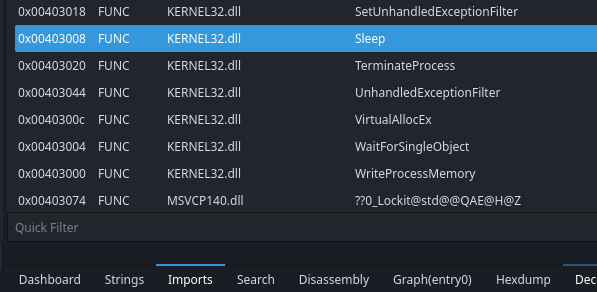
So, I dived into different Reverse Engineering tool and the one I found with beginner-friendly interface is Cutter. I opened the file and saw a sleep function being referenced in Imports:
I viewed the assembly code in by “Show X-Refs”, and there’s a value used for the sleep function:
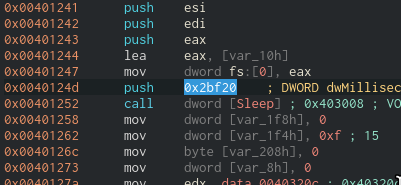
I decoded that Hex value to decimal using CyberChef, and calculated the time from Milliseconds to Minute format.
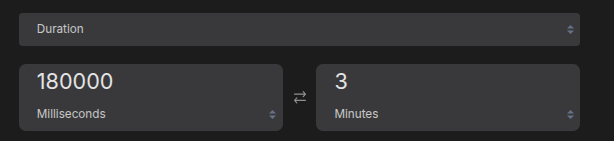
Q-3. After the sleep time, it prompts for user password, what is the correct password?
Just after a sleep, I saw a value in string format that it was asking for the password (I spent so much time reading assembly, ofc):
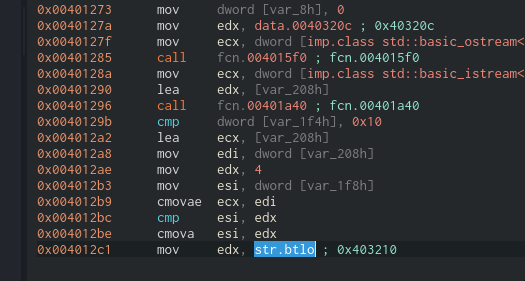
Q-4. What is the size of the shellcode?
I followed next of the function and I checked on WriteProcessMemory function. There’s asking dwSize and it was actually related to shellcode size:
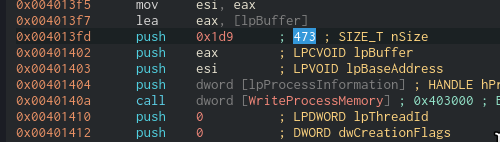
Q-5. Shellcode injection involves three important windows API. What is the name of the API Call used?
Checking the Imports again to see something interesting what APIs are used. After spending time searching, I see CreateRemoteThread. I learned that the function will use an address space of another process, then it creates a thread inside:

Q-6. What is the name of the victim process?
When I look at the strings again, I see a path C:\Windows\System32\nslookup.exe is being referenced:
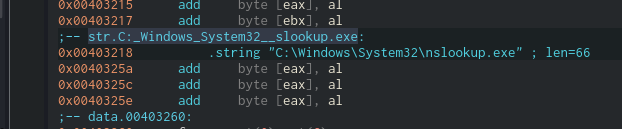
Q-7. What is the file created by the sample?
After a lot of trials-and-errors, I realized that this should be done by Dynamic Analysis rather than just reading assembly. I used a Windows VM, took a snapshot before malware execution, isolated networks and uninstalled guest drivers.
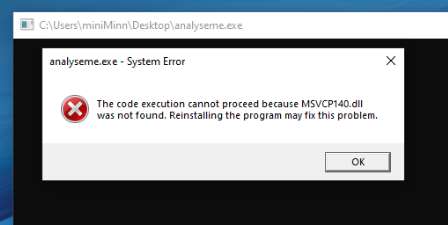
I ran the malware, but it needed some Microsoft Visual C++ dependencies (X86 and X64 needed):
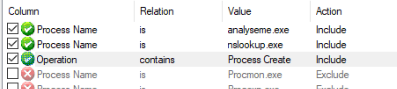
I setup ProcMon (sysinternals) and used a filter rule just to focus on analyseme.exe processes. More importantly, since we’re looking for what file is created, added a filter to show Process Create only:
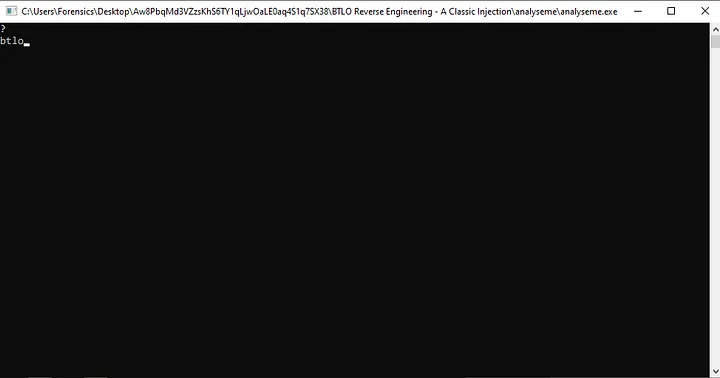
Now it was time to execute the malware. Note that it needs to be waited for 3 minutes to be executed and you’ll have to enter the password from we did at Q-3:
After execution, we look at the ProcMon, there’s a suspicious that powershell.exe is executed. In the event details, there’s a bunch of encoded commands:

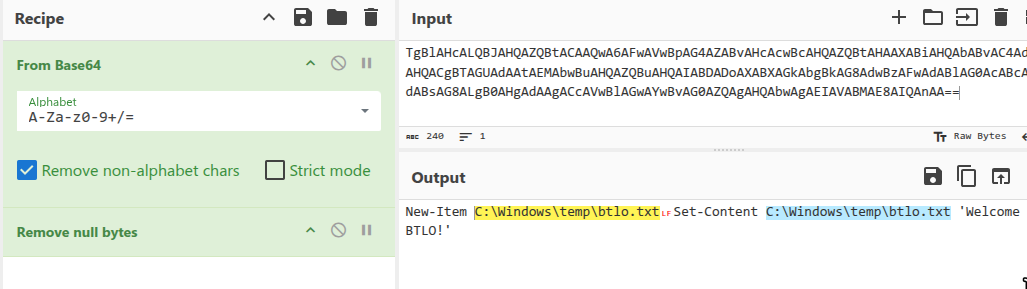
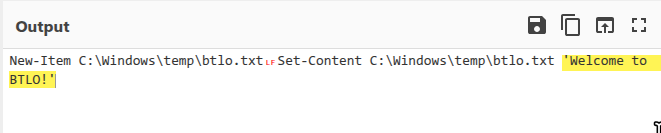
Going to CyberChef to decode this, I used base64 decoding and remove null bytes to see the original:
Q-8. What is the message in the created file
We can see the message is written into btlo.txt file:
Q-9. What is the program that the shellcode used to create and write this file
As we saw in ProcMon, the event shows that it used powershell.exe to write that file:

My thoughts
This is one of most difficult challenge for me as for someone who never seen Reverse Engineering before, but the experience is totally worth it, though I didn’t understand everything. There will be always trials-and-errors to understand what’s important by asking a lot of quesitons, cheers.